
The TouchPad from HP heads to market on Friday, that’s today. It looks pretty cool, and Jason Snell has an optimistic review at Macworld , with many points to recommend it. WebOS opens the door to Web Standards developers, which may deepen the wealth of apps.
Visit link:
BuildMobile: The Build Mobile Muster
via Comments on:
Episode 119 of The SitePoint Podcast is now available! This week the panel is made up of regular host Patrick O’Keefe (@iFroggy) with guests Venessa Paech (@venessapaech), Sarah Hawk (@ilovethehawk) and Matt Haughey (@mathowie). The panel discuss the profession of Online Community, how it’s grown in importance and profile, and what it means to today’s Web.
Play this episode directly in your browser — just click the orange “play” button below:
You can download this episode as a standalone MP3 file. Here’s the link:
The SitePoint Podcast is on iTunes! Add the SitePoint Podcast to your iTunes player. Or, if you don’t use iTunes, you can subscribe to the feed directly.
Browse the full list of links referenced in the show at http://delicious.com/sitepointpodcast/119.
Patrick: Hello and welcome to a special edition of the SitePoint Podcast! This is Patrick O’Keefe (@iFroggy) and I’m joined by a panel of community management veterans. Today we’ll be ripping on the profession, the challenges that we face and the state of community management today. I’m joined by Venessa Paech (@venessapaech), Sarah Hawk (@ilovethehawk) and Matt Haughey (@mathowie), and rather than having me introduce yourselves I’d like to ask each of you to give me the 20 second bio and talk about your experience in community management, Venessa, why don’t you go first.
Venessa: Sure, hi everybody, it’s really fantastic to be here. So, me; well, I came to the Web in general very early on, kind of early-ish pubic Web, kind of the late 80’s and was involved in online communities from the start as a user, so early IRC communities, bulletin boards, lots of glorious fun things, and so got to kind of experience them as a user from an early stage and saw how interesting and how fascinating they were and kind of always had that in the back of my mind. Had a bit of a background in journalism and in theatre and in a number of other sort of interpretive and communicative professions if you like that somehow or another involved in studying the human condition, and ultimately I sort of in the mid-90’s found myself dealing with being the one in the organization that I was working in who was charged with dealing with the people online, whatever context that took, whether it was a forum or people sending emails or people in various social networks. And most recently I’ve been working for Lonely Planet, the travel guide publishers who are sort of running their whole ecosystems, online communities, the Thorn Tree Forums which have been around about 15 years right through to their Facebook and Twitter presences and things like that. So, yeah, I’ve been around a while and seen a lot of changes obviously.
Patrick: And Sarah?
Sarah: Yeah, hi. My introduction to community management has been solely through SitePoint, actually I started off as a community member about eight years ago I think, I was a .net developer for a big corporation and out of, I don’t know, laziness and desperation I suppose I would use SitePoint to solve problems and grab code. And, yeah, as a result got really interested in the community side of things which was a much better fit for me working with people rather than code (laughs), which I know will surprise quite a few of you, and so, yeah, worked my up through the staff really and left the workforce to have kids three years ago, two-and-a-half years ago, and SitePoint sort of tracked me down and asked me if I wanted the perfect stay-at-home mother job of managing the community, and so, yeah, I’ve been doing that for a year now and have absolutely no intention of giving it up anytime soon, that’s me.
Patrick: And Matt?
Matt: Hello, glad to be here. Matt Haughey, I guess I started online in the mid-90’s, sort of kicked around a whole bunch of different web design mailing lists and kind of had in the back of my mind I’d like to run my own community, the world of blogs was sort of coming up around ’98, I started working on my own software because there was no such thing as Blogger, WordPress or any sort of Weblog software, so I sort of taught myself Cold Fusion at the time, built my first web app and quickly realized if you make a single author database powered site you can have 10,000 authors if you want, and if you make one page you can make 10,000 pages, so I made a little community blog and I had no idea how big it would get, I thought it would be four or five authors posting, a couple hundred commenters or something, and after a couple of years it sort of blossomed into a few thousand and we’re running up on our 12th anniversary in a couple weeks.
Patrick: Excellent, congratulations.
Matt: Thanks.
Patrick: And for any listeners that might be unfamiliar with me, obviously I’m Patrick O’Keefe, I run the iFroggy Network, it’s a network of websites covering various interests, I have been managing online communities for 11 years, online community is what I do and I think as with everyone here it’s a passion for me and I speak about it at conferences and events and using my experience I wrote the book, Managing Online Forums, which is a practical guide to managing online forums, communities and social spaces. So with that said let’s jump into the topics here. I think the first one that I want to tackle is online community, as I just called it a profession, it’s a hot job, it’s a hot title right now; countless numbers of job descriptions or job listings cross I guess my Twitter page would be the place I see them the most, and it’s always online community manager, and there are just so many of them popping up; what does the ideal online community manager look like, what skills do they have, how does this compare with how the role is packaged and sold? I don’t know who would like to take that one first but I’ll just start with this thought, it’s funny to watch how the title it’s almost everything, a catchall title in a way, where you have — I saw one the other day, I’m not going to call anybody out on this, it was actually in Australia, I’m not going to call anybody out but the title was Online Acquisition and Community Manager, and I think Sarah knows this job so we’ll keep that to ourselves, but the requirements for the position were: three years of online marketing experience, experience with search engine marketing, experience with email marketing and a passion for online marketing (laughter). So there wasn’t anything about community required, you didn’t need to have done that part of it before, so it’s a good thing because it means that the profession itself is kind of growing and it’s a hot thing right now, but on the other hand it’s sort of mixing up I think what the role is, and, Venessa, since you laughed I’ll ask you to chime in on that first.
Venessa: (Laughs) No, I’m sorry, and I don’t mean to be cheeky. I think we’re probably all saying this, I think on the one hand it’s genuinely fantastic that more and more people professionally are talking about the importance of online community, the idea of having some sort of staff member or personnel dedicated to thinking about and managing online community as a concept, as a cohesive concept across a business and across departments. I think my frustration is that along with that sort of ascendancy of awareness comes the natural confusion of a role, and that starts to happen which is that it’s sort of that people watching have a correct sense that it’s sort of a part of everything, that because people are media and online community for many businesses online underpins almost everything that they do that therefore it sort of has to be a part of everything and bolt onto everything, so they’re not quite sure where to put it but they have a general sense that everybody should sort of be doing it and thinking about it. So you do see all these very mixed messages and some truly hilarious job titles. And my reaction to what you said, Patrick, is that that’s an online marketing role and perhaps there’s a line item or a bullet point there that says that it’s really advantageous to have a deep or sophisticated understanding of online community and how it connects to what you’re doing. I fully disclose right now that I am a bit of a snob when it comes to the role, and by that I mean that — I don’t mean that someone needs to have necessarily an arm length of qualifications to have a job as an online community manager, but simply that I think that it’s much the same as me walking into a giant digital agency and saying, right, I’m going to take over all of your accounts, I’m a digital marketer and I know what I’m doing, I’m going to run everything for you; people would look at me rightly like I was mad. I think to me unless you put out quite a few fires and unless you’ve brushed up against what can be the mess of community as much as the fabulousness of community, then you probably aren’t really in a position to call yourself an online community manager, perhaps you’re a theorist, perhaps you’re an online community designer, a strategist, all of these other things which are components of the role, but I really don’t think unless you’ve sat with a group of people that you could arguably call a community and experience them in all of their complexity, good bad and ugly, that you really have earned the right to call yourself a community manager. And as I said, I freely admit that that’s a slightly snobbish position (laughs), and I’m open to having my arm twisted on that, but I do, so consequently I rankle when people sort of say, yeah, you’re a marketer and community manager, I’m like really, really? Do you ever actually touch people; do you understand how that works? So, yeah, as I said, I think it’s great that more people are talking about it and are aware of it and that there is this I think quite innate sense that it underpins a lot of what we do, but that it is still profusely misunderstood (laughs).
Patrick: Matt, I kind of identify with your background because I think we’re similar, and correct me if I’m wrong here because I looked at your blog and I didn’t see anywhere where it said hire me or consultant, so I look at it like I made up my own projects, my own communities, I don’t consult or you can’t really hire me, I kind of just do this, and you with MetaFilter have done that as well where you’ve been in this field doing it for over 12 years now, and so you were around before pretty much every community platform that now exists, was in existence, I mean that’s literally what it was like back then; I mean I tried to launch a community shortly after you launched a site and I remember the options that were available, so for you to see from where it started, or at least from that point because it started obviously earlier, to now and how it’s sort of become this professional thing, what do you think about all this?
Matt: Well, so I’ve got like three moderators as employees and I just can’t, I mean I know there are commonalities among community managers, the last person we hired had experience going back like to sort of, what came before Wow, like sort of massive online multi-player game forums from like the late 90’s she had experience, but I always hire from within, and so I mean I would say even if you’ve run a community or something before I would be hesitant to hire anyone what wasn’t like a longtime member, that didn’t understand the culture, a true mature community has its own culture, its own sort of feel, you’ve got your regulars and what they can handle and what they’re used to, and having someone come in and shutting down threads or deleting stuff would just be a nightmare. So, I essentially the first two people and even the third person I heard people are doing a better job than I was, so there was just a point of like when I was doing it I did it by myself for the first six years and I had a full time job at the time and it was just hellish on my life, so every spare moment was spent on the community, and so if I pop in late night and people are going, “Ah, why isn’t this the way, why doesn’t the site work like this?” And I’d scrabble out a quick little reply like, “Ah, I just don’t have the time to program that, and if you guys could just relax, you don’t need that special,” and I noticed some other user would be like, “Well, I understand your concern but there’s only so much horsepower in the server and I don’t think that little edge case feature is really important.” And then I realized holy cow that person is way better than me at my own job and ended up hiring those people to help me run the site. So I would hope that real serious mature communities could hire from within at least so that the people that will be doing the community managing have a really good sense of the community.
Patrick: Yeah, I think that’s a good point, and you know it’s important to distinguish between communities that are well established like a MetaFilter was six years in versus communities that are just getting started or a company that wants to better engage with their community, obviously those are different circumstances; I manage a volunteer team, as Sarah does with SitePoint, and it’s always from within because those are the people who understand the community. And so with an established community like that you do have to be really careful, so I guess just to kind of finish up on that skills point, Sarah, I wanted to ask you what do you view as sort of the primary important skills that you need to have to do this?
Sarah: A thick skin would be the primary necessity. I think that the key things for me are the fact that you are very much a people manager, as you say, in my case it’s an unpaid staff of approximately 60 which is a big staff to manage, especially when they’re not being paid, and for that reason I spend a lot of my time acting as a mediator both between the staff members themselves and the staff and the community, and I guess what makes that difficult is that all of this stuff is done in a very public way, so you’re managing your brand as well; whatever happens in your community spins off in ways that you can’t necessarily control, you can’t control what other people Tweet about you, you can’t control what other people say on Facebook about you, you can’t control what other people say on other forums about you, or on your own forum, really, if you want to manage things the way I do, so I think, yeah, very much people management skills, a very thick skin, some good mediation skills and a high-level awareness of your brand and how you want your brand or your company to be seen in the outside world.
Patrick: Yeah, on the topic of thick skin, Sue on the Web on Twitter, Sue John, she runs a community, she’s based in Charlotte, North Carolina, she Tweeted yesterday I believe, “Today a troll called me a bitch and wants me to die of cancer,” (laughs) so there you have it.
Sarah: Yeah, that can happen.
Patrick: Yeah, it’s a funny thing. We had a panel at South by Southwest years ago, and I forgot everyone who was out there, I think one was Heather who used to be the community manager at Flickr, and they all had on the back of their tags at the front of the stage they had what people had called them, and they flipped it around instead of their names to this awful name that someone had called them once (laughs), so that was pretty funny. Venessa posed a topic of why forums still rock, and I guess the point is the importance of forums within the space right now, whatever you call that space, whether you call that social media or you call that online community, and kind of how they fit in. Venessa, do you want to talk a little bit about that?
Venessa: Yeah, absolutely, and I thought this one would be close to your heart as well, Patrick.
Patrick: Thank you.
Venessa: Just before we moved on though I just wanted to say something an acting teacher of mine told me once, and I think absolutely encapsulates the community manager skill-set quick nicely is, “Hide of a bear, soul of a poet.”
Patrick: Okay, yep. Written word is important when you’re managing a community.
Venessa: Yeah, being able to spin that around and be necessarily empathic while being called every name under the sun is quite a skill sometimes, so to Sarah’s point completely. So why forums still rock, I find this really interesting because you’ve got, as the Web’s churning on, you’ve got a whole bunch of older established communities and many of those are forums because that was the technology available at the time, or the dominant technology. And I just think there’s something about we all know probably from experience that the physical structure of a social architecture can inform the behaviors within that, so you know whether it’s more conducive to sort of short form status update style sort of exchanges, Twitter, whether it’s 140 characters is something else again, creates a certain, or suggests a certain way of exchange, and forums again something different with their capacity to kind of let you dive a bit deeper and delve into lengthy long-form discussion, or it’s an environment that is invited and certainly considered acceptable, obviously people can disrupt any of those forums anyway, so you can do whatever you’d like with these forums but I do think they are conducive to one type of communication or another. So what I love about forums in a Facebook world is that it’s a space where you can still dive deeper, it’s also something about the fact that I think it creates in a world where you know Facebook and Twitter sort of dominate the paradigm and everything is very telegraph style short form updates, it can get a little ambient and it’s kind of wonderful and transient and amazing and awesome as well, but I think that our social lives tend to scroll past us so fast online now that it actually makes sometimes forming a community or sort of creating a sticky, if you like, sense of community a little bit difficult, a little bit challenging, perhaps that’s more like real life in a sense, but what I love about forums is that it creates a real sense of social wallpaper, it’s actually kind of a sense of a physical space, a bounded place where you can if you like hang up posters and decorate and kind of put up your fate; it’s the pub environment if you like where you can return time and time again and just have a real sense of shared history in that space that is a little bit more accessible than in the wall culture and status update culture. So it’s one of the reasons I like it, I think it provides a type of social interaction online that is difficult to achieve in some of the more popular social networks. So, what does everybody else think, do you love forums still or do you think they’re becoming redundant?
Patrick: Well, what I found funny was when I joined in QUORA for while and I still check in once in a while, but when it first got going and I was there I was having fun answering questions and I found that I would answer like three, four questions in a row about ‘are forums dead’, it’s like is this what I’m here to do on QUORA, it’s like are forums dead, why are forums stuck in 1999, why haven’t forums innovated ever? It was like these are the kinds of questions I have to answer, do you not understand the website you’re on? I mean QUORA is essentially threaded text conversation, they have some cool features, and features that some forums have had for quite a while, I mean the ability to vote things up and down, obviously QUORA is more reliant on that then many other communities, but there’s all these features and essentially when you break it down it’s a forum, and I think when I look at the social web as a whole I just see a lot of forums and forum-like functionality and I don’t see it as a necessary categorization I would say. It’s almost like when I talk to people, some people anyway, they try to separate forums from everything else in the world, like forums can’t innovate, forums are this, and they’re always this, this, this. Facebook came up with ‘liking’, aren’t they awesome, and forums had a thank you link on their site for — I’ve seen forums with that for many, many, many, many years, long before there was a Facebook. So, to me it’s a lot of the same and it’s all very deeply related. I don’t know, Matt, what do you think?
Matt: Well, from purely pragmatic point of view I sort of consider what I do blog, or giant community blog, but forums have always sort of filled, I think they’ll be around forever filling a gap in; I use them personally as whatever the gap in knowledge is between a thing you bought and everyone who owns it and what the site or company offers which is usually slim to none, like forums are always there for everything, it’s mostly just regular end users sharing the knowledge they have about whatever it is they own and they like, and I own an iPhone but I also own an Android phone for testing, and it’s like I can’t use an Android phone for 30 seconds without having to look up some forum hack for what I want it to do. And like every car I’ve ever owned has a very specialized forum of like 200 people that know everything there is to know about the car and can tell you what’s possible and what’s not, or what noises they’re making or how to get more out of it. And so I see like forums just being absolutely useful, in terms of like innovation, you know, we’ve all seen like a UBB style forum and there hasn’t been a lot, I mean I’m saying this as sort of an outsider not in the game, but it seems like they’re a predictable format and I think that’s fine and that works. I have seen like what’s the whole stack overflow, stack exchange world, those two guys, Jeff and Joel, they’re doing kind of an amazing weird hybrid of like a very forum-y thing but then some Slashdot-y stuff that’s kind of like Dig, they’re doing something that’s kind of new and then making a million different topics for their forums, and that’s pretty interesting for new stuff, I’m always wary of ranking systems or numbers and judgments, we can talk about that later.
Patrick: Yeah, yeah. I mean I hate to use vocabulary words but I kind of view forums as a little ubiquitous where I once compared them to bread where it’s like we know bread, right, we know bread really well, we know what bread does, we know how it’s made, we know how its constructed, but you can do a lot with bread, you can add things to it as you’re baking it, you can add things to it after it’s out of the oven, you can do a million different things with bread, and I kind of see forums in a similar light where they’re adaptable, they’re very flexible, so there will always be that threaded text space conversation, I mean that’s not something that’s going to change, but the stuff that happens around them and like the things that you referenced with stack overflow, that’s where things change and that’s where we get ideas from, and social networks, and forums are in my view are social networks, and you have Facebook and whatnot, but I think those kinds of sites learn from forums a lot, and in a way forums or other online communities if you want to call it that are learning from what works well on Facebook or what works well on other social sites, so I think the space as a whole really learns from each other really well. And, Sarah, SitePoint Forums is one of the largest web development communities in the world, obviously I’ve been on there for a long time and have been a staff member, it’s very core to the SitePoint experience the SitePoint Forums, are they not?
Sarah: Absolutely. And if I was to say otherwise I would be, um, –
Patrick: In trouble (laughter). So in other words what an awful question, but I know SitePoint obviously has a presence on other sites like Facebook and Twitter and what have you, but the SitePoint Forums are sort of — it’s the home of the community, I mean it’s where — this is really the SitePoint community.
Sarah: Absolutely. And for me the forum, the beauty of a forum is the flexibility, I mean I work hard to maintain a Facebook presence and a Facebook community, but at the end of the day if somebody asks a web related question I tend to send them back to the forums because that’s where the data is, there’s no point in replicating that somewhere else. Some people don’t like forums but they’re in the minority, yeah, they’re the core of our community and I can’t see that changing, although there are people that do view forums as old-school, I mean to me the fact that nothing better or newer and shinier, maybe Q&A systems, but there really isn’t anything that in my view can do the same thing in a better way, there’s just the fact that forums still does well really.
Patrick: So let’s stay on that. We talked a little bit about Facebook and Twitter, and one of the things I wanted to discuss is integrating I guess what I would call structured communities, so I really mean forums when I say that, but hosted communities, communities that you yourself host whether you call it a forum or not. But integrating those structured communities that you have with Facebook and with Twitter and with other social sites that you don’t control, and when and how to do so in a way that doesn’t fundamentally change what your community is all about and, Sarah, with SitePoint I’d like to hear your thoughts on that.
Sarah: Yeah, I am finding a really interesting dynamic at the moment with Facebook and Twitter, not so much primarily with our SitePoint community but with some of the spinoff communities that we’ve developed in the last six months, the really interesting thing I’ve actually pulled the pin on our RubySource Facebook community this week because I’ve discovered that RubySource, Ruby Programmers just aren’t people that use Facebook from what I’ve discovered, and it seems to me that to continue to try and pursue that audience was just sort of making us lose some respect really; how long do you continue to do something that’s just not working. So while I’m finding that for our SitePoint, our general SitePoint audience, the Facebook uptake is huge, you’ve really got to make some tough decisions as to what it is that you do want to target. Twitter I think you’ll always have Twitter followers regardless of what it is that you’re discussing, but as you sort of mentioned before that’s really one-way communication. I guess I would say that Facebook and Twitter are vital for many communities, they are something that I definitely would put a lot of stock in for younger, newer, larger growing communities, but I do think that you only trial something for so long before you decide that if you’re not getting any uptake then stop wasting your time, and I guess that’s what I’ve discovered lately. I find it heartbreaking really, I love Facebook from a business perspective, I don’t really use it on a personal level very much at all, and I always found it to be a personal failing when I couldn’t engage this new community and to pull pin on that felt like something that I’d failed and was doing wrong and I’ve had to sit back and think, no, hell, it’s just there are people that don’t use it, communities that communicate in other ways, and what I need to do in those cases is find out what those other ways are and try and target those, yeah, horses for courses I guess.
Venessa: I think Sarah makes a really great point there which is that ubiquity is only so ubiquitous, to use the vocabulary word again, and it’s a great illustration of how, of what we would probably all know to be a golden rule, which is just because every man and his dog is in a particular channel doesn’t necessarily mean that you and your community should be, so certainly if everybody quote/unquote really is kind of in a space and looking at a space and innovating there then I think that you do have due diligence to see what that’s all about and see if there is a context to your community and your brand and what you’re trying to achieve, but I think that it’s okay if it’s not relevant, and like Sarah I think I’ve applied pressure to myself in that regard and certainly there is I think brand and organizational pressure and expectation that you have to have an absolutely kick-ass Facebook strategy to deploy in concert with all of these other things. And most of the time that’s absolutely true and it will enrich your entire community proposition, or can do so, but I think not necessarily, and I just think that we should be okay if it’s not the case. We had a similar experience at Lonely Planet in the years that I was there where we had a really long-term established community in the Thorn Tree Forums, they’ve been around 15 years, oldest travel community on the Web, a lot of older people involved, not really a Facebook crowd, I mean they looked at all the stuff and approached it curiously but with a degree of cynicism, but they had their space and they were getting their needs met in that space and they weren’t particularly interested in doing anything else, and that’s perfectly fine. However, the business, we knew we wanted to explore what we could achieve from a community perspective in these other channels, so we did so and we found that we built entirely separate discreet audiences in those channels, pretty substantial ones, and there was very little overlap; as Sarah said, we’re finding that core community just didn’t particularly use that other channel. Same here, we found that there was little overlap and we struggled for a while to figure out, thought we were doing something wrong and not seeing where the overlap was and that there was a failing there, and then ultimately recognized that what we needed to focus on was content and experience that was contextual to the channel, so contextual to Facebook, Twitter or forums or whatever else, but then underpinning that, that there was a consistency of brand experience that was part of a cohesive community experience so that if I did happen to use the forums, encounter the brand on Facebook or Twitter, bottom line I could expect similar things, I could expect a certain type of content, a certain type of customer service, a certain type of like-mindedness and people involved, and that was a reasonably consistent experience understanding that each channel is going to be a little bit different, if that makes sense. I think that integration’s really tricky, particularly if you are coming from a place where you’ve got a group of people that have really worked hard. As we mentioned at the beginning, there was a very specific community culture that has established and that’s if it’s authentic then that’s not something you can dismiss with a wave of the hand.
Patrick: So, talking about community culture, on your end, Matt, with MetaFilter, I go to Metafilter.com and I don’t see a Facebook icon or a Twitter icon. And I Google for MetaFilter a Twitter feed or Facebook page and I’m not seeing a whole lot, so you kind of outline that it is a community blog, it is what it is, there’s a specific type of community that’s built here. Is this something that you’ve thought about and decided that it wasn’t — it didn’t really fit in with what MeFile was all about or is it just you’ve been too busy; what is your thought process there?
Matt: Well, I guess I start as a web designer and developer, and I think you’ll see this like, I forgot who was saying, that Ruby people would never touch Facebook and I would totally see that. When you can build your own things you realize, oh, Facebook’s just five crappy versions of things I already love, like it’s a lousy Flickr plus a terrible Delicious plus a lame Twitter plus like a basic forum and Friendster kind of thing or LinkedIn –
Patrick: When you put it that way (laughter). I mean we were talking earlier about South by Southwest, there it is, that’s your presentation, there it is, you’ll get votes, Facebook is a crappy version of five things I already love, the session!
Matt: Yeah. So especially when you’ve built it yourself you can build a better photo sharing app yourself if you wanted to, so why would you use a crappy thing where they take your copyrights and friends tag you. So, Twitter and Facebook, we use Twitter as, you know I worked with Evan Williams before on Blogger, who started Twitter, oh, we use Twitter as a notification service, it’s just for the site blog which is our best of the site kind of feed, and Facebook, I don’t know, some random member made a group but there’s no point, like we have a whole sub-site called MetaTalk which is just about talking about MetaFilter, and everyone has their usernames and stuff and they all know each other there, so we just do that and we coordinate meetups on the site and share photos of those meetups, and we sort of built everything we need and Facebook and Twitter kind of offer very little, especially Facebook.
Patrick: Yeah, it’s funny you mentioned that because something I’ve been saying a few times in different presentations as kind of a cute way to make a point, or I guess a stupid way depending on your perspective, is to say that I beat Facebook everyday. And my point is that I run a martial arts community and it’s one of the larger martial arts communities online, it’s a great community, I love it, I love what we have there, and I like to say, “If you want a martial arts community, if you want to talk with other martial artists you’re not going to go to Facebook.” Maybe there is a group there, maybe there is a page there and there are some good discussions going on, like no disrespect on that, I’m sure there’s some great community around the martial artists on Facebook, but if you’re actually looking for a community of martial artists you’re more likely to come to a niche community like mine to discuss that topic, so Facebook isn’t really a threat to that type of community in my view, but people want to try to build a community on Facebook which is great, but at the same time understand the limits I guess of that platform.
Matt: Yeah. Yeah, I mean Facebook makes total sense for like a friend runs a little hair salon in my little town, and like she goes on Facebook it’s awesome, and like that’s the place where she can post news and people in the area can see it show up as a local business or if they search for it they’ll see all this background info that they didn’t know, that works great, but for an existing community like, whatever, we already have our tools (laughter).
Patrick: Don’t even bother contacting them, Facebook; they don’t want you (laughter).
Venessa: I often find that using real world building and structural analogies can be quite helpful for this stuff as well, so one of my favorite examples with all due respect to the architects of Melbourne here in Australia, is that I often use Dockland, the Dockland’s precinct in Melbourne as an example of what not to do when building a community, hopefully they’ll prove me wrong over time, but it’s the classic they went in there and built bright, shiny, pretty structure, hyper-linear and said, great, we’ve built a series of villages, now come populate them, go forth and do wonderful things, and of course it’s still largely empty and very contrived as a social space, it doesn’t really work yet from an urban planning point of view, and I didn’t really talk to anybody that was actually around in the neighborhood and they didn’t really think about what they might need and they sort of ignored the fact that there was a bunch of established communities and villages that might be a bit less bright and shiny around that area. And so to your point, Matt, about community that already exists and is already around serving its needs and stopping to think about how maybe you can partner with existing community in kind of some innovating ways rather than sinking a ba-jillion dollars into giant shiny spaces.
Patrick: So I think for the last topic for this episode I want to talk about community projects, and what I mean is something that a community that you manage has done outside of the community, something they’ve put their collective knowledge or collective authority together to make something happen, and I’ll give you a couple of examples. SitePoint just released a new book that was written entirely by members of the SitePoint community called Thinking Web, Voices of the Community, and on the cover it says it’s by the SitePoint community, not any one person. Sarah, can you tell us a little bit about that process and how it came together?
Sarah: Yeah, absolutely. The idea was from a community member who came to me with the suggestion that we do something in order to harness all of the knowledge that we have because it just — there’s so much, so much skill and talent just lying dormant really, and by nature the people in the community are people that want to share their knowledge and help other people. So we decided being a publisher already that a book would be a great way to go, I was really excited about the project and I’ve got to be completely honest, it didn’t take off quite in the way that I had hoped, people as they always are with this kind of thing were super excited about the idea and everybody wanted to be part of it, and when we launched the introduction of the idea we had hundreds of people that put their hand up for it, but then when push came to shove and I started giving people deadlines they all started disappearing and suddenly their emails apparently didn’t work anymore (laughter), they changed their Twitter handles, not quite, but yeah, it became a real exercise in facing people up and organizing things which wasn’t really what I had hoped, the onus really fell back on me; I had hoped that as well as being a project, a book that would be written by the community for the community, it would also be managed by the community for the community, but, no, it was managed by the community manager for the community. It’s cool, it was fun, I’m really proud of what we’ve come up with, it’s not what I had envisaged that it would be when we started, I had envisaged that we would have a real step-by-step to step somebody through the process of web development from designing your site through to coding, what we actually got was a smaller number of really specialized articles by people that know the topics very, very well, it doesn’t necessarily come together as a cohesive step-by-step type book that I’d hoped, but it’s certainly an awesome read. And what I do like about it is aside from the fact that it was collaborative and has given people that wouldn’t otherwise have the opportunity to get published that opportunity, it also means that regardless of who you are or what your area of expertise is there is definitely going to be something in this book that you haven’t read before. So it’s been exciting and it’s really cool to see people come together and create something new that they haven’t done before, so, yeah, while it’s not exactly what I had hoped the project, or why the project didn’t run exactly as I’d hoped that it would, we certainly have an end product that I couldn’t more proud of.
Patrick: Just as a quick follow-up to that, the book is available as an e-book for free download, was that something that was decided early on; was it ever thought of as possibly being a product or a book that could be sold or was that just dismissed early on as something that wouldn’t work?
Sarah: I was adamant that that wasn’t going to be what this was about. We decided early on that if people wanted a printed version of the book that we would organize some sort of a print on demand option. As it turned out, there hasn’t been enough of a demand even for that for us to do something formal, so I’ve done some sort of personal research into that which I’m sharing with people if they want it but otherwise, no, it was always intended to be a free download for two reasons, one of them obviously is the legal ramifications of copyright and all of that sort of thing, it was going to get really complicated, aside from the fact that there would have been monetization required for marketing and that sort of thing, we would have had to figure out how we were going to pay the people that took part in it, or not necessarily pay but just all of the implications of that. So the fact that we didn’t know how it was going to end up as well to decide at the beginning that it was going to be something that we were going to sell would have put a whole lot of extra pressure not just on me and the team of people that helped me to organize it but just on the project on the whole, that’s why it was no pressure, it was a fun project, it was something that anybody could take part in. We had strict editing process and we did cut probably 50% of the articles that were originally put forth for publish, but short answer to your question that was never going to be our intention, no.
Patrick: And, Matt, as old as MetaFilter is I’m sure you have some fun stories, right?
Matt: Yeah, yeah. Having a section of the site dedicated to talking about the site I originally designed that just to keep people from jabbering about like fonts that they didn’t like in the middle of a thread about some news event, and just being like shut up, don’t do that; having a place dedicated has been great because then people can talk openly about lots of things. So, we’ve had whole bunches of things, a lot of things spring out of Ask MetaFilter which is like Q&A forum where you never know what, it’s a community of about 10 to 12,000 people, you just never know what people’s backgrounds are, so we’ve had someone, a sort of famous story from the site is someone asking if they could figure out where their grandfather lived during WWII in Europe before the Nazis came and he bailed to America just in time, but he wanted to visit where he lived and in like eight minutes someone who worked at the Holocaust Museum basically had phone books from Austria from that year before the war started and could look up, and in 24 hours basically told him where to go, the exact building, and actually furnished all the documents for his immigration they had in files in Washington DC, it was kind of amazing. And we’ve had like our 10th anniversary we coordinated a 68 party, 67 meetups around the world on all seven continents, I sort of like PayPal’ed every organizer $50 to $100 bucks depending on how many people showed up for a bar tab, and we actually got someone in Antarctica that read the site and they sort of threw a party in Antarctica right at the South Pole and we got a cool picture of them at the South Pole, that was fun. Just last weekend there was this weird story of someone just saying that their grandmother had gone missing and what are some techniques to help track her down, and she was suffering from Alzheimer’s, I think early-onset, and was basically lost overnight in San Francisco, and a member that was just well trained in that sort of stuff I think he was in L.A. and he went up to San Francisco and basically coordinated the family and broke them off into search groups and reported to all the local community like the local media, the newspapers, just did everything by the book like the perfect rescue mission, and in something like four or five hours they found her just by coordinating all these people that had been trying to find her for the last 24 hours. So there’s lots of ways for the community to come together and do good things and work towards some cool goals.
Patrick: That is amazingly wonderful. That’s a great story I have to say, that’s awesome.
Sarah: I think you often think of communities coming together in times of crisis like that, I know that’s my experience too, like they can do wonderful things just out of goodwill and on the lark, but when things are going wrong you can see some pretty extraordinary things happen.
Matt: Yeah, like we launched, I mean the entire idea of a Meetup came out in early 2002 when there was an earthquake in Seattle like in downtown, and everyone on the site was going, like 40 or 50 members in Seattle were just going, “Hey, my wall just came down, ah, I’m shaking,” like everyone was talking and then we realized, oh, my God, I didn’t know 30, 40 people lived in the same city, let’s go meet at a bar Friday night. And that started like the whole idea of meetups and now we have over 300 a year, like pretty much 15, 20 every weekend, somewhere around the world there’s going to be a Meetup of MetaFilter members, it’s sort of become this big part of the site and it just all came from an earthquake and people coming together.
Patrick: Wow. So before we close this episode off, because we’re coming up on an hour, I wanted to ask you Venessa about Swarm Sydney, it’s an upcoming conference for people in the community profession, right?
Venessa: It is indeed, yeah. So this is something I’m co-organizing with Alison Milchak who is the managing director of Quip, which is an Australian community management company. She and I actually founded the Australian Community Round Table a few years ago because we were all sort of, um, we knew there were lots of practitioners in the region of course, and we were all kind of a bit exhausted of seeing all the really exciting conferences and things happening on the other side of the world and not having the money to attend them all, of course wanting to. And they’re wonderful obviously, and we learn a lot from them, but we thought we’d like something in our own backyard because we are a bit far away, so yeah, so we had these series of roundtables and very quickly it became apparent that while they were very helpful there was the appetite for something a little bit bigger, there was never enough time of course to cover all the things everybody wanted to cover, there was always an appetite to bring more people in and make it a bit more open for people from other disciplines as well. So we’ve been organizing this conference, it’s the first Australasian kind of national level community management conference, we think it’s going to be on in November in Sydney, we’ve got lots of domestic community managers involved, myself is one of them, but we’ve got lots of folks from different communities, folks from over at Jama are going to talk a bit about enterprise, community from an internal perspective, we’ve got Jonathan Hutchinson from the ABC Extreme Broadcasting Corporations Pool, User Generated Content Community to come and talk about I guess the creative commons as a community and how that works and some of the complexities involved in managing that, some of our lawyer friends come along and talk about all of the legal stuff we all need to be aware of and deal with in our day-to-day, so information law and user generated content and all of these wonderful things, and the politics of ownership and copyright, and we’re going to have some high-profile international guests as well that we’re very excited about. So, yeah, we’re really thrilled, it’s just the beginnings of an event, it’s definitely a work in progress, but we’re really excited, we really want it to be an event of and for the community and for community managers, and we’re hoping that not just community managers but people that are really interested in what the day-to-day life of that world is about will be able to get a lot of value out of it, it’s definitely meant to be deliberately quite different to sort of all the social marketing conferences around the track some, which you know community management sometimes comes up in those as a point of discussion but it’s never really afforded a chance for a deep dive conversation about all of the mechanics of it, it’s not the forum for it. So, yeah, we want to be able to talk about and have an entire panel about trolls, have an entire panel about how to deal with all those wonderful names that you get called, and a few other interesting things like gender and community management, we see some interesting things happening there and all that sort of stuff. So, yeah, we’re really, really excited and we hope it becomes something cool and of value to the community.
Patrick: Excellent, and the website for that is Metafilter.com and my blog is A Whole Lot of Nothing;, I guess just Google my last name, H-A-U-G-H-E-Y, and you’ll find me and everything I do.
Patrick: Right. And what’s your username on Twitter?
Matt: @mathowie, it’s just my name phonetically spelled, mathowie.
Patrick: Sarah, where can we people find you if they don’t already know.
Sarah: Sitepoint.com very easy that one, and yeah, on Twitter @Sitepointdotcom or @ilovethehawk.
Patrick: That confusing brand (laughter). And Venessa?
Venessa: You can find me at Communityengine.com, I’m lead community manager there, that’s my day job, and on Twitter @venessapaech just to be completely annoying (laughter). It’s a dyslexic peach if that helps, and Venessa with an E.
Patrick: Excellent. And I am Patrick O’Keefe of the iFroggy Network. You can find me on Twitter @ifroggy, my usual co-hosts are Brad Williams, Louis Simoneau and Stephan Segraves; you can follow them @williamsba, @rssaddict and @ssegraves. You can follow SitePoint @sitepointdotcom, visit us at SitePoint.com/podcast to leave comments on this show and to subscribe to receive every show automatically. Email podcast@sitepoint.com with your questions for us, we’d love to read them out on the show and give you our advice. The SitePoint Podcast is produced by Karn Broad. Thank you for listening and we’ll see you again soon!
Theme music by Mike Mella.
Thanks for listening! Feel free to let us know how we’re doing, or to continue the discussion, using the comments field below.
via Comments on:

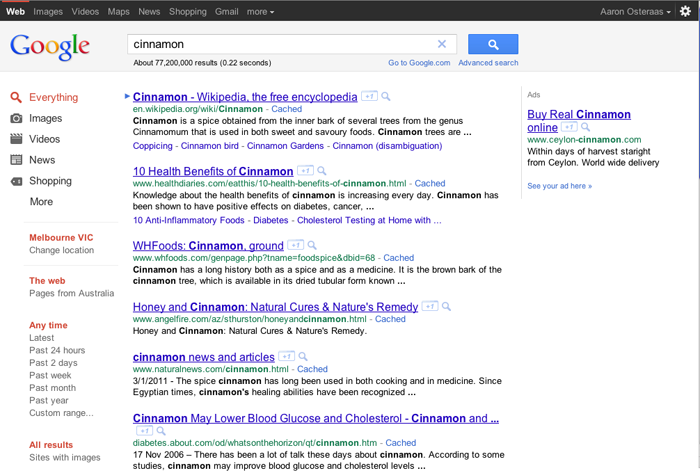
Google, in the wake of their Google+ testing phase, have also been rolling out other Interface changes, namely within the search results.
Game Changing AdWords?
By now, almost every user will have the black bar that spans the page width across the top. Aside from some basic color changes to the Advanced Search menu on the left hand side, there’s one enormous change that is likely to impact hundreds of thousands of businesses.
In not only the search results, but the AdSense displayed on the top or right of the page, the URL has been moved to under the Anchor Text. We can only speculate that they have been testing this on a limited number of people for some time, and furthermore can only imagine how it will impact clickthrough rates for people using AdSense.
Also worthy of mention is the Google logo, search box and magnifying glass button are now in a light grey area.
How do you feel about these changes? What do you think will be the impact on organic search results and clickthroughs?
via Comments on:

This post marks the first in a series to help you start from nothing and end with a Rails application. Although there are many posts/series on this subject, I feel like basic Rails tutorials, especially in the wake of Rails 3.1 changes, fall into a more-the-merrier category. Even so, this series will focus on setting things up in a proper manner (for those systems that support it) and will fly a little lower than the typical 50,000 foot level of many tutorials. Here are the items you will have learned by the end of the series: Setting up Ruby Version Manager (RVM) to maintain sandboxed development environments Installing Ruby 1.9.2 Installing Rails 3.1 Creating a rails application What Rails IDEs exist, and their pros/cons Creating a resource for your application to create/retrieve/update/delete Modifying a view template What to do next This series ends where a lot of single post series end, but my goal is to make sure that you have much more information when you get to the end
More:
RubySource: Rails Development 101: RVM
via Comments on:
You may have noticed the updated background on DesignFestival, currently, it is Blind Date Prep by Alan Dowling . Over the next number of weeks we’ll be rotating the background through the most popular entries to further show off the hard work people applied in this contest. Didn’t catch the contest? The Cicada Principle Explained Gallery of Entries Contribute to the Gallery Thanks again to all of the entrants for their great work, and we look forward to seeing more entries into the Gallery.
View post:
DesignFestival: Celebrating The Cicada Principle
via Comments on:

Editor’s Note: Images are used throughout this article to illustrate the effects achieved with border-image. To see this in action. and view the code, go to the demonstration page.
A feature that is new in CSS3, but not so new to browsers, is the border-image property. Border-image provides a method to add decorative borders to any element. With the border-image properties you can create decorative borders for elements, beyond simple rounded corners, with images of very small file size or even with gradients.
The border-image property allows you to take a small image, slice it virtually into nine sections, and place /spread the portions of your small image across a much larger element.
You can take an image and stretch it across a button or a whole page.

border-image for the div on the right, maintaining the corners, while stretching the center of the border-image to cover the entire div on the right.
border-image, we’ve repeated, slightly distorting the image if necessary to ensure we don’t have a broken image in supporting browsers.To ensure that the image is not ‘broken’, the width should be a multiple of the slice’s width. While we’ve repeated the top, bottom and sides, we’ve maintained the four corners, creating a stamp-like effect.Next, we’ll cover how to take a background-image, virtually cut it up, and either repeat or stretch the image to cover the borders and background of our element.
The border-image is a shorthand property used to declare:
  border-image-source:
  border-image-slice:
  border-image-width:
  border-image-outset:
  border-image-repeat:
The syntax for the shorthand is:
 border-image: <source>
<slice {1,4}> / <width {1,4}> <outset> <repeat{1,2}>;
At this time, Opera, Firefox, Chrome and Safari all support the vendor prefixed border-image shorthand property but don’t support any of the longhand properties that make up the shorthand. So, while we’ll cover the various properties that define border images, you should always use the shorthand instead of the shorthand properties described below.
The border-image-source, is the URL, gradient or data URI of the image you want to use as your border image. In the above examples, while the longhand property is NOT supported, it is as if we we had used
.gradientBox {
  border-image-source: url(gradient.png);
}
.stamp {
  border-image-source: url(stamp.gif);
}
Just as you can include gradients, base 64, gifs, jpegs, pngs, and even SVG images as background images, you can include all these image types as border images.
The border-image-slice property defines from one to four lengths that set the distance from each edge of the image marking the area that will be used to cut, or slice, up our border image.
The border-image-slice property values represent inward offsets from the top, right, bottom, and left (TRouBLe) edges respectively of the image. In effect, with the four lines you define, the browser divides the one border image into nine regions: four corners, four edges and a middle. The four corners maintain their exact size. The other five values can be stretched or repeated or a combo of the two (round), depending on the values of the other border-image properties.

The black lines in the images above delineate how our four defined slice lines cut up our border-image.
In our examples, we’ve sliced the image 30px in from each side for our gradient, and 8 pixels in from each side for our stamp.
In the above examples, while the longhand property is NOT supported, it is as if we we had used
.gradientBox {
  border-image-slice: 30 30 30 30;
}
.stamp {
  border-image-slice: 8 8 8 8;
}
or, since the values are repeated, like the TRBL of border or padding, we can use a single value for all four sides
.gradientBox {
  border-image-slice: 30;
}
.stamp {
  border-image-slice: 8;
}
Note we’ve used no length units. If you are setting the slice values in length, and the value will be interpreted as pixels, omit the units. If you are using percentage values, include the percent. In our example, we could also have used the following:
.gradientBox {
  border-image-slice: 30%;
}
.stamp {
  border-image-slice: 26.7%;
}
For bitmap images, the omitted values are interpolated as pixel values. For vector images (SVG), the values are coordinates. For percentages use the percent sign (%).
The border-image-width property sets the width of the element’s border. If the border-image-width property is declared, it takes precedence over the border-width, if one is declared. If omitted and the border-width is omitted, the value defaults to the border-width default which is ‘medium’, or generally 3px.
This shorthand is NOT supported in Opera (build 1024 is the most recent one checked). Additionally, the value of auto is not supported in any browser. As such, it is often recommended to include border-width as a separate property. Declaring as part of the shorthand is as if we had declared:
.gradientBox {
  border-image-width: 30px 30px 30px 30px;
}
.stamp {
  border-image-width: 8px 8px 8px 8px;
}
or, since all the value are the same,
.gradientBox {
  border-image-width: 30px;
}
.stamp {
  border-image-width: 8px;
}
So far we have:
.gradientBox {
  border-image: url(gradient.png) 30 / 30px;
}
.stamp {
  border-image: url(stamp.gif) 8 / 8px;
}
Since including border-image-width in the shorthand currently makes Opera fail, it is recommended to exclude this property, and instead opt for including the CSS2 border-width value.
.gradientBox {
  border-width: 30px;
}
.stamp {
  border-width: 8px;
}
Having the border-image-width be the same width as the border-image-slice will create the best looking border image with no distortion. But, they don’t need to have the same values. The slice will be stretched (or contracted) to the width of the border-image-width if the values are not the same.
Remember the box model! As you increase the border-image-width, your element will grow larger.
The border-image-outset property specifies the amount by which the border-image area extends beyond the border box on all four sides. It is not supported in any browsers, and makes the entire declaration fail, so, for now, don’t include it. The default value is 0.
The border-image-repeat property allows you to delineate how non-corner images (the sides and middle) are repeated and/or scaled. The first value is the top and bottom, the second value is the left and right sides. If the second value is omitted, all four sides will have the same value.
The specifications currently define four possible values, but only three are well supported. stretch means that the image should not be tiled, but rather stretched to fill the area. repeat means the image is tiled ( or repeated) to fill the area. If the area allocated for the repeating image is not exactly divisible by the width of the image, the last tiled image may be cut off. With round the image is tiled (repeated) to fill the area, with the image being scaled down, possibly losing its aspect ratio, but ensuring that the image is never cropped. Note that Webkit doesn’t support the round value, replacing it with repeat instead (which is better than failing, I guess).
The space value is not currently supported, but when supported, the border-image will be repeated as many times as can fully fit in the area provided, with the tiles evenly spaced, showing white space between the tiles if the width provided is not an exact multiple of the image size.
In our above examples, we used stretch for the gradient and round for the stamp. You will always want to stretch gradients, as repeating them creates harsh lines as one tile ends and the next begins. And, while it may seem to make sense to use repeat for the stamp, we have no way of knowing if the image is evenly divisible by the width of our design. The round does distort the image ever so slightly, but that is better than having the image cut off.
If we had used the inverse, the effect would be odd. While the top and bottom can use round, repeat or stretch, the left and right sides definitely need the stretch value:


As mentioned earlier, no browser supports the longhand properties defined above, but Opera, Firefox, Chrome and Safari understand the prefixed shorthand border-image property. Now that we understand the components of the shorthand property, let’s put it all together.
The correct syntax is
border-image: <source>
<slice {1,4}> / <width {1,4}>  / <outset> <repeat{1,2}>;
Since outset is not currently supported, we can omit it:
border-image: <source>
<slice {1,4}> / <width {1,4}> <repeat{1,2}>;
Like all border-images, we’ve cut our gradient image into nine slices defined by the border-image-slice property. Generally, the slices are the same width as the border-width. And, since we have a gradient, we want to stretch the image, not tile it, so we don’t get harsh color transitions. As such our code is:
.gradientBox {
    border-image: url(gradient.png) 34 34 34 34 / 34px 34px 34px 34px stretch stretch;
}
which, with repeated values, we can narrow down to:
.gradientBox {
    border-image: url(gradient.png) 34  / 34px  stretch;
}
Since Opera doesn’t understand border-image-width when included in the shorthand, we include the border-width separately and then expand our declarations to include the various vendor prefixes:
.gradientBox {
   border-width: 34px;
  -moz-border-image: url(gradient.png) 34 / 34px  stretch;
  -webkit-border-image: url(gradient.png) 34 / 34px  stretch;
  -o-border-image: url(gradient.png) 34   stretch;
   border-image: url(gradient.png) 34 / 34px   stretch;
}
Similarly, our stamp effect includes the stamp image as the border-image-source, has borders that are eight pixels wide, has a repeating border which can’t have a partial image showing lest we break the design. We still have the Opera issue of border-width, and all supporting browsers still use the vendor prefix. As such, our code looks like this:
.stamp {
    border-width: 8px;
   -webkit-border-image: url(stamp.gif) 8 / 8px round;
   -moz-border-image: url(stamp.gif) 8 / 8px round;
   -o-border-image: url(stamp.gif) 8  round;
    border-image: url(stamp.gif) 8 / 8px  round;
}At this point, you hopefully have a good understanding of how to create a border image. There are a few tools to help you along:
Images are used throughout this article to illustrate the effects achieved with border-image. To see this in action. and view the code, go to the demonstration page.
via Comments on:

I was looking at a few web developers’ websites recently, and was appalled at how tech-heavy most of them were.
Sure, it’s nice to show off that you understand the lingo, but prospects want to read your website without having to look in a dictionary.
Here’s the opening sentence on the homepage of a small web company I looked at;
Our team of developers will create XHTML and CSS that passes all validation and at the same time, meets your project requirements.
Sounds great, doesn’t it? Sure does; for the likes of you and I, that understand what is being said. The rule here is to use an active voice and keep the copy succinct and to the point.
I’m betting that the following sentence would work better for them than their current one;
We’ll exceed your website needs, and ensure everything ‘under the hood’ is taken care of as well.
Cast a critical eye over your own website right now; spot any acronyms or long tracts of text? Drop the mumbo jumbo and write your content with the reader in mind – not just other web developers.
Join our free business newsletter Tribune!
via Comments on:

Every job has its boring bits. Sometimes, the boring bits are actually mind-numbing; occasionally they’re actually loathsome.
For in-office workers, this isn’t such a big deal. For one thing, there are others to vent to about how boring a part of your work is. And then there’s your boss, only a couple of cubicles away, waiting on the results of that loathsome task. You just have to knuckle down and do it.
For the freelancer, there may be a deadline off in the distance somewhere, but we have none of the in-your-face physical prompts. We have freedom of choice: if we really don’t want to do something, we won’t. So we have to motivate ourselves to get the drudge work done.
How do you do it? I find these kinds of problems are mainly psychological — I don’t like the task, it’s boring, it’s not as fun as something else I have to do — rather than practical. So all my tactics for getting boring work done are, effectively, motivational mind games.
I don’t have to do much boring work, but the small chunks I do are often just part of the bigger picture. They don’t have their own deadlines or deliverables. They’re not ends unto themselves. That can make it even harder to set time aside to do them. So I’ve found that setting my own deadlines for the boring stuff helps.
My deadline is never arbitrary. Usually, I look at my week, and think “If this is still on my to-do list after Tuesday, I’m going to want to throw my computer out the window,” so I’ll set Tuesday as the deadline. By looking at my schedule I can see the tasks I want to be able to really immerse myself in, without having any boring tasks hanging over me. This is a big motivator to set a deadline and get the dull stuff done.
Chunking the boring work goes hand in hand with setting a deadline for it. Rather than trying to get boring work done around the edges of other, more engaging tasks, I set time in my schedule for it. Firstly, this ensures that it gets done — if I know when the boring task’s going to end, I’ll be more likely to dedicate myself to getting the job done in that timeframe. But it also gives me the chance to make the boring stuff as painless as possible.
For example, let’s say I’m doing a boring task for two hours on Wednesday morning. Maybe I’ll do that work over breakfast in a nice cafe. Maybe I’ll move from my desk to the couch, or the deck, for those two hours. Inevitably I’ll queue up two hours of decent music, and I’ll probably let myself take a break every forty minutes or so, so I can get up, clear my head, and refocus. If I don’t chunk the task, I can’t plan to make it easier. Chunking is worth it for that reason alone.
Sounds dramatic, right? Well, sometimes boring work is dramatic. As I’m facing up to the boring bits of my work, I start wondering why my job has boring bits. I mean, I’m freelancing! Isn’t the idea that my work should be fun fun fun, 24/7? How come there are boring bits? This mindset doesn’t help me focus, or get anything done. Overall, it’s pretty demotivating.
I’ve found it better to surrender: to accept the fact that I have to spend this time doing this task, put everything else aside, and just focus. If I dedicate myself to getting this task done as well as possible, I generally forget my frustrations, and the time and task pass much more quickly than they ordinarily would. To do this, though, I really need to spend a moment consciously focusing on the task before I begin. Surrendering doesn’t tend to happen by accident.
I’m big on the concept of self-reward. I like rewards for completing boring work to be exciting. “Do this, and you can spend the afternoon submerged in Exciting Project #1.” “Do this, and you can go out for dinner.” “Do this, and you can go bushwalking this afternoon.” If it’s a really tough (by which I mean really boring) task, I might give myself an entire day off as a reward.
You may not be as flexible with your timeframes as I am, but big, glowing rewards remain a good way to get tedious stuff done. Forget chocolate bars and coffees — go for broke when you’re choosing your reward, and that boring task will suddenly start to seem a whole lot more doable.
These are my favorite motivational mind-games — the ones that work best for me. How do you motivate yourself to get the boring bits of your work done?
Image courtesy stock.xchng user Daino_16.
via Comments on:

The Mobile Web is the most important development in the online world since the internet itself. Due to better services and smaller, cheaper devices, there has been a huge explosion in mobile technology that far outpaces the growth of any other computing cycle.
Are you ready for this?
Our brand new title Build Mobile Websites and Apps for Smart Devices is a practical guide for innovative front-end web designers and developers. You’ll discover a fun and accessible approach to mobile web design and development, with enormous scope for opportunity.
If you need convincing as to the mobile web’s impact, simply look around you. Everywhere you go, people are accessing the Web from their devices. Check out these statistics:
Clearly, the need to develop for mobile devices is very much alive, and will only become more necessary as time goes on. This book will take you from turning a basic website into a sexy mobile site, from cool mobile app to lucrative and seductive native app.
For the first time ever, you can grab a multi-media bundle including the epack, print book, and a comprehensive online course. The course is from our sister-site, Learnable and taught by one of the book’s authors, Myles Eftos.
You can grab the bundle here for only $49.95 (Saving of 50%!) and take part in this comprehensive learning experience!

The crew with their toys
[1] Internet Trends – Presentation from CM Summit, Morgan Stanley, June 2010
[2] CM Summit, June 2010
via Comments on:

Speaking as a developer, Opera’s version numbering seems sensible. Unlike Chrome and Firefox’s rapid updates or IE’s ridiculously sedate pace, Opera normally release a new browser once or twice a year. The version number is incremented when it’s right to do so.
Opera 11.50 is out now and it’s brimming with lovely new features. Come on Opera — as the last bastion of logical updates, it should have been version 12! The most obvious change is the redesigned interface:

The differences are subtle, but 11.5 sports a lighter, sleeker and cleaner look. It’s easier to concentrate on web page content and Opera claim it’s faster. I like it.
Perhaps the biggest change is speed dial extensions. Rather than simply providing quick access to favorite sites, extensions can add dynamic information to the Speed Dial page. Essentially, it’s a personal home page or set of desktop widgets on the start-up screen. A few extensions will be available today including Read It Later, Webdoc and StockTwits.
To help you manage your favorites and extensions, a new flow feature provides an unlimited number dials. Sizes are automatically adjusted for your screen or you can specify your own zoom level.
Password sync has finally arrived in Opera Link. The browser implements strong security so passwords are encrypted on the client using your Opera account password and a randomly generated key. No password is ever stored or transmitted as plain text, so that should reassure those affected by the recent high-profile security breaches experienced by Sony, Nintendo, the CIA and other organizations.
For more information, see Security of synchronized passwords with Opera Link.
The developers have fixed thousands of bugs and upgraded the rendering engine. It should result in a 10-15% speed improvement for CSS and SVG rendering.
The browser has always been on the cutting edge of HTML5 and it now supports Session History and Navigation, the W3C File API, classlist and the <time> element.
Finally, if you’re a Dragonfly fan, you’ll be pleased to hear that version 1.1 will be available shortly (please, please, please can we have CSS line numbers and links!)
Opera 11.5 builds on what was already a great browser. If you don’t have it installed, head over to Opera.com and become one of the many thousands featured on their live download counter.
What do you think of Opera 11.5?
via Comments on:

What’s interesting about the development platform for Windows Phone is that it is based on Silverlight, which, as most of us are aware, was first and foremost a web technology. As such Silverlight supports a navigation model that maps well to the way browsers work with the ability to navigate forward to new pages and back to previous pages. In this post you’ll learn how to carry out navigation tasks within your Windows Phone application. When you create a new application in Visual Studio or Expression Blend your project will contain a number of files which define a basic Windows Phone application, see Figure 1
See the original article here:
BuildMobile: Windows Phone 7 Navigation
via Comments on:
 Last week I came across an excellent presentation from the Scotland Ruby Conference: “Literary Criticism for the Idle Programmer” by Roland Swingler . It introduced me to a crazy little ruby script that allows you to write programs entirely in underscores! # hello.rb require “_” ____ _ _____ ____ __ ____ ____ __ ___ ____ __ __ _ ______ _____ ___ _ _ ___ _____ ______ ____ _ _ ____ _ _ ____ _ ____ __ __ ___ _ ______ ___ ____ __ ______ ____ _ ____ ____ __ _ ____ _ _ ___ _____ _____ _ ______ ____ _ ______ _____ That’s a hello world app, right there. I scarcely believed it either. Roland steps through briefly how this code works in his talk, but given our previous obfuscation adventures , I wanted to dive in a little deeper
Read this article:
RubySource: Code Safari: Underscore Madness
via Comments on:

In my previous WordPress posts we discovered how to create a plugin, change the administration panel branding, and remove unnecessary dashboard widgets and meta boxes.
In this post, we’ll make some fundamental changes to the main administration menu. If you haven’t created an initial plugin, please read the first part. Welcome back — let’s begin…
The standard WordPress menu can be a little daunting — and third-party plugins often add further items. You can restrict user roles so clients do not see all menu items but, unless you’re using every WordPress feature, they’ll still see options which don’t apply to their site.
We’ll create a function which removes redundant links and simplifies the experience for your clients. Here’s the full code which you can copy into easy-admin.php:
// remove unnecessary menus
function remove_admin_menus() {
	global $menu, $submenu;
	// main menus removed for all users
	$restrict = explode(',', 'Links,Comments');
	// sub-menus removed for all users
	$restrictsub = explode(',', 'Categories,Post Tags');
	// main menus removed for everyone except administrators
	$restrict_user = explode(',', 'Media,Profile,Appearance,Plugins,Users,Tools,Settings');
	// sub-menus removed for everyone except administrators
	$restrictsub_user = explode(',', 'Updates,My Sites');
	// WP localization
	$f = create_function('$v,$i', 'return __($v);');
	array_walk($restrict, $f);
	if (!current_user_can('activate_plugins')) {
		array_walk($restrict_user, $f);
		$restrict = array_merge($restrict, $restrict_user);
		array_walk($restrictsub_user, $f);
		$restrictsub = array_merge($restrictsub, $restrictsub_user);
	}
	// remove menus
	end($menu);
	while (prev($menu)) {
		$k = key($menu);
		$v = explode(' ', $menu[$k][0]);
		if(in_array(is_null($v[0]) ? '' : $v[0] , $restrict)) unset($menu[$k]);
	}
	// remove sub-menus
	foreach ($submenu as $k => $p) {
		foreach($submenu[$k] as $j => $s) {
			if (in_array(is_null($s[0]) ? '' : $s[0] , $restrictsub)) unset($submenu[$k][$j]);
		}
	}
}
add_action('admin_menu', 'remove_admin_menus');
The lines at the top of this function determine which menu items are removed:

If you don’t want any items removed for a specific value, set it to an empty array, e.g. $restrict = array();
The result is a far simpler administration menu which is free of dangerous options which could confuse your clients.
via Comments on:
For the last couple of weeks I have been (somewhat excessively) excited about an idea that I’ve been cooking up for a Twitter competition, and the time has come to let it loose on the world.
The basic premise is to get you to tell us what you’d like to learn, while making fools of yourselves. In order to do that, we want you to take ridiculous photos incorporating the SitePoint logo using whatever you want – food, objects, people, yourself, whatever… To demonstrate just how easy that can be I’ve taken one myself – but I have no doubt that you can do better. In fact, my cat could probably do better (he’d probably even get the logo the right way around, and as you can see, he looks great in a SitePoint t-shirt).
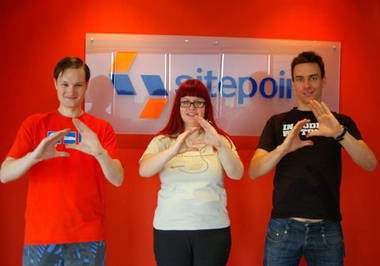

We then want you to upload that photo as part of a tweet telling us what you want to learn in a way that will pique the curiosity of your friends. The only rule (aside from attaching a photo) is that you must hash tag #sitepoint somewhere in that tweet in order to be eligible.
The competition will run for 5 days and the funniest/cleverest/most imaginative photo each day will win. Judging is based solely on my personal discretion. (I don’t take bribes but I do find idiocy especially entertaining.)
Winners can select their choice of a SitePoint course and a SitePoint book (print or ePack). To find out what you want to learn and for more information about the SitePoint courses that are available check out our sister site Learnable. For details of the books that you could choose from should you win, check out our bookstore.
So, to summarise:
Here are some examples:
Here is my cat wearing his #sitepoint t-shirt. He looks smart. He’d be keen to learn CSS3 & I wouldn’t mind joining him http://photourlhere
Thanks to #sitepoint I have the chance to learn HTML5. I have shaved their logo in my back hair and I look hot. http://photourlhere
I have arranged my herd of miniature ponies into the #sitepoint logo! I’m hoping to win a ProBlogger course! http://photourlhere
via Comments on:

Have you ever had a prospect tell he doesn’t need to market his business because he has more business than he can handle? Did you believe him?
“I already have more business than I can handle” is one of the most common blow-offs you’ll hear when prospecting. The trouble is discerning if it’s really a blow-off or whether it’s true. Some businesses do have more business than they can handle. But why? It’s been exactly two years that the Great Recession was “officially” declared to be over.
Unfortunately, many businesses didn’t get that memo. Most are still struggling. So who are these fortunate few with more business than they can handle, and how do I get a piece of that pie?
People who truly have more business than they can handle fall into one of two categories:
These are business owners who provide quality work for a fair price. They are happy with the amount of business they’re getting. They’re making money and paying the bills. They may be in demand because of the quality of their work and are usually booked weeks (or months) in advance. If more people want to hire them than they’re able to service, they have no problem turning them away or recommending them to a competitor.
(I know of a local painting contractor who fits this description. Yet, ironically, he still markets heavily during the off-season to stay busy all year around.)
These are business owners who get so much business because they charge so little, yet feel obligated to serve every customer or client who knocks on their door. Hiring extra help is out of the question, because they aren’t making enough money.
For these overwhelmed business owners, the solution is surprisingly simple: raise your prices.
(Of course, telling them that often elicits a blank stare back in response.)
What these overwhelmed business owners don’t realize is that the reason sooo many people want to do business with them is not because they’re so good. It’s because they’re so cheap. What’s more, being the low-cost leader means you attract the price-driven buyer. (You know, the cheapskate who grinds you down to the lowest price, yet demands the best service, who complains every chance he gets, then asks for a refund when you can’t satisfy his unreasonable demands. But I digress.)
Perhaps you’re one of those overwhelmed by too much business. FreelanceSwitch has compiled a list of the Top Ten Signs You May Be Charging Too Little:
10. Your clients mistake your daily rate for an hourly one.
9. You’ve won every job you’ve ever bid on.
8. Even though you work 80-hour weeks, your income level qualifies you for welfare payments.
7. New clients are always asking what “the catch” is.
6. Clients pay your invoices in cash from their wallet.
(You can read the rest here.)
Most people believe that raising prices equals less business because fewer people will want to do business with them—when the exact opposite may be true. What about you? What do you think?
via Comments on:
Episode 118 of The SitePoint Podcast is now available! This week the panel is made up of regular hosts Louis Simoneau (@rssaddict), Brad Williams (@williamsba), Patrick O’Keefe (@ifroggy), and guest Josh Catone (@catone) from Mashable. The panel discuss Cisco’s predictions for the future of internet traffic, applications being taken for new top level domains and more.
Play this episode directly in your browser — just click the orange “play” button below:
You can download this episode as a standalone MP3 file. Here’s the link:
The SitePoint Podcast is on iTunes! Add the SitePoint Podcast to your iTunes player. Or, if you don’t use iTunes, you can subscribe to the feed directly.
Here are the topics covered in this episode:
Browse the full list of links referenced in the show at http://delicious.com/sitepointpodcast/118.
Louis: Hello, and welcome to another episode of the SitePoint Podcast. We’re back with a regular panel this week with a few slight modifications, so Stephan couldn’t make it this week but have another special guest filling in for him, so let’s start with the regulars, hi Patrick!
Patrick: Lewis, Louis, my friend.
Louis: You’ll get there.
Patrick: My friend whose name I can’t remember, how are you, sir?
Louis: (Laughs) I am very well, how are you?
Patrick: Excellent, excellent.
Louis: It’s been a while. We had a couple interview shows and then a couple live shows before that, so it’s been quite a long time since we’ve been on the show together.
Patrick: It has.
Louis: And Brad on the line as well.
Brad: Hello! You’re right it has been a while.
Louis: Yeah. And new to the panel this week and sort of filling in for Stephen who couldn’t make it because he started a new job is Josh Catone from Mashable, hi Josh!
Josh: Hey, everyone, good to be here.
Louis: It’s good to have you. So what’s your official role at Mashable?
Josh: I’m the features editor at Mashable, so I manage anything that’s basically not news, all of our lists and how-to’s and info graphics and Op-Ed’s and all of our guest writers, anyone who’s contributing to Mashable who’s not on staff I manage all of that.
Louis: Cool. So there’s quite a lot of news this week to catch up on, not even just to catch up on, stuff that’s just happened this week, so I figure we may as well just dive into it. The first thing that caught my attention and also caught all of your attention from the quick chat we had before the show is this decision by ICANN, the Internet Corporation for Assigned Names and Numbers, so that’s the big corporation that handles all the top-level domains on the Internet, has just made a decision that approves, or that will approve, sort of arbitrary top-level demands.
Brad: You know this could get real messy.
Louis: That seems to be the general consensus.
Brad: At least the price is right, what is it, it’s $185,000 just for the application fee, and then $25,000 a year to have your own top-level domain, your own TLD.
Patrick: And the interesting thing about this is there are companies who make a business out of selling a TLD but it’s never been so transparent, you know, where I could say you know what I want to start selling dot whatever, and I know exactly how much I have to pay to do that now.
Josh: I actually read that the application fee is $185,000 and then $25,000 a year and all that other stuff you have to go through to actually be set up; it’s about 500 grand before you are even through with your TLD, so it’s half a million dollars, it’s pretty expensive.
Brad: In that case I’m going to get two.
Patrick: (Laughs) Yeah, still, it’s interesting to know that amount because previously I wouldn’t have had any idea what that costs, so that’s interesting fodder, not that I’m in the market to start .xxx or whatever, not saying anything, but it’s interesting to know.
Brad: It’ll be real interesting when they actually come out to see what companies take advantage of this, I mean it’s a pretty hefty investment, and I don’t think anyone really knows how it’s going to be perceived once it comes out. Especially like the amateur web users, I mean the mom and pops that all they know is Google and eBay; when they see a .coke are they going to know what that is?
Patrick: Yeah, I think it’s interesting because to us $500,000, you know, huge amount of money, to Coke or Fortune 500 companies dropping $500,000 on a marketing related endeavor or branding related thing is a drop in the bucket, not that it’s something that they’ll want to spend freely, but there is some opportunity here for marketing, for branding. I mean I think there’s probably a situation where a company could sign up for a TLD and then not sell it to the public, right, they could just use it themselves and control it, and I guess to me I’m not really into the intricacies of the domain name system, but what is the benefit to controlling and running your own registry in this case, is there a tangible benefit for a large company?
Louis: From the branding point of view, and this is odd because it seems like every story I read or every blog post I read about this story sort of focusing on that, on the branding ones, so like .coke or .McDonalds or whatever, but those seem like the least likely to go ahead because that’s a company spending $500,000 when they already have an established web presence like coke.com or mcdonalds.com just for this other thing that end users are probably not going to understand. But what does seem more likely is a lot of these sort of more generic TLD’s, you know like .car or .phone, because that’s something you can build a business out of, right, if you invest the money to set up a registrar that can sell domains on these TLD’s then you actually have a business model of selling domain registrations, so that seems like a likely way for this to end up going.
Patrick: Yeah.
Brad: And how are they going to sell these generic terms, have there been any details or is just a first come first served or an auction type?
Louis: So it looks like it’s an application process, so they’re going to accept applications, have this somewhere between January 2012 and April 2012, so they’ll accept applications with the application fees, and then they’ll review all those and grant the new top-level domains to sort of the successful applications I guess. I read the FAQ on ICANN’s website and they say we have no way of predicting how many new top-level domains will come out of this because we don’t know how many applications will be suitable, but, yeah, it seems like they’ll just review them and then go ahead with the ones that are valid. And the other thing to note is here is it’s not like registering a new domain name, it’s not just pay the fee and you’ve got it, you have to be able to show that you can have the infrastructure to run a domain registrar.
Patrick: Right. So not me in other words (laughter).
Brad: I think they probably want to avoid squatters on these things, even though I don’t know who would spend that kind of money and squat on it, but I’m sure somebody would.
Louis: Yeah.
Patrick: Right.
Josh: I think that’s actually in the guidelines that you have to keep it active. But here’s a question that I have not been able to figure out the answer to, and maybe one of you guys has some idea. It seems like there are protections in place so that trademark holders can’t violate another trademark holder’s trademark, and that was a crazy sentence, but essentially Coke can’t buy .Pepsi and Pepsi can’t buy .coke, but what I’ve been wondering today is could Pepsi buy .soda and then bar coke from registering coke.soda or sprite.soda, and Pepsi could just monopolize that sort of generic domain, and I haven’t been able to find any sort of answers to that.
Brad: I would imagine so. I mean I kind of think of it in terms of buying domains even though I know it’s significantly different, but if Coke buys soda.com or .soda and pays for it, I would imagine since it’s a generic term there is no copyright around that, right?
Patrick: Well, I think .com is operated by VeriSign I think, and could they prevent you from registering certain terms? I mean, I don’t know, whatever would apply to that I think is what would apply to these new TLD’s, and I don’t know if there’s any specific case or law, not law, but in an occurrence that we can point to, to say where that happened. I mean most of the — or the only situations I know of were certainly after the fact, mostly trademarks, WIPO cases, whatever, where you have a trademark that’s being infringed upon, nothing that’s preemptive, I’ve never really, yeah, it’s an interesting question, I’ve never really had — obviously I’ve never tried to register anything incredibly obscene to have it tell me no you cannot have that, but if they can then I kind of see no reason why Pepsi couldn’t, although then you have Coke who can certainly take advantage of our legal system to allege some form of discrimination.
Louis: Again, to me it just seems like that’s — I can’t imagine that happening.
Patrick: Yeah, it seems strange.
Louis: Given the size of the fees it just doesn’t seem like the payoff is there, right, so Coke what would they do with .soda or .cola?
Patrick: Well, let’s say you could just block people off it, right, so you could essentially say your website is HYPERLINK “http://www.soda” www.soda, right (laughter), if you control the registry you just redirect, forget any kind of registration in the middle, you’ve got .soda, you know, and I’d be curious about that. Also, www dot www is one too (laughter), I wonder what kind of mass confusion that would cause.
Louis: Oh, man. I’ve really no idea where that would end up going. But, again, some of the examples that are given in some of these blog posts do make sense, a lot of the people are giving examples of city based top-level domains, and that totally makes sense to me, so like a .nyc or .paris or .london, I can see that happening, and that could even be a source of revenue for the city government, if they register it then they can sort of administer the registration of the domains, and there are a lot of businesses that are sort of very city focused, and that seems to make sense to me.
Patrick: Some suckers will sign up for it (laughter). No, I mean I’m just kidding, but the thing is it’s probably so much better to have your name, cityname.com, right, then yourname.city, but of course some people will always sign up for it, I mean for Pete’s sake, I own two .tv’s.
Louis: Yeah, so look at if I’ve got a website and I want to do a hotel reservation website, now, hotels.com is taken and it costs a million dollars if I wanted to get it, and same for hotels.net or whatever, but if say New York City has registered the .nyc TLD and they’re administering that, and if I can get like hotels.nyc and have a website that’s devoted to hotel registrations in New York that seems like something you might want to do, it’s not unreasonable.
Patrick: For sure.
Josh: But Patrick still makes a good point, I mean I think when all of us have registered domains we probably go to .com first, I think there’s still some cache with .com that will remain, I mean you know we’ve seen recently in the past few years some of the CCTLD’s, like .ly and .li and .me have grown in popularity but the .com names are still the ones that people remember and go to first, and so I think for the average user .com will remain probably the most popular and easy to use domain name for a while.
Patrick: So here’s a question, what the most exotic TLD that you guys own?
Brad: What do you mean by exotic?
Patrick: Well, what’s the smallest country, you know, farthest away from where you’re based?
Louis: I think I only have .com domains registered.
Patrick: Okay. I have a .gy.
Louis: A dot what?
Patrick: .gy.
Brad: What country is that?
Patrick: Guyana. (Laughter) Geez, I’m serious, I’m serious, I own ifrog.gy.
Louis: That’s pretty good.
Patrick: Yeah, I haven’t actually started using it yet but I figured what the hey, it took about three months to actually secure the registration, I had to send carrier pigeon like 70 times, (laughter) but it is mine, it is mine.
Brad: I do have .ly, I have Libyan .ly.
Louis: See, that’s another thing here, the reason ly got so popular is just because it’s easy to sort of make a word out of it, so it will be interesting to see what kind of English suffixes become TLD’s as a result of this, like .able or .ing, you know like you can make words out of.
Josh: That’s probably a smart business move for someone who wants to put down the 200 grand to start it off. I could see Go Daddy or one of those big registrars snapping up some of those.
Patrick: That’s another good idea, I mean where you have a domain name registrar who says, hey, we want to have this extension, and that opens up another issue with the whole access to the extension thing is what if a registrar does that and says we’re the only ones who can give this out. I think we have situations where there are extensions that are either seemingly exclusive whether on purpose or not, so if Go Daddy, for example, takes .cars and says we’re the only ones who can sell .cars, obviously there will be some people crying foul.
Louis: Yeah, I didn’t manage to gather from any of the posts whether there would be requirements from ICANN in terms of how you would administer the domain once you had it.
Brad: I mean if you pay approximately $500,000 for whatever, .ing, like you said all you have to do is sell 10,000 of them at $50.00 a pop and you’ve just broken even, I mean 10,000 is not that large of a number when it comes to selling domain names, especially if it’s something that’s brandable like you said .ing.
Patrick: I mean you could see .nyc paying off like that for sure, I mean you know just sell all the one-word domains, right, to the people who really would be interested in them. Sucker in the Yankees and the Mets (laughter) because they have the $10,000 to drop, it’s not like it’s a big deal, and just start with the sports teams and just go from there.
Josh: I think very clearly the ING financial services company has a whole new market that they can open up (laughter).
Louis: Yeah, so I’m just again trying to read through the FAQ on ICANN.org to see how they’re actually going to review these applications. There’s some stuff in here on the different panels that will be reviewing the applications.
Patrick: They don’t want to sell .pedophile, for example, is that what we’re talking about?
Louis: No, I was just saying like do you have to show that you’re going to provide registry services to anyone.
Patrick: Right, or can they just be private.
Louis: Yeah. So it does say that it expects the TLD’s to be active so you can’t buy it and not use it. The application process requires applicants to provide a detailed plan for the launch and operation of the proposed GTLD, or expect it to be delegated within one year of signing a registry agreement with ICANN, so that’s something, but it doesn’t necessarily say whether you can buy one and just use it yourself or buy it and sort of limit who you sell domains to. So I guess we’ll sort of have to wait and see what happens once this really gets going.
Patrick: So WordPress 3.2 is right around the corner, it’s already some release candidate releases, but Mick Olenick at SitePoint has seven things that we should know, or you should know, about WordPress 3.2 and, Brad, feel free to chime in on these as I read through them here.
Brad: I might.
Patrick: The first is that 3.2 is the first version of WordPress that will drop support for MySQL4 and PHP4, if you try to upgrade from WordPress 3.1 with that installed you will be told that you have insufficient requirements, so I would like to hope a majority of really active WordPress installations are already on MySQL5 and PHP5 so they won’t have this issue, but some will; are there any numbers out there on usage?
Brad: It’s low, I think they said that they’re aiming for under 5% or something like that if I remember right, it’s low but there are still hosts out there that enable PHP4 by default, so most users have no idea they should even switch it, you know, they just go with whatever’s set up and leave it at that, which a lot of this is trying to force those final few hosts to make that switch, but I think it’s really low.
Louis: Yeah, I mean that’s just ridiculous, right, if your host is providing PHP4 by default they shouldn’t be, and they shouldn’t even be in the hosting business as far as I’m concerned, so for WordPress to — totally legitimate decision I think.
Brad: And there is a requirements check plugin which is called WordPress Requirements Check, so if you’re not sure you can just install the plugin and it will tell you if your host is compatible with 3.2 or not.
Patrick: Yeah, and that plugin is by Ryan Duff who both me and Brad and Stephan, actually all three of us hung out with at WordCamp Raleigh in May, so hey Ryan.
Brad: Duff man! (Laughter)
Patrick: On that same compatibility note, WordPress –
Brad: This is the awesome one.
Patrick: This is the awesome one, well, it’s the one that, you know, and Microsoft even applauded this, I think on their Twitter stream I saw that, IE’s Twitter stream I’m pretty sure I saw this, that WordPress is dropping support with this version for IE6.
Brad: Thank you.
Patrick: And so there’s nothing else really to say on that, everybody wants that it seems like.
Brad: This is where we need that big applause sound effect, you know that big cheering crowd. I’ve had a few people ask me; just to clarify that’s dropping support on the admin side of WordPress, so if you log in it’s not that they’re completely breaking it on purpose, they’re just not testing it in IE6, and from what I’ve heard, I haven’t tested it, I’ve heard that 3.2 is pretty much unusable on the admin side if you’re on IE6 at this point.
Patrick: So you’re saying the front end will be fine.
Brad: The front end is still fine; it’s the admin side that’s no longer supported.
Louis: I guess they won’t be testing the default theme either though, so when at this point the default theme is still the one that came with WordPress 3.0.
Brad: Yeah, basically your front end is your theme, so if you’re running it, if I still support IE6 it will still support it; it’s not going to break that.
Louis: But when they do a new default theme, say in WordPress 4.0, they won’t be testing that on IE6 is what this is saying.
Brad: Right, yeah, and the admin side; so basically anything that ships with core will no longer be tested with IE6.
Patrick: It’s off the list.
Brad: Goodbye.
Patrick: Speaking of the admin interface, a new streamlined admin interface is a part of 3.2 as well, there’s a screenshot here at SitePoint.com, and it looks like a nice coat of paint; have you played around with the admin interface yet, Brad?
Brad: Yeah, it’s like you said, they just kind of cleaned it up a bit, tightened up some things, if you’re on WordPress.com this has already rolled out, so you can actually see it or just set up a WordPress.com site to check it out. But, yeah, it’s nice, I mean any time they change the admin side it always takes a little bit of getting used to, but this is one of the more intuitive ones because it really doesn’t change where things are at, for the most part it just really changes the way they look, so overall it’s a pretty nice little facelift.
Patrick: Yeah and there’s I guess the screen options work really well in 3.2. Is it weird to say that I’ve never played with those; I mean have a majority of people not really explored screen options all that much?
Brad: I think most people don’t realize they’re there. The screen options and the help, the little dropdowns at the top right you click them and they pull down, and screen options have different options for the page you’re on and help has some contextual help for the page you’re on. I think a lot of people overlook that, but yeah I know the help is great, I’ve been pointing it out because they’ve really, the last few versions they’ve added a lot of great kind of specific help in there, so for new users it’s great if they’re on a page and they’re not really sure what they’re doing they can just click that and get some more information.
Patrick: And you know those video sites that allow you to turn the lights out, well, WordPress Writing at least has no essentially that feature, distraction free writing where you can put really the body of the post, the message box, the title, in sort of a full screen where that’s all you see, these two text boxes and then some of the what you see is what you get editor, so it’s pretty simple, pretty straight forward, so if that’s distracting to you, the menu’s distracting to you, if everything around the message box is distracting to you, you can now put that stuff aside, hide it and put it up, just the real bare bones part of the post up in full screen.
Louis: That’s good. I really like that one because one thing, I don’t know if anyone else has this problem, but I login and start writing a blog post and because the comment count is updating in Ajax on the sidebar I’ll see new comments come in I’ll go, ooh, I want to go read a comment on my last post, and then I’ll wind up approving comments and then responding to comments and then two hours later oh, hey, I was in the middle of writing something.
Josh: It’s funny because I think distraction free writing mode is probably the thing that I’m most excited about in WordPress 3.2 but also the thing that I’ll probably never use, I mean I love the idea and the concept, and you know when I’m actually writing something not a blog post I usually try to get as distraction free as possible and close down, sometimes I have to close down IM and stuff just to get everything out of the way so I can concentrate on writing, but I just don’t trust writing in WordPress, I’ve had my blog post erased midway enough times where the Internet goes out or the server goes down or something, so I just do all my writing in TextMate and I don’t think it’s going to change, so.
Brad: When I first heard about this feature I was like, because I kind of have full screen now, it’s obviously not as distraction free as this, but there is a full screen option and a lot of people probably don’t even realize it’s there, and I heard about this and I was like yeah I don’t really see why that needs an update, I don’t know how much people will get out of it but when I actually used it and saw it in action I was like this is pretty cool, I mean it’s a really slick feature and the way they did it, it just kind of fits with the whole just how WordPress works, very smooth, a lot of Ajax-y features, they came really nice.
Louis: It looks like when you go into full screen mode there’s still a title bar on the page, but then as you stop moving the mouse that sort of fades away and all you’ve got is a big text field, and then at the bottom right corner is this one sentence that it’s actually the only part of the GUI that’s on screen is the sentence, ‘Just write’.
Brad: Simple and to the point.
Patrick: Just you and your words. WordPress 3.2 is apparently much faster, apparently it’s a lot faster than previous version because the core dev team re-factored the core code, removed a lot of depreciated functions and just made it overall run a lot more efficiently, and also the switch from PHP4 to PHP5 also offers significant speed increase as well. There’s really not much to say with that one, right, it’s just much faster.
Brad: It’s one of those ones you probably won’t — you just don’t notice unless your site’s extremely slow, but I’m sure a lot of people will when they upgrade; I know they spent a lot of time going through a lot of the admin side in the really highly used sections and seeing what they could do to optimize it, whether via caching or optimizing the queries that are pulling from the database, and this is something people have been asking for a while because a lot of people have the feeling that WordPress is a little sluggish, and it can be if you get a lot of content in there; I’m sure Mashable has a ridiculous amount of caching set up to handle the amount of traffic you guys get, any site pretty much needs it.
Josh: I couldn’t speak to it technically, that’s above my head, but I do know that our CTO is Frederick Town who wrote one of the more popular WordPress Caching plugins.
Brad: Yeah, W3 Total Cache, I love that, I love that plugin.
Patrick: On the speed note, 3.2 also introduces incremental updates, in the past according to this article upgrades were for replacements of core code, whereas now it will work where it only replaces files that have actually been modified and need to be changed, so the upgrade process will be a little bit faster. And I’m an old-school kind of guy anyway, I don’t trust the whole one click upgrade thing, I upload the changed files.
Josh: It’s too easy (laughter).
Patrick: Yeah, I know, it’s just too easy (laughter), it’s something like Mullenweg snuck a bogeyman on that code, man, I really need to upgrade it one at a time, no. And the final entry in this entry by Mick Olenick at SitePoint is that there is a new default theme aptly titled 2011. There are a couple color schemes that come default with it, light and dark, and you can make — there are some customization options in the admin panel to change things like the link color and the layout, I know this is the upgrade from 2010 obviously, we’re in a new year; so how much different is this theme?
Brad: It’s not significantly different at first appearance. The header is obviously much bigger when you first view it, the header is bigger, and they have a rotating header image so every refresh, every pageview the header will change between six or seven different images, but it is different. There are some layout options on the backend like you said, left sidebar, right sidebar, no sidebar, stuff like that, and it’s kind of cool to see them do this, and I hope they keep doing it each year because I always tell people like if you’re ever looking to get into themes or see how themes are developed, you know the default themes that come with WordPress are a great place to start. And the fact that they’re adding options to these themes is even better because then you can see how do you make options in a theme and how do you do it correctly, you know, so rather than basing it off of some free theme you download that may or may not have done it the right way, you’re looking at the one that a theme has done it as flawless as it can, so it’s a great place to dive in if you’re looking to start developing themes. And just out of the box it’s a really nice theme, you throw up a custom header and you have a good looking site.
Patrick: And WordPress 3.2 is planned for release on June 30th with 3.3 due out sometime this year as well.
Louis: Awesome.
Brad: The big question out there is do developers get better with age? And a guy by the name of Peter Knego, I always get no matter what story I’m talking about they always have the strangest last names and I always butcher them, so I’m sorry, Peter, but it’s K-N-E-G-O, ‘Nee-go’ (phonetic) is what I’m going with. So what he did, he wrote a bash script which basically downloads data from stack overflow because he wanted to know how developers cope with the onslaught of new technologies with age. So as a developer you’re not going to work on the same language you’re entire life obviously, you know technology’s evolving and extremely quickly; chances are if you’ve been developing five years you probably already switched languages at least once, so it’s a common question. So what he did, he wrote a bash script that went through the data from 70,000 different developers on stack overflow who had a reputation of over 100, so these are active users, these are not just random accounts that have done nothing. And from those 70,000, 53% of them, or 37,400 actually had their age listed, so that’s the data we’re working with, 37,400 devs, obviously this is not a scientific study but it is interesting nonetheless. So basically he has some graphs and we’ll have the link in the show notes, essentially he goes through and looks at the number of developers and their reputation by age, and he has two different color lines on the graph, so the one is number of devs and you can see the numbers start around 16 and they shoot up significantly starting at around 19 or 20 and it peaks at about 27 and then starts trending its way down a little way to around 50 to where the stats stopped. I don’t know if there’s nobody over 50 or if he just cut it off, I’m assuming there’s developers over 50 on stack overflow (laughter).
Patrick: That’s retirement age.
Brad: But what’s interesting is you can see from the start it’s almost the average reputation progressively gets higher the older you get based on his stats, so it would seem that basically the older you get the more answers you’re providing which are actually correct, so the more you’re teaching the more you’re actually asking questions which would prove that as you get older as a developer you are actually learning, and progressively learning, and teaching the younger developers as they come up, so did you guys check out these stats at all?
Patrick: I did. And what became apparent to me is the older you get the more retweets and the more Diggs, and whatever other thing you want to get, the more you beg for those things. I mean the more reputation points you beg for the older you are (laughter), that’s what it is obviously. I like how people thought I was serious (laughter).
Louis: Yeah, I don’t even know where to go from there.
Patrick: Yeah, it’s a small sample size, right, I mean part of this is it is a small sample size, you can see the number of devs drop drastically, you have the highest reputation point at what looks like, let’s see, 46, 47, age 48, and you have also coincidence, I don’t know, it’s the smallest or second or third smallest number of developers, so I think it’s important to keep that in mind that while this is fun to look at certainly the bulk of people, the more people you have, I think it’s natural the more that the reputation number will generally be driven down, it’s just the law of averages.
Louis: Hmm. But if you look at the part of the graph that has sort of very high numbers, so that area between around the age of 20 and the age of about 35, that those are pretty high samples, those are over 1,500 devs for each of those ages, and you can see still an increase in the average reputation between those ages, so even before you get to those sort of lower sample sizes at the very end of the graph it looks like there’s some kind of correlation there. But the one thing that’s interesting is the last graph he shows which is a graph of the number of up-votes per post by age, so that’s the actual sort of number of votes that each their posts has gotten, so not their reputation and not the number of answers they provided but the actual quality of each of those answers. And that doesn’t seem to actually be affected by age at all; it looks like a pretty flat graph.
Patrick: Yeah, that to me seems kind of like a balancing factor, I don’t know, I can see how there is reputation with age, but at the same time the numbers kind of play with it when you skew down, even with those middle numbers you were talking about, there is some up and down, and you only get those really sizable gains once the number of devs has dropped by half or more in some cases, so I don’t know how to read this except to say it’s fun. I would actually like to see the numbers; I guess there are full stats interactive graphs of how low these numbers actually get, I’m going to look at those now.
Brad: If you hover them you can see the numbers.
Patrick: I see. So there are a 141 devs that are age 48, okay, versus 2559 who are 27, that’s the high peak; so you have a drop from 2559 to 141 so that’s pretty substantial.
Josh: For that first graph it’s talking about reputation and that accumulates, right, I’m not too familiar with stack overflow and how it works, but reputation doesn’t expire so if you join the site at age 25 and then accumulate age 31 whether or not your answers are getting better you are still going to have more reputation than four years ago, your stock might be frozen at a couple years old, but you know.
Louis: Yeah, that’s probably an interesting point, most people who are 17 or 18 on this site have probably not been on stack overflow very long so that probably does account for some of that difference.
Patrick: Yeah, the people who are 48 have been on here like 30 years (laughter), so it’s like old-timers move on, let go!
Louis: You can always count on Patrick to come out of left field with one of those.
Brad: One of the first comments is maybe seniors have more spare time to answer questions on stack overflow, that might not be a bad point.
Patrick: Yeah, I mean the questions and answers thing really doesn’t — there’s a drop, right, but it’s not a huge, huge drop as far as questions asked, answers answered — answers answered, that’s awesome, that goes up a lot (laughter), but questions asked doesn’t really drop and I think that’s a good thing because I think it’s dangerous especially in developer communities of which I run one where I’ve had members who think this person doesn’t know things because they ask questions, where of course it’s the opposite, it’s the people who really know things that ask questions when they don’t know them and improve their own knowledge, so I think that is kind of shown here in a way.
Brad: I’m almost surprised the questions don’t actually go up as they get older, because a lot of the older developers started out in languages that aren’t even used anymore and ultimately are going to have to migrate to something more current. I started out with my first database driven sites were built in Classic ASP, and that’s what I use primarily through seven or eight years of SitePoint is Classic ASP which is pretty much unheard of at this point, there are still a few sites out there I come across running it, but nothing like it used to be, it’s pretty much dead. And I had to move on, I had to move, so I had to evolve or get swallowed, so now I code in more current languages.
Patrick: You know when SitePoint first started, I wasn’t that far after, but they started on Latin and now it’s a dead language, so (laughter).
Brad: There’s a little bit of trivia for you.
Louis: So the other story I had this week was a blog post on the Microsoft Security Blog which is very simple titled WebGL Considered Harmful. And what it is, is sort of an expansion on this — so, for anyone who’s not familiar with the background, WebGL is this new sort of standard technology that’s meant to provide sort of hardware accelerated 3D graphics in the browser sort of as an extension to the Canvass element, so you could create a Canvass with 3D context and that would have access to hardware accelerated 3D in the browser. So already Google has implemented this in Chrome, Mozilla has implemented it in Firefox, Opera’s working on implementation and Apple has stated that they’ll have it in IOS 5 but in some sort of limited form only for the ads platform if I understand correctly. So a few weeks ago there was a blog post, sorry, not a blog post, a report from a group called Context Information Security, and they exposed a couple of sort of security flaws in the WebGL technology, so one of them was that in the Firefox implementation it was possible for a website to sort of take a screenshot of the users browser and desktop so you could actually if you viewed a website they could take a screenshot and save it on their site of your desktop including whatever open tabs or whatever else you had. And the other one was a potential for a denial of service attack where if they just made a bunch of requests to your graphics card they could sort of overload your system and shut it down. So Microsoft has actually come out and said we don’t see any way for WebGL, or basically what they’re saying is we don’t see any way for WebGL to be used in a secure manner and so we’re not going to go ahead an implement it, which is a pretty serious blow because it means it would potentially never be implemented in Internet Explorer. So I don’t know if you guys have any thoughts on this.
Patrick: I’m just changing my desktop that’s all (laughter).
Brad: That’s scary. I mean I hadn’t heard about the security vulnerabilities being able to kind of get into your system like that, but I mean that is scary; you know any time you open a different part of your computer to a browser you’re always going to run the risk for that, right, I mean there’s always going to be a chance for a security vulnerability no matter what you’re doing if you open it up. So, I would hate for them to just say it’s dead and we’re not going to support it and that’s it, I would hope they would really work to try to figure out a proper solution for it because I think it could be really cool especially if it’s adopted in the Internet Explorer where, what, like 60% of the users are at, something like that.
Louis: Yeah. I think actually around 50 at the moment.
Patrick: Finally a reason that I can be glad I haven’t downloaded Chrome yet.
Brad: Patrick mentions that at least one time a show I swear (laughter).
Patrick: It’s a meem. IE is actually at 43.87% as of May this year, according to the Statcounter global stats.
Louis: Wow, that’s even lower then I thought. This is definitely interesting, however, so there’s been a reply from Mozilla’s Vice President of Technical Strategy, Mike Shaver, has posted on his personal blog, not on the Mozilla Security Blog interestingly, sort of a rebuttal to this, and a couple of the points he makes I think are very, very interesting. So one of them is that Microsoft and Adobe both have 3D acceleration in Flash and Silverlight, so yeah, so Adobe and Flash both have come up with some way of sort of maybe handling this because they do provide access to developers straight into the 3D acceleration of the system, so they obviously feel that Silverlight which is available on Mac, it’s a cross platform thing, can be protected in some way, so that’s one thing. And the other thing is sort of it might be seen as a little bit hypocritical for Microsoft to be all defensive about browsers exposing security vulnerabilities since they developed ActiveX controls for ten years now which have been for a very long time pretty much the number one source security vulnerabilities exposed through the browser.
Patrick: Yeah, I think that’s a weak point, I think if it’s an issue it’s an issue; if Microsoft Silverlight has an issue it’s an issue, bring it up. I don’t know if it negates anything; should Microsoft never say anything just because they’ve developed things that are let us say iffy? So, I mean are they never allowed to speak again? (Laughter) No, if it’s an issue then it is an issue so that’s the only thing that really needs to be judged here.
Brad: You know Internet Explorer is the only major browser not supporting it, I think ultimately in the end it’s going to hurt Microsoft because ultimately if somebody wants to use a site that is running WebGL or a game or whatever it may be, they’re going to use the browser that supports it, they’re not going to say, no, I can’t use Internet Explorer so I can’t do it. I don’t think this is something that if you run into that roadblock I think you’re going to be technically savvy enough that you’ll know, alright, I’ll use Chrome or Firefox or whatever.
Patrick: They said the same thing about Flash and the iPad.
Louis: (Laughs) Yeah. Well, it’ll be interesting to see how it plays out. I mean I do think that probably what’s most likely to happen is that the remaining browser vendors will work together to secure this and make it a better implementation at which point Microsoft might revise its opinion. It does seem, as someone was saying earlier, I think it was you, Patrick, it does seem a little bit odd to come out and say this is not a valid technology rather than actually participating in the discussion and trying to come up with what are solutions to these problems.
Patrick: My spotlight this week is Turntable.fm. I know Brad’s on this service, I don’t know, Louis, have you played around with this at all?
Louis: I have not; I’ve yet to see it, no.
Patrick: Okay, cool, Josh?
Brad: Don’t, you’ll get addicted and get no work done.
Patrick: Okay, so here’s the thing, Turntable.fm is sort of a social DJ-ing service, you login, right now access is limited to Facebook friends of people who are already on it I believe, or at least that’s how it was when I got in. And you know you sign in, you sign up, you login and then you can access any number of rooms, different rooms for different genres, different companies, different topics, whatever, you click in a room and you can listen to what the DJ’s in that room are playing, and if there’s a DJ slot available you can DJ yourself, and by DJ I mean that you select from a list of licensed songs that they’ve licensed from MediaNet, so it is a legit service that has the music legally, and so you pick the songs, you play the songs you want to play and people vote on them, awesome or lame; if people vote awesome you get DJ points, they can become fans of DJ’s, so in a way it’s sort of like your own radio station, but I like it because it’s a legit service, how they’ve set it up is very fun, very social, I’ve been hanging out a lot in the WDS Café Disco, which WDS is Webdevstudios.com.
Brad: It’s crazy in there.
Patrick: (Laughs) So Brad and a number of his employees as well as his business partner are in the room and playing different tracks, and I’ve joined in that as well, and it’s just a fun thing, a fun experience, it’s one of those things where it’s almost better just to do it then to hear me explain it.
Louis: Yeah, I’ll definitely have a look.
Patrick: So you should definitely check it out, and it’s got a lot of buzz going right now as far as in the social entrepreneur, or whatever you want to call it, social media circles, there’s a lot of people talking about it, there’s a lot of people on it, there’s a lot of people that have rooms. I’m looking at it right now and there’s a Google NYC room, I don’t know if Google created that but there is a Google room and there and I know Jason Calacanis had a room in there, and there’s rooms for various companies and websites, and there’s Airbnb room I’m looking at right now. So it’s just a really cool service, check it out if you love music.
Louis: Yeah. Just out of curiosity how is the selection of songs if it’s all licensed, is it pretty decent?
Patrick: Well, MediaNet says they have a catalog of over 11 million songs with a 100,000 songs added every week, so they have the four major labels and they have they say 80,000 independent label. So they have that license catalog and they also — a lot of people upload music; I, myself, am hesitant to do that just because I’m not sure how the MediaNet licensing allows for that or makes that okay, so I’m holding off on any uploading, but, in general the catalog that they have, as I said, quite large, over 11 million tracks, so if you can think of a track there’s a good chance that it is on there, especially if the group has been signed to a major label or even if it ‘s an indie one there’s a fair chance as well. There’s every genre of music that you could think of, the WDS room especially has played every genre of music from Putting on the Ritz by Taco, which is Brad’s daily record that he plays, to my collection which is a little more Hip Hop in influence. You should check it out, Louis.
Louis: Sounds good. I will; I think I’ll have to friend you guys on Facebook, I haven’t but that will be worth it.
Patrick: Thank you for admitting that publicly (laughter).
Josh: The one thing that will make it worth it. It wasn’t worth it before, but now.
Louis: My spotlight this week is this set of icons, it’s sort of web icons, so these little icons that you can use for a site, it’s got like a search icon, a magnifying glass and all of those things that are generated in pure CSS. So it’s all using sort of the after and before pseudo selectors to create icons for your interfaces on your websites without any images, and there’s really an amazing selection of them going from sort of checkmarks, pie charts, a repeat rewind, permalink, and so these are done using just sort of rotates and CSS transforms to sort of create shapes, maybe some of you have seen the sort of tutorials where they show you how to create like triangles or page curls or whatever in pure CSS, but this is really taking it to another level in doing, I don’t know, there must be 50-odd or more than that icons all in pure CSS and all just available to use, it’s just code so you can give it a go. Obviously it doesn’t work in IE but that’s just I guess (laughter) –
Brad: But what does really?
Louis: Yeah, I know, nothing works in IE, so.
Patrick: Is this powered by WebGL? Is my desktop going to get taken advantage of? (Laughter)
Louis: Right now there’s no 3D icons but you never know.
Brad: I have a fun info graph, everybody loves info graphs, always fun pictures and stats; I guess I’m bringing a lot of stats or graphs to the table today.
Patrick: And no one loves them more than Shanghai web designers though.
Brad: Apparently. And this one a lot of you have probably seen it but I thought it was pretty interesting, so if you haven’t seen it check it out, it’s called What Happens on the Internet Every 60 Seconds, and it lists all sorts of things that happen within 60 seconds on the Internet such as Google serves up almost 700,000 searches every minute, there are 6,600 pictures uploaded to Flickr every minute, 168 million emails sent, 70 new domains are registered every minute, so just over one a second. I actually thought domains would be higher but I guess it’s probably because there’s just not as many out there, right? It takes longer to find them. There are 170,000-plus minutes of voice calls on Skype, I mean it’s really mind-blowing just looking at some of these numbers, it’s a pretty neat little info graph so we’ll definitely have a link in the show notes.
Patrick: Yeah, I hadn’t seen this actually myself. These numbers are interesting, 70 domain names like you said in 60 seconds, and the Skype number is 370,000 minutes per 60 seconds, so that means 370,000 people are on Skype at any given moment.
Brad: I like the one new definition on Urban Dictionary every minute.
Louis: Yeah, that was my favorite as well.
Patrick: And I wonder how the one new Associated article got in there, I’m looking at that one like is this sponsored, what’s going on over there? This looks weird to me.
Brad: Oh, did you see the iPhone, 13,000 iPhone applications; that’s insane.
Louis: Yeah, that’s mental; 1,700 Firefox downloads, 50 WordPress downloads.
Brad: A lot happens every minute on the Internet.
Patrick: We can never sleep, that’s why we’re all dying younger.
Josh: So I also have an info graph. At Mashable we’ve actually just started doing some of our own really high quality info graphics that we’re pretty proud of, so I’m just going to put this out there, I know it’s a little self-referential but we’re really proud of this so, you know. Basically we got a big data dump from Cisco that showed that they had a ton of spreadsheets that I didn’t understand that I gave to an artist that he sorted through, this guy Nick Sixx Siegler who is really talented, and he pulled out all this amazing data about what Cisco expects global Internet traffic to do over the next five years, or four years I guess. Some of the predictions that they’ve made are really mind-blowing, so I mean it’s actually very similar to what Brad was talking about but this is for the entire year so, for example, a million minutes of video will go across the Internet every second in 2015, so if you thought what was going across the Internet every minute now is a lot, that’s 674 days of video every second four years from now and that’s pretty crazy. And the average broadband speed will obviously have to go up to accommodate all that traffic, so the good news is that the average speed around the world will go up from seven megahertz per second to 28 which is welcome news; I know a lot of people who are still stuck on slow DSL.
Louis: Yeah, like all of Australia (laughter).
Patrick: I don’t know what ‘slow’ is but just watch it.
Louis: I’d love to believe that but I’m just so –
Patrick: Let’s get our measuring sticks out.
Louis: I’m so bitter about DSL now that we’ll see what happens.
Josh: The other crazy stat on here is just that the projected device growth, and we looked at the percentages because raw numbers were a little deceiving, but the percentages you can actually see which categories of devices are going to see the most growth over the next four years, at least according to what Cisco is predicting, and crazily enough flat panel television’s up 1000%, I think that’s probably just because a lot of people are finally getting ready to upgrade from those old tube televisions and also as more flat panels are getting Internet apps baked in people are going to start switching over. But, not surprisingly the second biggest device growth category is tablet computers with 750% growth predicted over the next four years which is, you know, that’s showing what kind of impact the iPad has had on personal computing; desktops are only going to be 25%, people are still buying them but not that much, non-Smartphones only up 17%, laptops only up 83%, so really –
Louis: Everyone’s looking at this same number on this graph, it’s got the third largest, so you mentioned flat panel television in the lead with tablets –
Patrick: Yeah, this is the surprising one; this is the biggest number here. Go ahead, Louis.
Louis: The third largest one at 600% growth from 2010 to 2015 is apparently the digital photo frame, now I’m really not sure I buy that one.
Brad: I thought that phase passed a couple years ago.
Patrick: Yeah, I don’t have one. I mean that’s what it’s saying; I’m going to buy one, in the next five years I will own one so just count on that (laughter) before I own a Smartphone.
Josh: I’ve heard that Brad’s put in like a pre-order for like 40,000 of them, so he’s accounting for like –
Patrick: As soon as you can hook those babies up to Turntable.fm he will line his wall.
Brad: I’m going to have the .digitalphotoframe TLD too, so I’m gonna really own that market.
Louis: I think maybe that’s it because it’s a percentage here.
Josh: It’s a function of us looking at percentages, so I think it might be that there’s one digital photo frame out there right now and then there’s going to be 600 four years from now (laughter).
Louis: Yeah, that’s maybe where that’s coming from.
Patrick: And maybe it’s just one of those really kind of, I hate to say it, but it’s not a lack of knowledge but just a pretty consumer device, you know, it’s an easy sell, you know, it’s easy to describe, it’s like here is a frame, you put your card in it, it displays your pictures, bam! And that’s it, it’s like it’s an easy sell I guess you could say.
Louis: The other thing is they’ll probably be — I mean you know they’re already pretty cheap, but they’ll probably be like 10 or 15 bucks in a couple years. It’ll be cheaper than buying a wooden photo frame. One of the things I really like about this though is that it’s saying that worldwide Internet traffic will approach one zettabyte per year by 2015, and then it’s trying to explain what one zettabyte is, and the information it gives is “One zettabyte is all digitally stored information as of 2010,” so the entire amount of information we currently have would be traversing the Internet every year in five years.
Patrick: What is a zettabyte?
Brad: That number’s so large, so big, you can’t even fathom like how big that is. Even looking at all those zeros it’s still doesn’t compute like how big that number is.
Josh: Yeah, I mean and some of these numbers came from Cisco, we were actually able to verify from Scientific American the estimated capacity of the human brain is 2.5 petabytes which is, I’m not going to even attempt to do the math, but that’s –
Patrick: You don’t have a calculator that has that many zeros.
Josh: I mean a petabyte is a 10 to the 15 bytes, and a zettabyte is 1×10 to the 21 bytes, so it’s orders of magnitude smaller and that’s the capacity of the human brain, and the brain carries a lot of information so there’s going to be a lot of information out there. I remember when we were doing the research for this info graphic we came across another info graphic, and I’m going to butcher this stat, but it was something like if you were to try to build a datacenter, to house one zettabyte of information it would cost like the GDP of every country in the world or something ridiculous.
Patrick: It would cost a zettabyte is what it would cost in actual currency.
Josh: It would like cover the state of New Jersey, like it was just impossible to store this amount of information in one place with the technology we have right now, so it’s an amazing amount of information. And then to think that that’s actually just going to be traversing the Internet over the course of the year, not just stored places, that the amount of information that’s stored is going to be even bigger, so it’s just crazy how much more information we’re adding out into the ether every year.
Patrick: People talk about how much will a gigabyte cost, how much will a zettabyte cost when we get there; when will I get my zettabyte external hard drive, USB hard drive, when will I get that?
Josh: Steve Jobs probably already has an iPod that holds a zettabyte like out in — that’s like the iPod 10, and it just implants directly into your eye and you just see it, you don’t even have to like hold it, it’s amazing technology.
Patrick: I saw a South Park episode about that I think.
Brad: The eye-I (laughter).
Josh: Yes, the eye-I.
Louis: So, hey, that was a good long show, so it’s been great having you on, Josh, and hopefully –
Josh: I’m sure you’ll never have me back (laughter).
Louis: Stephan might be back next week but I won’t be, I’m going to be on vacation for a month back home, so yeah, you guys will be holding down the fort, Patrick will be running lead for the next couple of weeks, and hopefully I’ll see you guys on the other side. So, yeah, do you guys want to go around the table?
Brad: Sure. I’m Brad Williams with Webdev Studios and you can find me on Twitter @williamsba.
Patrick: I am Patrick O’Keefe of the iFroggy Network, on Twitter @ifroggy, i-f-r-o-g-g-y.
Josh: I am Josh Catone of Mashable. I’m on Twitter @catone, that’s c-a-t-o-n-e, and thanks for having me, guys.
Louis: And thanks for listening to this week’s episode of the SitePoint Podcast. I’d love to hear what you thought about today’s show, so if you have any thoughts or suggestions just go to SitePoint.com/podcast and you can leave a comment on today’s episode, you can also get any of our previous episodes to download or subscribe to get the show automatically. You can follow SitePoint on Twitter @sitepointdotcom, that’s SitePoint d-o-t-c-o-m, and you can follow me on Twitter @rssaddict. The show this week was produced by Karn Broad and I’m Louis Simoneau. Thanks for listening and bye for now.
Theme music by Mike Mella.
Thanks for listening! Feel free to let us know how we’re doing, or to continue the discussion, using the comments field below.
via Comments on:

Sometimes the functionality of a library or set of classes that you’re working with is 99% perfect for the job, but the last 1% requires modification of some of the core assumptions made in the code. Altering code can cause maintenance frustrations down the track and extending code can cause maintenance frustration right away, but Ruby provides us with a flexible way to modify code with less damage. In converting to Ruby I realized how strict PHP is in its class hierarchy.
View original post here:
RubySource: Confessions of a Converted PHP Developer: Animal Abuse
via Comments on:

Google has stressed the importance of quality content on multiple occasions. In May they published a blog post titled “More guidance on building high-quality websites” where they outlined what counts as high-quality content. Some of the advice:
Google clearly places value on quality content, but how do you programmatically determine quality content? That might be where PostRank comes in‚ their technology analyzes blog posts for engagement analysis, or how the blog’s audience engages with the content.
Google’s purchase of PostRank gives them the technology to analyze content for audience engagement similar to how their PageRank algorithms analyze websites for link popularity. The technology will be finding its way into several of Google’s products in the near future, such as Analytics and Reader. But PostRank will also likely be used to determine organic search engine ranking.
Google has already been moving in that direction, adding a +1 button for user feedback in search results and by tying all employees bonuses to the company’s success in the social space. It’s clear Google is serious about being a major contender in social. PostRank gives them the ability to measure how people interact with content, essentially giving them a social “quality score” that they can use to judge the content’s quality.
PageRank is going to play a lesser role in determining page quality and organic ranking in the coming years. Incoming links are definitely one major factor in the popularity and quality of a web page, but they are too easily manipulated. J.C. Penney and BMW have been in the news for buying links and other “black-hat” strategies to increase PageRank, and they’re just the high-profile examples. Thousands of companies purchase links or setup their own link farms to manipulate PageRank and improve their position on Google.
Social engagement is much more difficult to fake. Shares on Facebook and Twitter (and to a lesser extent comments on blog posts) are not completely anonymous – they require users login details. Google will be able to determine how popular content is with real web users, which is likely a better indicator of quality than backlinks.
We should also see more social analytics data show up in Google Analytics and Feedburner products following the integration of the PostRank technology. PostRank’s publisher analytics data shows number of mentions on social platforms such as Twitter, Digg and Delicious as well as who shared the content.
The information is valuable in determining what kind of content is more likely to be shared (or go viral). As social grows and drives more traffic, this will become just as important as determining which content gets searched most frequently, helping us to write content that is more likely to be shared. In turn, writing content that is more likely to be shared will probably influence organic search engine rankings as well.
PostRank is already used to determine quality and ranking on a number of prominent online lists, including the AdAge Power 150. Google effectively put a stamp of approval on PostRank’s technology – expect to see more third parties using PostRank to help them evaluate individual content or entire websites.
via Comments on:
 This is part three of an ongoing series. You may wish to read or review the previous sections on iOS Development Basics and iOS Apps with Tasty UI . As the series goes on, we’re going to develop an application called “Orny”.
See more here:
BuildMobile: An Interactive Orny
via Comments on:
 Hello again and welcome to episode eight of the Design Festival podcast. This week with web standards advocate and champion Derek Featherstone of FurtherAhead.com and most notably WebStandards.org . Derek is a teacher, speaker, writer, developer, designer, and strong proponent of accessibility and web standards.
More here:
DesignFestival: Design Festival Podcast #8: Web Standards with Derek Featherstone
via Comments on:

When most people think about grids, they think about engineering and architecture. However, the grid is an essential tool for graphic design as well, and the use of grids in website design have exploded in popularity in the last few years. Using a grid is more than just about making elements on the page be square and line up: it’s about proportion as well. That’s where the theory comes into grid theory
More here:
DesignFestival: Grid Theory
via Comments on:

The role of search in your site can be a hot topic. Sometimes there is pressure to make it a giant bandage to cover poor navigational structure, and other times it’s included just because “every site needs search.” Let’s look at three pervasive myths about search and two questions that will help us create a strategy unique to every site. Misconceptions About Search Myth #1: Site Visitors Prefer to Find Information With Search Researchers have worked to combat this myth and have found that site visitors’ behavior does not naturally trend toward search first, even when searchers know exactly what they’re looking for.
See the original article here:
DesignFestival: Creating Meaningful Site Search by Challenging Assumptions
via Comments on:
The role of search in your site can be a hot topic. Sometimes there is pressure to make it a giant bandage to cover poor navigational structure, and other times it’s included just because “every site needs search.” Let’s look at three pervasive myths about search and two questions that will help us create a strategy unique to every site. Misconceptions About Search Myth #1: Site Visitors Prefer to Find Information With Search Researchers have worked to combat this myth and have found that site visitors’ behavior does not naturally trend toward search first, even when searchers know exactly what they’re looking for.
See the original article here:
DesignFestival: Creating Meaningful Site Search by Challenging Assumptions
via Comments on:

This is an excerpt from the upcoming book “Build Mobile Websites and Apps for Smart Devices” by Earle Castledine , Myles Eftos and Max Wheeler . Over the coming weeks BuildMobile will exclusively publish a complete chapter from the book, the chapter on Mobile Web Apps. Enjoy.
More:
BuildMobile: Mobile Web Apps: Setting Up Shop
via Comments on:

 Many, if not most, of the new breed of mobile devices use touch as their main input method. While many of the principles we usually apply to interface design are the same, there are some shifts in mindset required. Our fingers are remarkably dexterous, but they lack the same level of precision of a mouse.
See the original post:
DesignFestival: Design for Mobile — Build a Better Mouse
via Comments on: