Log on:
Powered by Elgg

Feed detail

December 01, 2020

#OEB20


It has been quite a while since I last posted on this blog, but a lot has happened, including my falling ill with a virus infection. I tested positive for Covid-19 and then spent just over a month slowly recovering, but I'm now hopefully on the mend. I did hear a young lad not so long back ask his Mum if she'd had to live through the previous 18 Covid outbreaks. Perish the thought. 

Yesterday was a great first session of Online Educa Berlin's virtual event. Ironically, although OEB has traded on its 'Online' moniker for three decades, this was the first fully online event, and the organisers have to be congratulated on their swift organisation after being forced to take this route. It's not the same as sitting with other delegates at the Hotel Intercontinental on Budapesterstrasse or experiencing the chill air and the glittering lights on Ku-Damm, or sampling the gluhwein in the wonderful Weihnachstmarken but it's the next best thing. Perhaps in future OEB events, the organisers will create a more hybrid conference where online and f2f sessions combine seamlessly. We shall see.

The sessions I saw and participated in, including a lively and insightful keynote session from OECD's Andreas Schleicher, ably chaired by the ever urbane Donald H Taylor, and sessions on online learning protocols and strategies during Covid-19 from old friends Gila Kurtz and Eran Gal (Israel) and the future of education with Gilly Salmon (UK) and Ulf-Daniel Ehlers (Germany) were engaging, thought provoking and informative. 

A lot has been crammed into OEB 2020, which is probably why it's being held over 5 days instead of the traditional 3 days. I will continue to participate in the next few days in between my online tutorial sessions with my own students, and will enjoy the presentations and interactions, but it will be a welcome relief to meet people face to face again next year at OEB 2021 in Berlin, between December 1-3.  

Creative Commons License

#OEB20 by Steve Wheeler was written in Plymouth, England and is licensed under a Creative Commons Attribution-NonCommercial-ShareAlike 3.0 Unported License.


October 05, 2020

Technical requirements

It's often the case that educators are put off from creating their own digital content due to lack of familiarity with technology. Recently, for a new book I published, I created a promotional video and posted it to YouTube. The book is called Urban Voices and the video was a three-minute sequence featuring my reading of the opening poem in the book, titled Metro Cityscape Panorama. The poem takes a commuter's view of working every day in a large city. Check it out at the link at the foot of this post, and then read on:

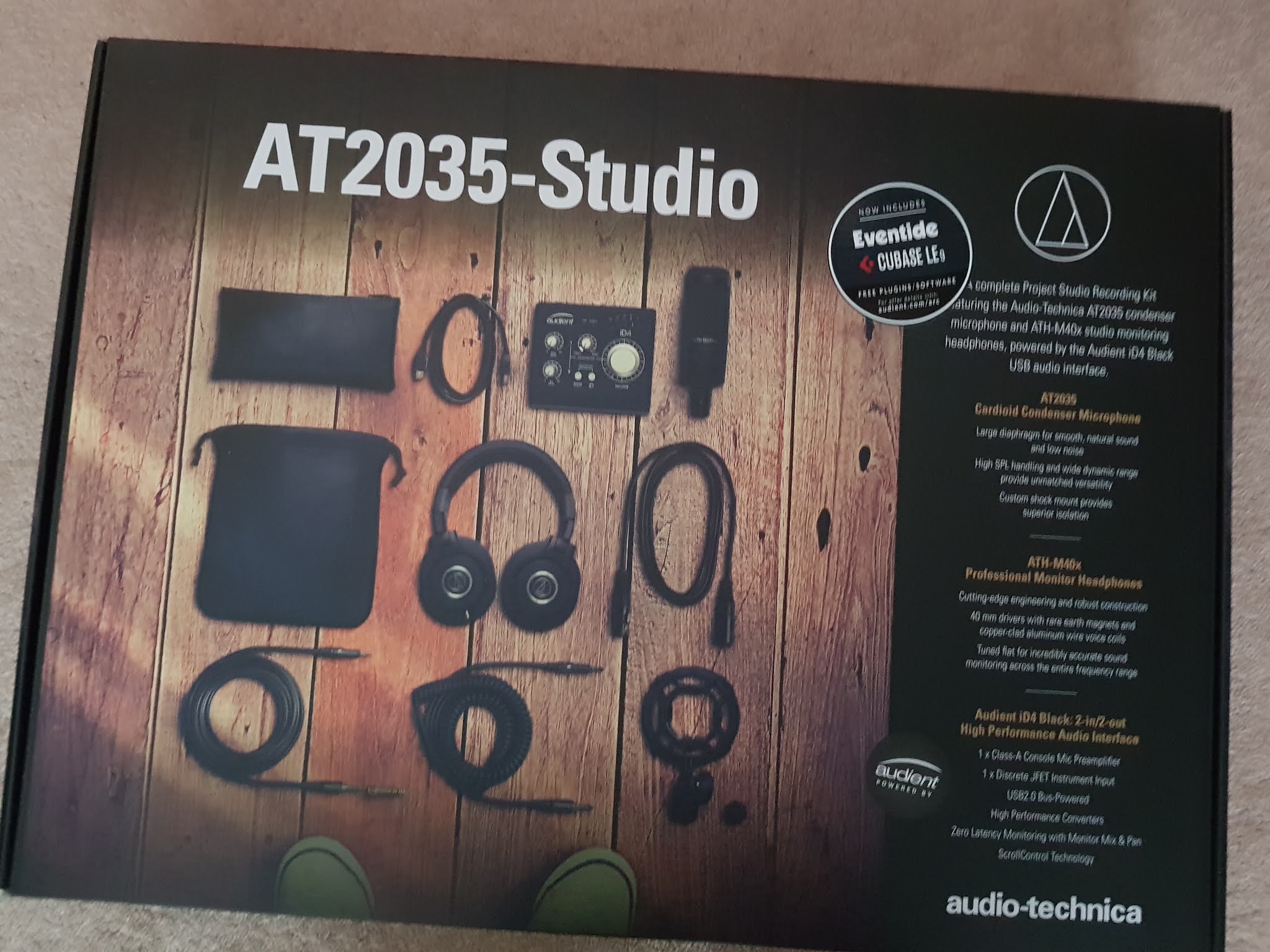
The soundscape and my vocals were recorded using a fairly inexpensive set of recording equipment I purchased online during the lockdown. It consists of an Audient iD4 digital 2-in 2-out interface (this connects by USB cable to my laptop computer to the microphone, headphones and other inputs/outputs), a pair of ATH-M40X professional monitor headphones and an AT2035 cardioid condenser microphone (both made by Audio-Technica). The bundle comes packaged as the AT2035 Studio complete with several cables and a microphone stand attachment. I purchased a boom microphone stand at the same time.

The soundscape behind my vocals was created using Garage Band - it hosts a vast range of audio samples for drums, keyboards and other instruments and a few hours spent exploring how this desktop multi-track recording system works is time well spent. 

The video footage was created on iMovie on my Apple Macbook Air, but there are other similar software tools such as Movie Maker that can be used on pc. I added the MP3 soundtrack I had created on Garage Band first, and then built the video clips in around it on a separate channel. The video clips were all found fairly quickly on Vivedo and are copyright free with attribution. Once I had created the MP4 file via iMovie, it was a simple matter of uploading it to YouTube. 

Here's the video. 


Creative Commons License
Technical requirements by Steve Wheeler was written in Plymouth, England and is licensed under a Creative Commons Attribution-NonCommercial-ShareAlike 3.0 Unported License.


Technical requirements

It's often the case that educators are put off from creating their own digital content due to lack of familiarity with technology. Recently, for a new book I published, I created a promotional video and posted it to YouTube. The book is called Urban Voices and the video was a three-minute sequence featuring my reading of the opening poem in the book, titled Metro Cityscape Panorama. The poem takes a commuter's view of working every day in a large city. Check it out at the link at the foot of this post, and then read on:

The soundscape and my vocals were recorded using a fairly inexpensive set of recording equipment I purchased online during the lockdown. It consists of an Audient iD4 digital 2-in 2-out interface (this connects by USB cable to my laptop computer to the microphone, headphones and other inputs/outputs), a pair of ATH-M40X professional monitor headphones and an AT2035 cardioid condenser microphone (both made by Audio-Technica). The bundle comes packaged as the AT2035 Studio complete with several cables and a microphone stand attachment. I purchased a boom microphone stand at the same time.

The soundscape behind my vocals was created using Garage Band - it hosts a vast range of audio samples for drums, keyboards and other instruments and a few hours spent exploring how this desktop multi-track recording system works is time well spent. 

The video footage was created on iMovie on my Apple Macbook Air, but there are other similar software tools such as Movie Maker that can be used on pc. I added the MP3 soundtrack I had created on Garage Band first, and then built the video clips in around it on a separate channel. The video clips were all found fairly quickly on Vivedo and are copyright free with attribution. Once I had created the MP4 file via iMovie, it was a simple matter of uploading it to YouTube. 

Here's the video. 


Creative Commons License
Technical requirements by Steve Wheeler was written in Plymouth, England and is licensed under a Creative Commons Attribution-NonCommercial-ShareAlike 3.0 Unported License.


Technical requirements

It's often the case that educators are put off from creating their own digital content due to lack of familiarity with technology. Recently, for a new book I published, I created a promotional video and posted it to YouTube. The book is called Urban Voices and the video was a three-minute sequence featuring my reading of the opening poem in the book, titled Metro Cityscape Panorama. The poem takes a commuter's view of working every day in a large city. Check it out at the link at the foot of this post, and then read on:

The soundscape and my vocals were recorded using a fairly inexpensive set of recording equipment I purchased online during the lockdown. It consists of an Audient iD4 digital 2-in 2-out interface (this connects by USB cable to my laptop computer to the microphone, headphones and other inputs/outputs), a pair of ATH-M40X professional monitor headphones and an AT2035 cardioid condenser microphone (both made by Audio-Technica). The bundle comes packaged as the AT2035 Studio complete with several cables and a microphone stand attachment. I purchased a boom microphone stand at the same time.

The soundscape behind my vocals was created using Garage Band - it hosts a vast range of audio samples for drums, keyboards and other instruments and a few hours spent exploring how this desktop multi-track recording system works is time well spent. 

The video footage was created on iMovie on my Apple Macbook Air, but there are other similar software tools such as Movie Maker that can be used on pc. I added the MP3 soundtrack I had created on Garage Band first, and then built the video clips in around it on a separate channel. The video clips were all found fairly quickly on Vivedo and are copyright free with attribution. Once I had created the MP4 file via iMovie, it was a simple matter of uploading it to YouTube. 

Here's the video. 


Creative Commons License
Technical requirements by Steve Wheeler was written in Plymouth, England and is licensed under a Creative Commons Attribution-NonCommercial-ShareAlike 3.0 Unported License.


September 10, 2020

Desire paths

Image from Wikimedia Commons 
I have argued for a while that the success of digital learning environments such as the LMS (Learning Management System) is based on a fine balance. This is the homeostasis between user experience and institutional design.

You probably know the story of the architect who was asked to design a university.

He created the blueprints for the buildings; the design was approved and then the construction commenced. As the buildings were nearing completion, the authorities asked the architect about the pathways between the buildings. He told them he was going to wait until the staff (faculty) and students had arrived. He wanted to see the user experience effects and how they played out. He wanted to watch the desire paths evolving. Like all the best architects, he was people centred.

The staff and students arrived, and after several weeks of walking between the buildings, several thousands feet had created pathways across the grass. He then sent in the builders and they paved over the pathways to make them safer. The desire paths had been established and were now bing supported.

The story illustrates the balance between what users desire and what the institution believes they need. It's quite a difficult balance to achieve. When an institution invests in an organisation-wide platform for learning, they need to decide on a number of issues. Most important is what the learners will be doing on the platform. Will they require just access to content, or will they need discussion groups, access to other resources, and other tools.  The answer to all of the preceding, is usually yes.

But what kinds of tools do they need? And will these be used inside or outside of the 'walled garden' of the Learning Management System? Often LMS are designed to keep people out, because the content and activities are in need of protection. But in today's learning climate, is this still necessary? Should we be imposing restrictions on what can be learnt and how it can be learnt? Or should we simply be supporting students as they create their own desire paths? Are we people centred, or are we more interested in how the systems will work?

My conclusion: A lot of money has been spent by universities on tools they think students need, but often, students will choose their own tools, and only use university provision when they absolutely have to.

Creative Commons License
Desire paths by Steve Wheeler was written in Plymouth, England and is licensed under a Creative Commons Attribution-NonCommercial-ShareAlike 3.0 Unported License.


Desire paths

Image from Wikimedia Commons 
I have argued for a while that the success of digital learning environments such as the LMS (Learning Management System) is based on a fine balance. This is the homeostasis between user experience and institutional design.

You probably know the story of the architect who was asked to design a university.

He created the blueprints for the buildings; the design was approved and then the construction commenced. As the buildings were nearing completion, the authorities asked the architect about the pathways between the buildings. He told them he was going to wait until the staff (faculty) and students had arrived. He wanted to see the user experience effects and how they played out. He wanted to watch the desire paths evolving. Like all the best architects, he was people centred.

The staff and students arrived, and after several weeks of walking between the buildings, several thousands feet had created pathways across the grass. He then sent in the builders and they paved over the pathways to make them safer. The desire paths had been established and were now bing supported.

The story illustrates the balance between what users desire and what the institution believes they need. It's quite a difficult balance to achieve. When an institution invests in an organisation-wide platform for learning, they need to decide on a number of issues. Most important is what the learners will be doing on the platform. Will they require just access to content, or will they need discussion groups, access to other resources, and other tools.  The answer to all of the preceding, is usually yes.

But what kinds of tools do they need? And will these be used inside or outside of the 'walled garden' of the Learning Management System? Often LMS are designed to keep people out, because the content and activities are in need of protection. But in today's learning climate, is this still necessary? Should we be imposing restrictions on what can be learnt and how it can be learnt? Or should we simply be supporting students as they create their own desire paths? Are we people centred, or are we more interested in how the systems will work?

My conclusion: A lot of money has been spent by universities on tools they think students need, but often, students will choose their own tools, and only use university provision when they absolutely have to.

Creative Commons License
Desire paths by Steve Wheeler was written in Plymouth, England and is licensed under a Creative Commons Attribution-NonCommercial-ShareAlike 3.0 Unported License.


Desire paths

Image from Wikimedia Commons 
I have argued for a while that the success of digital learning environments such as the LMS (Learning Management System) is based on a fine balance. This is the homeostasis between user experience and institutional design.

You probably know the story of the architect who was asked to design a university.

He created the blueprints for the buildings; the design was approved and then the construction commenced. As the buildings were nearing completion, the authorities asked the architect about the pathways between the buildings. He told them he was going to wait until the staff (faculty) and students had arrived. He wanted to see the user experience effects and how they played out. He wanted to watch the desire paths evolving. Like all the best architects, he was people centred.

The staff and students arrived, and after several weeks of walking between the buildings, several thousands feet had created pathways across the grass. He then sent in the builders and they paved over the pathways to make them safer. The desire paths had been established and were now bing supported.

The story illustrates the balance between what users desire and what the institution believes they need. It's quite a difficult balance to achieve. When an institution invests in an organisation-wide platform for learning, they need to decide on a number of issues. Most important is what the learners will be doing on the platform. Will they require just access to content, or will they need discussion groups, access to other resources, and other tools.  The answer to all of the preceding, is usually yes.

But what kinds of tools do they need? And will these be used inside or outside of the 'walled garden' of the Learning Management System? Often LMS are designed to keep people out, because the content and activities are in need of protection. But in today's learning climate, is this still necessary? Should we be imposing restrictions on what can be learnt and how it can be learnt? Or should we simply be supporting students as they create their own desire paths? Are we people centred, or are we more interested in how the systems will work?

My conclusion: A lot of money has been spent by universities on tools they think students need, but often, students will choose their own tools, and only use university provision when they absolutely have to.

Creative Commons License
Desire paths by Steve Wheeler was written in Plymouth, England and is licensed under a Creative Commons Attribution-NonCommercial-ShareAlike 3.0 Unported License.


September 05, 2020

How are you engaging your learners?

Image from Pickpik
The question I have been asked the most in recent months is one all teachers are interested in now they have been compelled to use online learning. It is this: What can I do to engage my learners in an online environment? What they are really asking is, how can I motivate my students to learn when I'm not in the same space as them?

The glib answer is - do the same as you would if you wished to engage them in a face to face environment. But it's a little more nuanced than this, because you are not there.

One of the principles of pedagogy I learnt very early on in my career was not to privilege teaching above learning. The delivery of content and the instructional aspects of education are, and should always be considered to be, just two components in learning. There's more to education than standing up and teaching.

When learners are in an online environment, problems can be compounded. It's easier to be distracted, easier to focus on familiar objects or events in the room than on learning. It's more likely that there will be interruptions at home that will not occur in a classroom. It's a psychological inevitability that learning from home will not be as intense as learning in a classroom with one's peers. All of these issues need to be considered, and more, if we are to make online learning a more engaging experience for learners.

That's why I suggest that you amplify and extend the methods you use in a classroom. Engaging students there requires activities, dialogue, and most importantly, applied focus on developing skills, gaining knowledge and improving understanding. How do you do this? Every teacher is different, but I suspect you use questioning, you present challenges, you set problems and you get students to search, create and present new knowledge.

Engaging students online involves exactly the same methods, but in an online context, they can be offered in shorted bursts, allowing students to think and reflect more, and to engage with their peers and with the teacher as well as with the content.

Here's the best tip I can give you: What a student does offline is probably more important than what they do online. Presenting content should be mainly seen as a stimulus for further study, and should not be the end goal. Learning about the content, exploring wider, constructing meaning, and ultimately sharing that knowledge should be the goal. How you assess and measure that is up to you.

I doubt if anyone will post any relevant comments on this post (blogging seems to be a dying art for most teachers these days) but if you choose to do so, I will respond. Promise.

Creative Commons License
How are you engaging your learners? by Steve Wheeler was written in Plymouth, England and is licensed under a Creative Commons Attribution-NonCommercial-ShareAlike 3.0 Unported License.


How are you engaging your learners?

Image from Pickpik
The question I have been asked the most in recent months is one all teachers are interested in now they have been compelled to use online learning. It is this: What can I do to engage my learners in an online environment? What they are really asking is, how can I motivate my students to learn when I'm not in the same space as them?

The glib answer is - do the same as you would if you wished to engage them in a face to face environment. But it's a little more nuanced than this, because you are not there.

One of the principles of pedagogy I learnt very early on in my career was not to privilege teaching above learning. The delivery of content and the instructional aspects of education are, and should always be considered to be, just two components in learning. There's more to education than standing up and teaching.

When learners are in an online environment, problems can be compounded. It's easier to be distracted, easier to focus on familiar objects or events in the room than on learning. It's more likely that there will be interruptions at home that will not occur in a classroom. It's a psychological inevitability that learning from home will not be as intense as learning in a classroom with one's peers. All of these issues need to be considered, and more, if we are to make online learning a more engaging experience for learners.

That's why I suggest that you amplify and extend the methods you use in a classroom. Engaging students there requires activities, dialogue, and most importantly, applied focus on developing skills, gaining knowledge and improving understanding. How do you do this? Every teacher is different, but I suspect you use questioning, you present challenges, you set problems and you get students to search, create and present new knowledge.

Engaging students online involves exactly the same methods, but in an online context, they can be offered in shorted bursts, allowing students to think and reflect more, and to engage with their peers and with the teacher as well as with the content.

Here's the best tip I can give you: What a student does offline is probably more important than what they do online. Presenting content should be mainly seen as a stimulus for further study, and should not be the end goal. Learning about the content, exploring wider, constructing meaning, and ultimately sharing that knowledge should be the goal. How you assess and measure that is up to you.

I doubt if anyone will post any relevant comments on this post (blogging seems to be a dying art for most teachers these days) but if you choose to do so, I will respond. Promise.

Creative Commons License
How are you engaging your learners? by Steve Wheeler was written in Plymouth, England and is licensed under a Creative Commons Attribution-NonCommercial-ShareAlike 3.0 Unported License.


How are you engaging your learners?

Image from Pickpik
The question I have been asked the most in recent months is one all teachers are interested in now they have been compelled to use online learning. It is this: What can I do to engage my learners in an online environment? What they are really asking is, how can I motivate my students to learn when I'm not in the same space as them?

The glib answer is - do the same as you would if you wished to engage them in a face to face environment. But it's a little more nuanced than this, because you are not there.

One of the principles of pedagogy I learnt very early on in my career was not to privilege teaching above learning. The delivery of content and the instructional aspects of education are, and should always be considered to be, just two components in learning. There's more to education than standing up and teaching.

When learners are in an online environment, problems can be compounded. It's easier to be distracted, easier to focus on familiar objects or events in the room than on learning. It's more likely that there will be interruptions at home that will not occur in a classroom. It's a psychological inevitability that learning from home will not be as intense as learning in a classroom with one's peers. All of these issues need to be considered, and more, if we are to make online learning a more engaging experience for learners.

That's why I suggest that you amplify and extend the methods you use in a classroom. Engaging students there requires activities, dialogue, and most importantly, applied focus on developing skills, gaining knowledge and improving understanding. How do you do this? Every teacher is different, but I suspect you use questioning, you present challenges, you set problems and you get students to search, create and present new knowledge.

Engaging students online involves exactly the same methods, but in an online context, they can be offered in shorted bursts, allowing students to think and reflect more, and to engage with their peers and with the teacher as well as with the content.

Here's the best tip I can give you: What a student does offline is probably more important than what they do online. Presenting content should be mainly seen as a stimulus for further study, and should not be the end goal. Learning about the content, exploring wider, constructing meaning, and ultimately sharing that knowledge should be the goal. How you assess and measure that is up to you.

I doubt if anyone will post any relevant comments on this post (blogging seems to be a dying art for most teachers these days) but if you choose to do so, I will respond. Promise.

Creative Commons License
How are you engaging your learners? by Steve Wheeler was written in Plymouth, England and is licensed under a Creative Commons Attribution-NonCommercial-ShareAlike 3.0 Unported License.


August 13, 2020

Expressing creativity

It has been quite a long time since my last blog post (more than 6 weeks!). There are several reasons for this, but perhaps the most important one is that I have been spending my time writing. I'm used to writing academic content, papers, conference papers, keynote speeches, chapter for books, peer reviewed journal articles. It's all run-of-the-mill stuff to any academic and we tend to take it in our stride.

But lately, I have been going back to my roots. I used to write a lot of poetry, lyrics for songs, and short stories. That was before I became embroiled in Higher Education teaching and research. Now, as a semi-retired academic, I can take back a lot of my time to express my creativity again. It's quite exciting and liberating actually.

To that end, I published two books of poetry this year and I have a third, to complete the trilogy planned for publication in December. If you fancy a read and some deeper thoughts (and maybe a laugh or two) about my views on life, the universe and just about everything else, the two books below are now available to purchase for a modest fee on Amazon in both Kindle and paperback formats.

Do take a look (and write a review if the moment grabs you!) - and let me know whether you think academic can write decent poetry.

The first book in the trilogy is called Ellipsis and the second is Sacred - the third book will be released in December with the provisional title of Childhood.

Creative Commons License
Expressing creativity by Steve Wheeler was written in Plymouth, England and is licensed under a Creative Commons Attribution-NonCommercial-ShareAlike 3.0 Unported License.


Expressing creativity

It has been quite a long time since my last blog post (more than 6 weeks!). There are several reasons for this, but perhaps the most important one is that I have been spending my time writing. I'm used to writing academic content, papers, conference papers, keynote speeches, chapter for books, peer reviewed journal articles. It's all run-of-the-mill stuff to any academic and we tend to take it in our stride.

But lately, I have been going back to my roots. I used to write a lot of poetry, lyrics for songs, and short stories. That was before I became embroiled in Higher Education teaching and research. Now, as a semi-retired academic, I can take back a lot of my time to express my creativity again. It's quite exciting and liberating actually.

To that end, I published two books of poetry this year and I have a third, to complete the trilogy planned for publication in December. If you fancy a read and some deeper thoughts (and maybe a laugh or two) about my views on life, the universe and just about everything else, the two books below are now available to purchase for a modest fee on Amazon in both Kindle and paperback formats.

Do take a look (and write a review if the moment grabs you!) - and let me know whether you think academic can write decent poetry.

The first book in the trilogy is called Ellipsis and the second is Sacred - the third book will be released in December with the provisional title of Childhood.

Creative Commons License
Expressing creativity by Steve Wheeler was written in Plymouth, England and is licensed under a Creative Commons Attribution-NonCommercial-ShareAlike 3.0 Unported License.


Expressing creativity

It has been quite a long time since my last blog post (more than 6 weeks!). There are several reasons for this, but perhaps the most important one is that I have been spending my time writing. I'm used to writing academic content, papers, conference papers, keynote speeches, chapter for books, peer reviewed journal articles. It's all run-of-the-mill stuff to any academic and we tend to take it in our stride.

But lately, I have been going back to my roots. I used to write a lot of poetry, lyrics for songs, and short stories. That was before I became embroiled in Higher Education teaching and research. Now, as a semi-retired academic, I can take back a lot of my time to express my creativity again. It's quite exciting and liberating actually.

To that end, I published two books of poetry this year and I have a third, to complete the trilogy planned for publication in December. If you fancy a read and some deeper thoughts (and maybe a laugh or two) about my views on life, the universe and just about everything else, the two books below are now available to purchase for a modest fee on Amazon in both Kindle and paperback formats.

Do take a look (and write a review if the moment grabs you!) - and let me know whether you think academic can write decent poetry.

The first book in the trilogy is called Ellipsis and the second is Sacred - the third book will be released in December with the provisional title of Childhood.

Creative Commons License
Expressing creativity by Steve Wheeler was written in Plymouth, England and is licensed under a Creative Commons Attribution-NonCommercial-ShareAlike 3.0 Unported License.


June 29, 2020

Grades are like grenades

Photo from Flickr 


Grades are grenades exploding in the mind like waves and wounding little children as they try to find a place to avoid the flying shrapnel of sarcasm and hide behind the walls they build and weep within a chasm of silence their faces contorted with confusion at the verbal violence.
Grades are like grenades

With remnants of regret they strive to avoid the bottom set while aspiring to be the teacher’s pet which is something many grasp for but few will reach if the teacher is as cold as polar ice and does little more than teach and preach and throw content about like gambling dice.
Grades are like grenades

The curriculum is dour and should be rearranged but lesson plans pass through many hands unchanged, unrevised and undisturbed which leaves the children unprepared and much perturbed about where their future in society rests while expression and creativity matter less than tests.
Grades are like grenades


Steve Wheeler © 29 June, 2020


Footnote: I have been writing a lot of poetry lately. Correction, I have always written poetry, right back from when I can remember, but in recent times, I have had a lot more time than usual to sit down and think, and write. So here is one of those poems. You can find a lot more of my ramblings about education, life, faith, society and stupidity at this link and if you wish to read more poetry by me, there's a book out called Ellipsis. Go ahead. You know you want to.


Grades are like grenades

Photo from Flickr 


Grades are grenades exploding in the mind like waves and wounding little children as they try to find a place to avoid the flying shrapnel of sarcasm and hide behind the walls they build and weep within a chasm of silence their faces contorted with confusion at the verbal violence.
Grades are like grenades

With remnants of regret they strive to avoid the bottom set while aspiring to be the teacher’s pet which is something many grasp for but few will reach if the teacher is as cold as polar ice and does little more than teach and preach and throw content about like gambling dice.
Grades are like grenades

The curriculum is dour and should be rearranged but lesson plans pass through many hands unchanged, unrevised and undisturbed which leaves the children unprepared and much perturbed about where their future in society rests while expression and creativity matter less than tests.
Grades are like grenades


Steve Wheeler © 29 June, 2020


Footnote: I have been writing a lot of poetry lately. Correction, I have always written poetry, right back from when I can remember, but in recent times, I have had a lot more time than usual to sit down and think, and write. So here is one of those poems. You can find a lot more of my ramblings about education, life, faith, society and stupidity at this link and if you wish to read more poetry by me, there's a book out called Ellipsis. Go ahead. You know you want to.


Grades are like grenades

Photo from Flickr 


Grades are grenades exploding in the mind like waves and wounding little children as they try to find a place to avoid the flying shrapnel of sarcasm and hide behind the walls they build and weep within a chasm of silence their faces contorted with confusion at the verbal violence.
Grades are like grenades

With remnants of regret they strive to avoid the bottom set while aspiring to be the teacher’s pet which is something many grasp for but few will reach if the teacher is as cold as polar ice and does little more than teach and preach and throw content about like gambling dice.
Grades are like grenades

The curriculum is dour and should be rearranged but lesson plans pass through many hands unchanged, unrevised and undisturbed which leaves the children unprepared and much perturbed about where their future in society rests while expression and creativity matter less than tests.
Grades are like grenades


Steve Wheeler © 29 June, 2020


Footnote: I have been writing a lot of poetry lately. Correction, I have always written poetry, right back from when I can remember, but in recent times, I have had a lot more time than usual to sit down and think, and write. So here is one of those poems. You can find a lot more of my ramblings about education, life, faith, society and stupidity at this link and if you wish to read more poetry by me, there's a book out called Ellipsis. Go ahead. You know you want to.


June 14, 2020

Engaging online learners 5

Photo from Pixabay
This series is about how teachers can improve engagement for online learners (see links below for previous posts in the series). All forms of education require learners to engage, but when teachers and their students are separated by geographical distance, the challenges increase.

This post is about improving student engagement in asynchronous modes - which can be forgotten in the rush to connect with video. And yet asynchronous modes of online learning can be as equally powerful as synchronous methods. For the uninitiated, synchronous communication occurs in the same timeframe, and interaction is more or less simultaneous (think video, telephone or live text). Asynchronous communication is time-shifted - e-mail, text messages and standard mail (correspondence courses were one of the first forms of distance education).

Here are seven ways you can increase engagement in asynchronous online learning:

1. First, and most importantly, keep discussion going! Interaction between students, and with their teacher, is vital to maintain engagement and also to create a learning community. Encourage the group to regularly share their ideas, discuss their hopes and concerns, promote their content and celebrate their successes.

2. Make interaction with content interesting. The use of hyperlinks and hypermedia (e.g. embedded video) give flat content an added dimension, enabling students to dig deeper if they so desire. Encourage additional personal research by adding activities linked to content (see below).

3. Create opportunities for students to ask questions, either via an online forum, or direct to you using e-mail or other asynchronous communication. Don't forget to respond promptly - the immediacy of your reply can increase social presence and motivation.

4. Promote creative writing using blog challenges such as #Blimage or #TwistedPair as visual prompts (the latter involves unlikely pairings of people to provoke imagination. I'm particularly proud of my bizarre combination of Maria von Trapp and Socrates). Give the students licence to write imaginatively to express their ideas, while at the same time developing their thinking.

5. Present students with problems or challenges to solve. A strategically placed quiz, will not only test their memory, but might trigger some additional motivation, and will also give you some indication of their learning. Engaging with problems enables them to apply the knowledge they have gained from the content into direct practice.

6. Set up collaborative writing exercises around course content. This can be done using shared digital spaces such as group blogs, wikis or Google Docs. The negotiation and teamwork required adds a new dimension to the engagement; the smaller the groups/teams, the better.

7. Ask students to produce something that can be performed or shown online. This could be a podcast, video, blog, or multi-media presentation such as a slide show. A number of transferrable skills need to be developed to do this successfully.

Previous posts in this series
Engaging online learners 1: Collaborative spaces
Engaging online learners 2: 5 Phase model
Engaging online learners 3: 5 Step Model
Engaging online learners 4: Synchronous online learning

See also
Free online course: Supporting Online Learners

Creative Commons License
Engaging online learners 5 by Steve Wheeler was written in Plymouth, England and is licensed under a Creative Commons Attribution-NonCommercial-ShareAlike 3.0 Unported License.


Engaging online learners 5

Photo from Pixabay
This series is about how teachers can improve engagement for online learners (see links below for previous posts in the series). All forms of education require learners to engage, but when teachers and their students are separated by geographical distance, the challenges increase.

This post is about improving student engagement in asynchronous modes - which can be forgotten in the rush to connect with video. And yet asynchronous modes of online learning can be as equally powerful as synchronous methods. For the uninitiated, synchronous communication occurs in the same timeframe, and interaction is more or less simultaneous (think video, telephone or live text). Asynchronous communication is time-shifted - e-mail, text messages and standard mail (correspondence courses were one of the first forms of distance education).

Here are seven ways you can increase engagement in asynchronous online learning:

1. First, and most importantly, keep discussion going! Interaction between students, and with their teacher, is vital to maintain engagement and also to create a learning community. Encourage the group to regularly share their ideas, discuss their hopes and concerns, promote their content and celebrate their successes.

2. Make interaction with content interesting. The use of hyperlinks and hypermedia (e.g. embedded video) give flat content an added dimension, enabling students to dig deeper if they so desire. Encourage additional personal research by adding activities linked to content (see below).

3. Create opportunities for students to ask questions, either via an online forum, or direct to you using e-mail or other asynchronous communication. Don't forget to respond promptly - the immediacy of your reply can increase social presence and motivation.

4. Promote creative writing using blog challenges such as #Blimage or #TwistedPair as visual prompts (the latter involves unlikely pairings of people to provoke imagination. I'm particularly proud of my bizarre combination of Maria von Trapp and Socrates). Give the students licence to write imaginatively to express their ideas, while at the same time developing their thinking.

5. Present students with problems or challenges to solve. A strategically placed quiz, will not only test their memory, but might trigger some additional motivation, and will also give you some indication of their learning. Engaging with problems enables them to apply the knowledge they have gained from the content into direct practice.

6. Set up collaborative writing exercises around course content. This can be done using shared digital spaces such as group blogs, wikis or Google Docs. The negotiation and teamwork required adds a new dimension to the engagement; the smaller the groups/teams, the better.

7. Ask students to produce something that can be performed or shown online. This could be a podcast, video, blog, or multi-media presentation such as a slide show. A number of transferrable skills need to be developed to do this successfully.

Previous posts in this series
Engaging online learners 1: Collaborative spaces
Engaging online learners 2: 5 Phase model
Engaging online learners 3: 5 Step Model
Engaging online learners 4: Synchronous online learning

See also
Free online course: Supporting Online Learners

Creative Commons License
Engaging online learners 5 by Steve Wheeler was written in Plymouth, England and is licensed under a Creative Commons Attribution-NonCommercial-ShareAlike 3.0 Unported License.


Engaging online learners 5

Photo from Pixabay
This series is about how teachers can improve engagement for online learners (see links below for previous posts in the series). All forms of education require learners to engage, but when teachers and their students are separated by geographical distance, the challenges increase.

This post is about improving student engagement in asynchronous modes - which can be forgotten in the rush to connect with video. And yet asynchronous modes of online learning can be as equally powerful as synchronous methods. For the uninitiated, synchronous communication occurs in the same timeframe, and interaction is more or less simultaneous (think video, telephone or live text). Asynchronous communication is time-shifted - e-mail, text messages and standard mail (correspondence courses were one of the first forms of distance education).

Here are seven ways you can increase engagement in asynchronous online learning:

1. First, and most importantly, keep discussion going! Interaction between students, and with their teacher, is vital to maintain engagement and also to create a learning community. Encourage the group to regularly share their ideas, discuss their hopes and concerns, promote their content and celebrate their successes.

2. Make interaction with content interesting. The use of hyperlinks and hypermedia (e.g. embedded video) give flat content an added dimension, enabling students to dig deeper if they so desire. Encourage additional personal research by adding activities linked to content (see below).

3. Create opportunities for students to ask questions, either via an online forum, or direct to you using e-mail or other asynchronous communication. Don't forget to respond promptly - the immediacy of your reply can increase social presence and motivation.

4. Promote creative writing using blog challenges such as #Blimage or #TwistedPair as visual prompts (the latter involves unlikely pairings of people to provoke imagination. I'm particularly proud of my bizarre combination of Maria von Trapp and Socrates). Give the students licence to write imaginatively to express their ideas, while at the same time developing their thinking.

5. Present students with problems or challenges to solve. A strategically placed quiz, will not only test their memory, but might trigger some additional motivation, and will also give you some indication of their learning. Engaging with problems enables them to apply the knowledge they have gained from the content into direct practice.

6. Set up collaborative writing exercises around course content. This can be done using shared digital spaces such as group blogs, wikis or Google Docs. The negotiation and teamwork required adds a new dimension to the engagement; the smaller the groups/teams, the better.

7. Ask students to produce something that can be performed or shown online. This could be a podcast, video, blog, or multi-media presentation such as a slide show. A number of transferrable skills need to be developed to do this successfully.

Previous posts in this series
Engaging online learners 1: Collaborative spaces
Engaging online learners 2: 5 Phase model
Engaging online learners 3: 5 Step Model
Engaging online learners 4: Synchronous online learning

See also
Free online course: Supporting Online Learners

Creative Commons License
Engaging online learners 5 by Steve Wheeler was written in Plymouth, England and is licensed under a Creative Commons Attribution-NonCommercial-ShareAlike 3.0 Unported License.


June 13, 2020

Engaging online learners 4

Photo by Julia M Cameron on Pexels
In previous posts in this series (see links below), I explored some of the nuances of engaging online learners in creative writing and critical thinking. It's not an easy prospect, especially when you are some distance away and all your communication is being mediated through technology.

The next two posts will focus on some of the methods used to engage students for other purposes, for example, reflection on practice, problem solving, creating content and performing learning. Next time, I'll discuss asynchronous forms of distance education, but in this post we'll look at synchronous modes.

When we think about synchronous distance education, we normally visualise video conferencing using tools such as Zoom, MS Teams, Collaborate, Google Meet or FaceTime. Increasingly, these technologies are being used because they seem to have all of the vital elements - video and audio communication, slide sharing and text messaging - that can make distance teaching successful. But there are other forms of synchronous communication - consider for example the standard phone, whether tethered or smart, or live discussion forums. Many of the earliest research on distance education methods came from studying these modes of communication.

All of the above work in 'real time', with teachers and students needing to be present in the same time space. Attendance is therefore more or less obligatory, although there are features on many of the above tools that can capture and archive discussion and content for later use. But time shifting an experience is not necessarily as rich as actually 'being there'. It follows then that engagement once students are there is equally as important. So how can we create the environment in which students engage? Below are seven ideas I have tried and found useful, both in traditional and online lessons:

1. Keep online sessions fairly brief. If your session runs for more than 20 minutes, break up the content, activities and interaction in some way. Students usually won't be able to focus in the same mode for more than this amount of time, but switching the pace and interaction can keep them focused for longer.

2. Smaller groups can help. If you are only teaching a small number of students, you can focus more on their responses during interaction, and there is more onus on each to participate. They don't feel 'hidden in the crowd'.

3. Ask questions, and make sure the students know you'll be doing this. Let them know that any one of them can be chosen to respond to your questions about something that has just been covered. This will keep them on their toes.

4. Field questions from the text chat (or Twitter backchannel with a unique hashtag) during the session . Encourage each students to ask/post at least one relevant question or comment during the session, and respond directly to as many as you can during the session.

5. Inform your students that at some point during your session there will either be a lie or an inaccuracy. Ask them to see if they can spot it, and at the end of the session find out who is paying attention!

6. Break up the session with some breakout time, asking students to perform some specific task, and then report back (this is where the session will benefit from smaller groups).

7. Ensure there is as much activity for students to engage in as possible. This could be discussion groups, tasks involving them making something, on the fly writing, live annotation, or other engaging activity that maintains their interest.

Previous posts in this series
Engaging online learners 1: Collaborative spaces
Engaging online learners 2: 5 Phase model
Engaging online learners 3: 5 Step Model

See also
Free online course: Supporting Online Learners

Creative Commons License
Engaging online learners 4 by Steve Wheeler was written in Plymouth, England and is licensed under a Creative Commons Attribution-NonCommercial-ShareAlike 3.0 Unported License.


Engaging online learners 4

Photo by Julia M Cameron on Pexels
In previous posts in this series (see links below), I explored some of the nuances of engaging online learners in creative writing and critical thinking. It's not an easy prospect, especially when you are some distance away and all your communication is being mediated through technology.

The next two posts will focus on some of the methods used to engage students for other purposes, for example, reflection on practice, problem solving, creating content and performing learning. Next time, I'll discuss asynchronous forms of distance education, but in this post we'll look at synchronous modes.

When we think about synchronous distance education, we normally visualise video conferencing using tools such as Zoom, MS Teams, Collaborate, Google Meet or FaceTime. Increasingly, these technologies are being used because they seem to have all of the vital elements - video and audio communication, slide sharing and text messaging - that can make distance teaching successful. But there are other forms of synchronous communication - consider for example the standard phone, whether tethered or smart, or live discussion forums. Many of the earliest research on distance education methods came from studying these modes of communication.

All of the above work in 'real time', with teachers and students needing to be present in the same time space. Attendance is therefore more or less obligatory, although there are features on many of the above tools that can capture and archive discussion and content for later use. But time shifting an experience is not necessarily as rich as actually 'being there'. It follows then that engagement once students are there is equally as important. So how can we create the environment in which students engage? Below are seven ideas I have tried and found useful, both in traditional and online lessons:

1. Keep online sessions fairly brief. If your session runs for more than 20 minutes, break up the content, activities and interaction in some way. Students usually won't be able to focus in the same mode for more than this amount of time, but switching the pace and interaction can keep them focused for longer.

2. Smaller groups can help. If you are only teaching a small number of students, you can focus more on their responses during interaction, and there is more onus on each to participate. They don't feel 'hidden in the crowd'.

3. Ask questions, and make sure the students know you'll be doing this. Let them know that any one of them can be chosen to respond to your questions about something that has just been covered. This will keep them on their toes.

4. Field questions from the text chat (or Twitter backchannel with a unique hashtag) during the session . Encourage each students to ask/post at least one relevant question or comment during the session, and respond directly to as many as you can during the session.

5. Inform your students that at some point during your session there will either be a lie or an inaccuracy. Ask them to see if they can spot it, and at the end of the session find out who is paying attention!

6. Break up the session with some breakout time, asking students to perform some specific task, and then report back (this is where the session will benefit from smaller groups).

7. Ensure there is as much activity for students to engage in as possible. This could be discussion groups, tasks involving them making something, on the fly writing, live annotation, or other engaging activity that maintains their interest.

Previous posts in this series
Engaging online learners 1: Collaborative spaces
Engaging online learners 2: 5 Phase model
Engaging online learners 3: 5 Step Model

See also
Free online course: Supporting Online Learners

Creative Commons License
Engaging online learners 4 by Steve Wheeler was written in Plymouth, England and is licensed under a Creative Commons Attribution-NonCommercial-ShareAlike 3.0 Unported License.


Engaging online learners 4

Photo by Julia M Cameron on Pexels
In previous posts in this series (see links below), I explored some of the nuances of engaging online learners in creative writing and critical thinking. It's not an easy prospect, especially when you are some distance away and all your communication is being mediated through technology.

The next two posts will focus on some of the methods used to engage students for other purposes, for example, reflection on practice, problem solving, creating content and performing learning. Next time, I'll discuss asynchronous forms of distance education, but in this post we'll look at synchronous modes.

When we think about synchronous distance education, we normally visualise video conferencing using tools such as Zoom, MS Teams, Collaborate, Google Meet or FaceTime. Increasingly, these technologies are being used because they seem to have all of the vital elements - video and audio communication, slide sharing and text messaging - that can make distance teaching successful. But there are other forms of synchronous communication - consider for example the standard phone, whether tethered or smart, or live discussion forums. Many of the earliest research on distance education methods came from studying these modes of communication.

All of the above work in 'real time', with teachers and students needing to be present in the same time space. Attendance is therefore more or less obligatory, although there are features on many of the above tools that can capture and archive discussion and content for later use. But time shifting an experience is not necessarily as rich as actually 'being there'. It follows then that engagement once students are there is equally as important. So how can we create the environment in which students engage? Below are seven ideas I have tried and found useful, both in traditional and online lessons:

1. Keep online sessions fairly brief. If your session runs for more than 20 minutes, break up the content, activities and interaction in some way. Students usually won't be able to focus in the same mode for more than this amount of time, but switching the pace and interaction can keep them focused for longer.

2. Smaller groups can help. If you are only teaching a small number of students, you can focus more on their responses during interaction, and there is more onus on each to participate. They don't feel 'hidden in the crowd'.

3. Ask questions, and make sure the students know you'll be doing this. Let them know that any one of them can be chosen to respond to your questions about something that has just been covered. This will keep them on their toes.

4. Field questions from the text chat (or Twitter backchannel with a unique hashtag) during the session . Encourage each students to ask/post at least one relevant question or comment during the session, and respond directly to as many as you can during the session.

5. Inform your students that at some point during your session there will either be a lie or an inaccuracy. Ask them to see if they can spot it, and at the end of the session find out who is paying attention!

6. Break up the session with some breakout time, asking students to perform some specific task, and then report back (this is where the session will benefit from smaller groups).

7. Ensure there is as much activity for students to engage in as possible. This could be discussion groups, tasks involving them making something, on the fly writing, live annotation, or other engaging activity that maintains their interest.

Previous posts in this series
Engaging online learners 1: Collaborative spaces
Engaging online learners 2: 5 Phase model
Engaging online learners 3: 5 Step Model

See also
Free online course: Supporting Online Learners

Creative Commons License
Engaging online learners 4 by Steve Wheeler was written in Plymouth, England and is licensed under a Creative Commons Attribution-NonCommercial-ShareAlike 3.0 Unported License.

June 12, 2020

Engaging online learners 3

Photo by Steve Wheeler
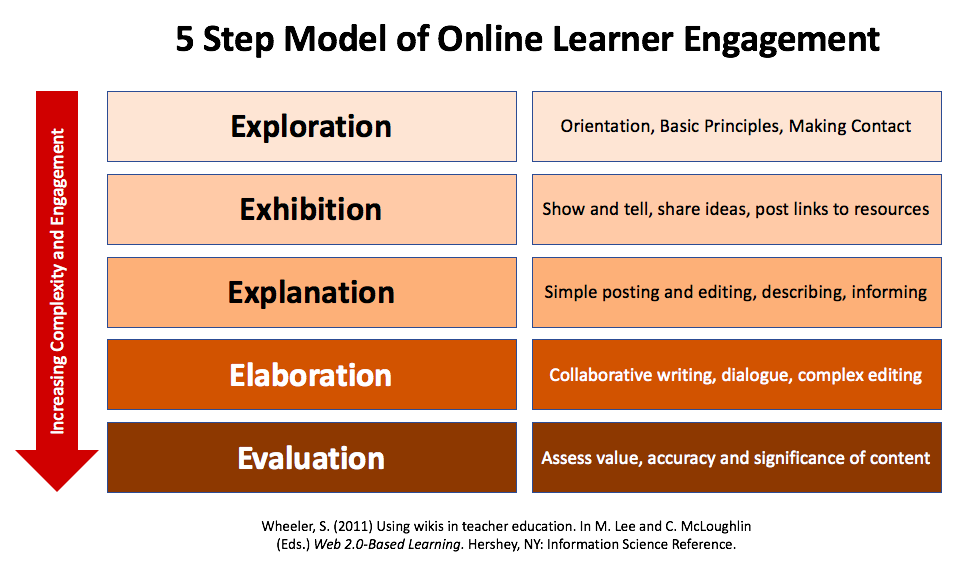
In previous posts here and also here, I wrote about how to engage learners in online collaborative writing. I developed a 5 step model based on the work of Lani Gunawardena (1995) which I used to promote deeper and more critical engagement for online learners working in wikis. Here's a snapshot of the model:

The model starts with Exploration (where students are finding out about their new learning environment, discovering the do's and dont's and generally orientating themselves on the wiki). I mentioned in a previous post about an introductory activity where each student is encouraged to create a space in which they introduce themselves with a few words and an image that represents them. 

Next comes Exhibition - where they are encouraged to talk about themselves, to show and tell best practice and to reflect on their experiences. They are also asked to perform tasks such as 'Mining for Gold' - finding useful websites, online resources etc, that they can share with the group as 'gold dust resources'. 

Third comes Explanation - here they describe in deeper terms their ideas and provide other group members with more detail. They may for example, elaborate on why their 'gold dust resources' are so useful. 

Fourth, there is Elaboration - here students start to edit each other's postings and append arguments or discussions with counter arguments. They may expand upon their resources, or annotate each other's postings. 

Finally, Evaluation is where students place a value on the validity, reliability, veracity and relevance of their work. They judge the significance of their collaborative efforts and decide where they will go next in their learning journey.
Graphics and concept by Steve Wheeler
Reference
Gunawardena, C. (1995) Social presence theory and implications for interaction and collaborative learning in computer conferences. International Journal of Educational Technologies, 1 (2/3), 147-166.

Creative Commons License
Engaging online learners 3 by Steve Wheeler was written in Plymouth, England and is licensed under a Creative Commons Attribution-NonCommercial-ShareAlike 3.0 Unported License.


Engaging online learners 3

Photo by Steve Wheeler
In previous posts here and also here, I wrote about how to engage learners in online collaborative writing. I developed a 5 step model based on the work of Lani Gunawardena (1995) which I used to promote deeper and more critical engagement for online learners working in wikis. Here's a snapshot of the model:

The model starts with Exploration (where students are finding out about their new learning environment, discovering the do's and dont's and generally orientating themselves on the wiki). I mentioned in a previous post about an introductory activity where each student is encouraged to create a space in which they introduce themselves with a few words and an image that represents them. 

Next comes Exhibition - where they are encouraged to talk about themselves, to show and tell best practice and to reflect on their experiences. They are also asked to perform tasks such as 'Mining for Gold' - finding useful websites, online resources etc, that they can share with the group as 'gold dust resources'. 

Third comes Explanation - here they describe in deeper terms their ideas and provide other group members with more detail. They may for example, elaborate on why their 'gold dust resources' are so useful. 

Fourth, there is Elaboration - here students start to edit each other's postings and append arguments or discussions with counter arguments. They may expand upon their resources, or annotate each other's postings. 

Finally, Evaluation is where students place a value on the validity, reliability, veracity and relevance of their work. They judge the significance of their collaborative efforts and decide where they will go next in their learning journey.
Graphics and concept by Steve Wheeler
Reference
Gunawardena, C. (1995) Social presence theory and implications for interaction and collaborative learning in computer conferences. International Journal of Educational Technologies, 1 (2/3), 147-166.

Creative Commons License
Engaging online learners 3 by Steve Wheeler was written in Plymouth, England and is licensed under a Creative Commons Attribution-NonCommercial-ShareAlike 3.0 Unported License.


Engaging online learners 3

Photo by Steve Wheeler
In previous posts here and also here, I wrote about how to engage learners in online collaborative writing. I developed a 5 step model based on the work of Lani Gunawardena (1995) which I used to promote deeper and more critical engagement for online learners working in wikis. Here's a snapshot of the model:

The model starts with Exploration (where students are finding out about their new learning environment, discovering the do's and dont's and generally orientating themselves on the wiki). I mentioned in a previous post about an introductory activity where each student is encouraged to create a space in which they introduce themselves with a few words and an image that represents them. 

Next comes Exhibition - where they are encouraged to talk about themselves, to show and tell best practice and to reflect on their experiences. They are also asked to perform tasks such as 'Mining for Gold' - finding useful websites, online resources etc, that they can share with the group as 'gold dust resources'. 

Third comes Explanation - here they describe in deeper terms their ideas and provide other group members with more detail. They may for example, elaborate on why their 'gold dust resources' are so useful. 

Fourth, there is Elaboration - here students start to edit each other's postings and append arguments or discussions with counter arguments. They may expand upon their resources, or annotate each other's postings. 

Finally, Evaluation is where students place a value on the validity, reliability, veracity and relevance of their work. They judge the significance of their collaborative efforts and decide where they will go next in their learning journey.
Graphics and concept by Steve Wheeler
Reference
Gunawardena, C. (1995) Social presence theory and implications for interaction and collaborative learning in computer conferences. International Journal of Educational Technologies, 1 (2/3), 147-166.

Creative Commons License
Engaging online learners 3 by Steve Wheeler was written in Plymouth, England and is licensed under a Creative Commons Attribution-NonCommercial-ShareAlike 3.0 Unported License.


<< Back Next >>