

Estimate the value of automating your application deployments and overall software delivery Take two minutes to determine the value your organization could attain. The IBM Rational software delivery automation value estimators illustrate how your organization can be positively impacted by the use of Rational automation software solutions.
Oracle is apparently rolling back Solaris to its pre-open source days. The company hasn't made an official announcement, and may never, but an internal e-mail ostensibly to its own remaining Solaris engineers outlining its position on OpenSolaris just happened to fall into the hands of OpenSolaris contributor Steven Stallion last Friday. He posted it under the headline "OpenSolaris is Dead" here. Generally regarded as authentic, the e-mail says Solaris is meant to drive Oracle's newfound proprietary server and storage business, which is supposed to be worth "many billions of dollars," and as such "is not something we outsource to others, it is not the assembly of someone else's technology, and it is not a sustaining-only product."
Having said nothing for months about its intentions, a deafening silence that had Sun users biting their nails down to the quick about where the technology was really going – then demonstrating their angst in their order rate or their leap into the waiting arms of competitors – Oracle the other day finally opened its mind a tad. For starters, it staged a webcast Tuesday and said that it means to put its resources behind Sun’s Sparc and x86 systems, something it said before however unconvincingly. But now it’s got what it called an “aggressive” albeit stripped-down – and for that matter pretty much unreadable – five-year roadmap to wave around that plots out Sparc server development through 2015.
Measurement is the most central concept in any performance-related activity. If you are not measuring you are blind. As important as measuring per se is collecting the right measurements. Which metrics are the right ones depends on what you want to do. However there are some general principles which – when followed – can make your life much easier.
To save me time in the future, rather than having to write it again and again for clients, this blog entry documents how to install JDeveloper 11g Studio Edition v11.1.1.2.0 build 5536 under Windows. I'll admit it's not the most exciting blog post, for sure Oracle's already done it (without my witty dialogue of course), and hey, it's not even the latest release, but sometimes we just gotta-do-documentation-for-documentation's-sake.
Software
The JDeveloper software can be obtained from here ... then selecting the Downloads tab -> Archived Downloads -> Oracle JDeveloper 11g 11.1.1.2.0 -> Accept License Agreement -> jdevstudio11112install.exe (that constitutes the Studio Edition for Windows including JDK 6.
Prerequisites
Disable virus scanners - to make your life easier, disable any virus scanners during the installation as this will slow the install process down if the virus scanner scans each Java archive. This has from experience been a particular problem with McAfee's products, and I recommend an alternative virus scanner.
Administrative access – you'll require privileges to install software onto the local PC.
Installation
1) On the local Windows PC execute the jdevstudio11112.install.exe. This will display the Oracle Installer Welcome dialog: 2) Selecting Next presents the Choose Middleware Home Directory dialog where you can select an existing Fusion Middleware Home directory or create a new one. It's recommended you always install each JDeveloper installation in it's own directory, so create a new directory either by typing the directory in the text box or using the Browse button.
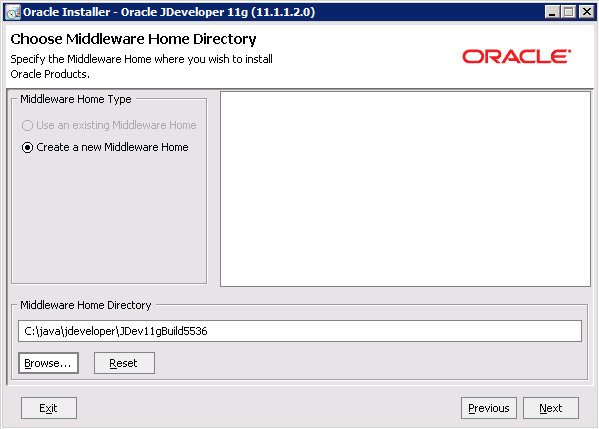 If you have multiple developers setting up JDeveloper on their local PCs, it's recommended you standardize the installation directories, and cater for multiple JDeveloper versions. In the picture above C:javajdeveloperJDev11gBuild5536 reflects a separate directory for JDeveloper 11g v11.1.1.2.0 build 5536. As alternative a later version JDeveloper 11g v11.1.1.3.0 build 5560 could be installed under C:javajdeveloperJDev11gBuild5560. Note to avoid cross-platform issues in the future it's recommended you standardize the capitalization of the directories too.
3) Selecting Next presents the Choose Install Type dialog, allowing you a choice between installing the full package or customising the install and dropping off components: As it's unknown what future parts of JDeveloper will be required for development purposes it's recommended the Complete installation option is chosen. If you do choose the Custom option you'll be presented with the Choose Products and Components dialog:
 .....where you need to make you're own informed choices.
4) Next presents the Confirm Product Installation Directories dialog. Of note are the base Middleware Home Directory, and the two separate directories for the actual JDeveloper software and the separate integrated WebLogic Server: 5) The Choose Shortcut Location dialog displayed next gives you options to create the JDeveloper Windows group either for the current user or all users on the local PC. As multiple developers may use the same PC, giving access to all users may be the preferred option:
 If you do choose to create the JDeveloper Windows group in all users accounts, assuming you have administrative rights on the local PC for installing JDeveloper, install at the end of this process that the installed JDeveloper files can also be run by other users on the same PC.
6) The Installation Summary dialog on selecting Next displays what will be installed, how much disk space will be consumed:  Select Next starts the installation process:
 7) On successful completion the Installation Complete dialog will show:
 Leaving the Run Quickstart checkbox checked and selecting the Done button will close the installer and open the Quickstart program (explained in the next section). We'll assume you uncheck the checkbox and start JDeveloper separately below.
Your JDeveloper installation is now complete.
What was Installed
Post installation JDeveloper will have installed the following:
1) Under the specified installation directory the JDeveloper and integrated WebLogic Server files will exist: 2) A new directory C:bea will have been created if this is your first Fusion Middleware install with the file beahomelist. This text file when open reveals the installation home directory for each product installed.
3) Within the Windows Start menu a new group Oracle Fusion Middleware 11.1.1.2.0 will exist: 4) When you run JDeveloper for the first time it will create two sets of files under the Windows user directories for the current user. Where these are found depends on which version of Windows you're using. Older versions including Windows XP stores the files under:
a) C:Documents and Settings<username>Application DataJDeveloper
...in that directory you'll notice a subdirectory like "system11.1.1.2.36.55.36" where the system directory numbering scheme references the version of JDeveloper and build number (e.g. version 11.1.1.2.0 and build 5536 from the example above) you've installed. Multiple versions of JDeveloper will see additional system directories created here.
b) C:Documents and Settings<username>Oracleoradiag_
....I'm not entirely sure what this directory is used for presumably capturing diagnostic information. I believe it's enabled by selecting the XXXX option in the following section.
If you're using a modern version of Windows the likely location for these files are:
a) C:Users<username>AppDataRoamingJDeveloper
b) C:Users<username>Oracle
Running JDeveloper
You can open JDeveloper via the Windows group Oracle Fusion Middleware 11.1.1.2.0 – JDeveloper Studio 11.1.1.2.0 option. The first dialog you'll see is the loading window: At certain points during the load JDeveloper will prompt you for more information, including:
1) The Select Role dialog will display: This allows you to select different developer modes for the IDE which influence which features run. As typically it's unknown what the developer will be doing in thee future, selecting the Default Role option and unselecting the Always prompt for role selection on startup checkbox are recommended.
If you wish to turn this dialog back on at a later date, it's preference is accessible via the JDeveloper menu option Tools -> Preferences -> Roles, then selecting the Always prompt for role selection on startup checkbox.
2) The first time you run a newly installed JDeveloper version, if you have previous versions of JDeveloper installed on the same machine, the installer will prompt you to migrate the user's settings from the previous JDeveloper install into the new JDeveloper install:
todo: need a screenshot of this dialog
3) On the IDE opening for the first time it will prompt you to associate certain file types under Windows with the IDE: This is a personal preference left up to the reader.
4) On the IDE opening for the first time it will prompt you to report back IDE errors and crashes to Oracle Corporation: Assuming Oracle is actually gathering and using these statistics, this can be useful for improving the quality of the IDE in the future. However it may be against your organization's security policy to enable this. In addition if JDeveloper has connectivity problems in reaching Oracle's website this could also slow JDeveloper down.
5) On the IDE opening for the first time it will display a Tip of the Day: Enabling or disabling this is a personal preference left up to the reader.
JDeveloper is now running for the first time.
After sometime you might see the following Check for Updates green popup in the bottom right of the IDE:
todo: need picture
JDeveloper periodically scans external plug in servers to see if there are updates available to various parts of the JDeveloper install. Blindly accepting the choices provided can result in developers having inconsistent installations, and code that will work on one developer's PC but not anothers as the wrong updates are installed. Thought needs to be given on standardizing the patches installed and if the update feature should be used at all.
Priming the Integrated WebLogic Server (WLS)
To speed up further development in JDeveloper it's useful to run and stop the integrated WebLogic Server (WLS) such that it is initialized for the first time. To do this:
1) Select the Run -> Start Server Instance (IntegratedWebLogicServer) option: 2) As a result in the Log window under the Running: IntegratedWebLogicServer child tab, you'll see the WLS server initialize and start for the first time:
 Of particular note you're looking for the <Server started in RUNNING mode> message that shows a successful initialization.
3) To stop the WLS server, in the Log window select the red box icon, then the IntegratedWebLogicServer option: 4) In the resulting Log window under the Running: IntegratedWebLogicServer child tab, you'll the WLS messages as it shuts down:
 This completes the initialization of the integrated WebLogic Server.
Anybody really know why Mark Hurd was forced to resign? We ask because the story that HP put out Friday to explain why its golden boy suddenly wasn’t its CEO anymore doesn’t make much sense especially in view of the contradictions now coming from Hurd’s side of the aisle. If Hurd wasn’t having an affair with 50-year-old company geisha Jodie Fisher why would he fudge his expense account to cover up the fact that he had dinner with her?
Mark Papermaster, the head of iPhone hardware engineering, has left Apple apparently because somebody had to take the fall for the recent Antennagate fiasco. Friends of Papermaster, who used to be IBM’s top Power chip jockey, say he got sick of all the finger-pointing and blame shifting going on among Apple’s hardware staff and asked for an exit package.
Fifteen years ago there was no iPhone and Android. Web browsers were hot. Netscape market share was over 90% - they didn't have competition.The situation changed when Microsoft has introduces Internet Explorer (me too, me too). Back in 1998, there was an infamous law suite between Microsoft and Sun Microsystems – the former started quietly introducing their own class libraries to Java breaking the write-once-run-anywhere idea of Sun that back then seemed to be achievable. Sun won that $10B law suite. But as the saying goes, they won the battle but lost the war.
Angry Microsoft refused to include upgrades to JVM that came with Internet Explorer, which seriously hurt applets popularity – the end user couldn’t just open a Web page to see the applet that required, say 1.3 version of JVM. They’d need to first download the proper version of JVM, and only then the applets that were written with the assumption that JVM 1.3 was available would work. The process of downloading the right JVM Plug-in was a multi-step process, and a truck driver from Alabama wouldn’t be able to go through it.
High penetration of the required runtime environment and the ease of its upgrade are the crucial moments for any Web-based technology. Adobe Flash Player shines in this area today (sorry, Steve). Flash Player is also a virtual machine with a small memory footprint (1.5Mb), and its installation takes under 20 seconds after one button click. For years, the size of the JVM Plug-in was about 16Mb and install was complicated for a non-programmer, and (the rumor has it) – it’s a lot smaller now.
This situation has changed after the release of Java 6 update 10, which includes so called next-generation Java Plug-in. Now applets don’t run in the JVM packaged with the Web browser, but run in a separate JVM launched by the Java Plug-in. The applet still appears in the Web browser’s window, but now it doesn’t depend on the goodwill of the browser vendor to include the latest Plug-in. You can read more about this Java Plug-in at https://jdk6.dev.java.net/plugin2.
The other major change introduced in the next-generation Java Plug-In is ability to launch Java applets directly from JNLP (Java Network Launch Protocol) files, which in the previous releases were used only in Java Web Start technology that allowed local deployment of the applications over the network. As of Java 10.6.10 you can use the JNLP meta descriptors to launch applets too. JNLP support is described in details at http://www.oracle.com/technetwork/java/javase/index-142562.html.
Earlier versions of HTML standard included the tag <applet> to incorporate Java applets into HTML page. But as of HTML 4.01 this tag has been deprecated and you should use the tags <object> for users who like Internet Explorer or <embed> for other Web browsers. But Oracle, the company behind Java, recommends using <applet> for Web pages accessed through the Internet and <object> or <embed> for intranet-based Web sites. The main reason being that Web browser vendors are infamous for being inconsistent of implementing HTML standards, and it’s safer to use tried and true <applet> tag to get predictable look and feel of the Web pages that host Java applets. But intranet is a more controlled environment. You can read about the differences of embedding applets with these tags at http://download.oracle.com/javase/6/docs/technotes/guides/plugin/developer_guide/using_tags.html. When young and old kids (sorry Steve) tell that HTML 5 will change the world, it's funny.
The deployment options for applets have been extended as of release of Java 6 update 10. To learn all the options of applet deployment in depth, refer to the Oracle document titled “Java Rich Internet Applications Deployment Advice” available at http://download.oracle.com/javase/6/docs/technotes/guides/jweb/deployment_advice.html.
What’s the next step in applet’s evolution? You’ll be creating UI for the Web-based applications with a relatively new language called JavaFX. In a month, I'll be trying to attend every JavaFX technical session at JavaOne conference to see if it'll become a real competition to Adobe Flex and Microsoft Silverlight.
If you're not into Java applets, consider attending our Third Annual Enterprise Flex Symposium in New York City. It’s a small event where attendees and presenters will talk turkey about Adobe Flex.
Currently SOA is used as a technology at one customer that is using ESB, Repository, etc. Cloud computing is used in such a way that all the components are put on the cloud, requiring a complete switch for the customer to a cloud infrastructure. However, the integration of the systems at one customer with the cloud offerings has the potential to provide additional capabilities such as process modeling, business activity monitoring, or simulation in the cloud integrated with the customer’s systems. In his session at the 7th International Cloud Expo, Ulf Fildebrandt, Chief Development Architect SOA Infrastructure at SAP AG, will explain the potential of this integration and how it can be done.
This post is yet another Contextual Event blog description with a slight programmatic twist. It was inspired by Lucas Jellema's OTN forum post on how to raise programmatic Contextual Events, and in addition uses techniques as demonstrated by Pino and Frank described below. Readers might be interested in a thread on the ADF EMG about the design of Contextual Events in the ADF framework, and the idea of Implicit Contextual Events - The Rise and Rise of Contextual Events (or the birth of Implicit Contextual Events). In that ADF EMG thread I allude to a near "million blogs" that already describe Contextual Events as supporting collateral for Oracle's documentation. If you're interested in other posts check out Pino Jeddah's or Frank Nimphius's screencasts.
One objective look at the current PaaS market provides all the evidence you need to conclude that we are in but the infancy of development for this technology. I want to be clear here, there are some really cool (and more importantly value-providing) offerings out there, but there is a long way to go. Specifically, I am not convinced anyone can make a case that we have solutions today that comprehensively address two concepts that will become mere table-stakes in the PaaS play space.
I’ve been customizing rendering templates a lot lately using a wide variety of scripting technologies such as JavaScript, jQuery, and SPServices. One requirement I had with all of these rendering templates was to call a custom web service to populate a drop down list. This is relatively easy to do and there are plenty of resources out there on how to deploy web services with SharePoint. I thought I would make a point today though to talk about this issue since I seem to forget about it every time. :-) The issue is that you build and test your pages and they work great as an administrator. However, once an end user tries the page, the script on the page doesn’t work. With any scripting issue, I bust out FireBug in Firefox and take a look at the page. It shows the web service call which works great for the administrator but when the user tries it, the result is 403 forbidden.
Within the contextual event framework, effectively there is a "producer" task flow and a "consumer" task flow. The producer publishes a contextual event, and the consumer subscribes to the contextual event. It's all rather handily described in Section 28.7.1 of the Fusion Guide How to Create Contextual Events Declaratively The publisher can pass a data payload (payLoad, PayLoad, um, pay load?) to the consumer. The publisher users an EL expression to extract data from their local bindings to do this, maybe something like #{bindings.employeeNo.inputValue}, which would be familiar to ADF programmers. The consumer however needs to use an EL expression #{payLoad} to capture the data from the published event.
Managed Methods Inc., a provider of SOA (service-oriented architecture) & Cloud governance, has announced the availability of their JaxView 6.0. While providing full support for SOA & Cloud management for the IT operations, JaxView 6.0 expanded runtime policy enforcement features such as expanded service virtualization and security federation. "We are very pleased with our customer adoption of JaxView for SOA & Cloud governance for monitoring and securing such environments." states Al Aghili Founder and Chief Technology Officer of Managed Methods Inc.
The past few weeks we have been discussing some of the mistakes made in early cloud deployments. This week we are discussing a key mistake that occurs fairly often; one that only manifests long after the solution is operational…blindly assuming that Cloud equals costs savings. Blasphemy, you say – how could it possibly not cost less? Let’s take a look at the considerations and components of IT cost, and revisit this question at the end. The unfortunate truth is that most enterprises have well-established IT cost allocation mechanisms, but few of these have any basis in actual consumption. Put simply, can you (or your users) confidently say that your IT bill reflects how much – or little – you use something? Traditional approaches to IT chargeback involve aggregating the net IT cost, and allocating it proportionally to business units based on head count, server count, or some other surrogate for allocating actual cost. This approach (sometimes affectionately referred to as ‘peanut butter’ – you spread it around) has merit in its simplicity, but cannot be allowed to persist as we move toward Cloud operating models.
In the run-up to the next Cloud Expo, 7th Cloud Expo (November 1-4, 2010) at the Santa Clara Convention Center in Silicon Valley, it's time to give my earlier list a complete overhaul. Here, accordingly, is an expanded list of the most active players in the Cloud Ecosystem.
In looking back at my JavaFX… does it have a future? posting, my views have been changed by some of the comments made (here and here), in particular about JavaFX vs. Flash/Flex and Java Web Start. JavaFX and applets I agree that comparing JavaFX applets vs Flash/Flex is not something we should be doing. Flash [...]
Oracle said Thursday that Dell and HP will sell Oracle Solaris, Oracle Enterprise Linux and Oracle VM on their x86 platforms, which will presumably come as some relief to customers uncertain of Oracle’s intentions. HP said in a canned statement that many users “have hardwired stacks of applications and infrastructure that can’t rapidly change.” Oracle will do the support. Meanwhile, things on the OpenSolaris side of the house are in a tizzy with the widgetry’s governing board issuing ultimatums and threatening to disband if Oracle doesn’t pay it some mind while a breakaway movement is believed to be in progress because Oracle, while committed to Solaris, has reduced its support for OpenSolaris as a distribution.
Terracotta is out to cure skimpy cache by making Ehcache really, really big, 1TB in fact, a size only a few people can use right now, but just you wait, it says, the day is upon us when practically everybody with a database will want it to be in-memory. The biggest caches these days are still 100GB-200GB and they’re a lot of work to build. Maybe there are two or three that hit 200 GB. The average, on the other hand, is more like sub-20 gigs. Terracotta swears it’s made it easy to store over a terabyte of data and hundreds of millions of entries in a single cache, so data retrieval is a whole lot faster and clouds and virtualization aren’t bottlenecked.
Apple says it still can’t deliver any white iPhone 4s because they “continue to be more challenging to manufacture than we originally expected, and as a result they will not be available until later this year.” A week ago Steve Jobs said they would be out at the end of the month. Apparently they’ve picked up a yellow tinge. Anyway, as of June 30, the iPhone 4 will be shipping in another 17 countries: Austria, Australia, Belgium, Canada, Denmark, Finland, Hong Kong, Ireland, Italy, Luxembourg, Holland, Norway, New Zealand, Singapore, Spain, Sweden and Switzerland. It started in the U.S., UK, France, Germany and Japan.
Recently I had the opportunity to address two groups of Corporate Developers that are targeting iPhone and iPad as a deployment platform for their Enterprise. During the seminars both myself and a few other Sybase colleagues covered such subjects as Management and Security of iOS devices through our integration with Apple's new MDM (Mobile Device Management) protocol along with unwiring enterprise data from heterogeneous back ends to primarily iOS devices, though others are also possible. This last point is achievable through the use of a Mobile Enterprise Application Platform (MEAP), of which Sybase has the market leader in SUP or the Sybase Unwired Platform.
NaviSite, Inc., a provider of complex hosting, application management and managed cloud services for the enterprise market, is using a combination of Oracle's Sun servers and Oracle software to run its mission-critical systems. With more than 1,500 customers in 10 datacenters across the US and UK, NaviSite needed to expand its virtualization platform to meet the growing infrastructure demands of its customers, while delivering industry-leading performance and availability.
After months of promising we have finally moved Exadel Flamingo to exadel.org and released version 2.2.0. exadel.org is our community site for hosting open source projects. Flamingo is a light weight framework for connecting rich web and mobile user interfaces to enterprise back end. Flamingo connects Seam, Spring, and Java EE 6 (soon via CDI/JSR299) with the following user interfaces.
Exadel has released Exadel JavaFX Plug-in for Eclipse version 1.3.4. The biggest feature in this release is Organize Imports (just like in Java editor). The class for Text node is missing, pressing Ctrl+Shift+O, will display the dialog where the correct class can be selected. You can also invoke Organize Imports from the editor context menu (right-click anywhere in the editor and select Organize Imports). You can also invoke Organize Imports from the editor context menu (right-click [...]
One of the most common questions for people that are new to BIRT is about how to ask data from the DataSet in the report. The question is when building expressions should I use dataSetRow["FIELD"] or row["FIELD"]? So let me see if I can set the record straight. When data is acquired, it is acquired by a DataSet, so the following query in a JDBC DataSet will create a three field resultset.
