


My first paid freelance job fresh out of design school was creating a brochure for a magician. Having moved beyond performing for children’s parties, he began doing “magic with a message”—shows designed to teach kids how to avoid drugs and strangers. The ideal venue for his show was high schools, and his target market was high school principals. The brochure was to be part of his marketing collateral.
Besides being an excellent magician, he is also a savvy marketer. Instead of images of himself performing magic tricks, the photos he provided were faces of delighted and awe-struck kids watching him perform. His reasoning was surprisingly astute. Rather than focusing on the magic, he wanted to draw attention to the experience. Showing how he created “insanely great experiences” for his audience is what caused his target prospect—namely, high school principals—to book an engagement.
As in my earlier article, this title comes from the ebook, Innovate the Steve Jobs Way: 7 Insanely Different Principles for Breakthrough Success. Like my marketing-savvy magician friend, Apple seems to get the concept that people buy experiences rather than products. Their recent iPad commercial tells us that “now, we can watch a newspaper … listen to a magazine … curl up with a movie … and see a phone call.” Verizon, on the other hand, is telling us that their tablets are “flash-ready,” come equipped with a “core Tegra 2 chipset,” and are “4G LTE upgradeable.” And while that might send chills up yours and my techno-spine, it does nothing for someone like my technologically-challenged mother-in-law, who was impressed by the fact that “you just touch it to make it go where you want.” Even she can have an “insanely great experience”—but only with the tablet manufacturer smart enough to tell her so.
But “insanely great experiences” are not limited to using the product or service. People also want “insanely great experiences” when buying a product or service. Consultant Alan Weiss calls this creating “breakthrough relationships.” One way he suggests to do this is by keeping a record of important issues facing your existing clients and key prospects (regardless of whether you are working with them on these issues or if they are out of your area of expertise), then sending articles and other useful resources on that topic.
Let’s face it. Our prospects are not going to experience roller coaster thrills over the website we’ve developed for them. (In fact, you really didn’t develop the website for your prospect at all. You developed it for his prospects, clients, customers, or patients.) So what type of experience can you create during the buying process itself?
Over the past decade, I’ve seen website development go from what most people thought was some type of voodoo magic to something a teenager can do. Next year, my fifteen-year-old son will be learning in high school what I went to graphic design college (and re-paid thousands of dollars back in student loans) to learn. When kids coming out of high school know much as you did when you graduated college (if you did), your skills have become commoditized. Sure, you’re going to develop a great site. Of course it will have a professional look, be standards-complaint and search engine friendly. But those things are “the cost of entry” if you want to compete in this field—not what sets you apart. Creating “insanely great experiences” during the buying process may be the only hope you have left.
Neil Rackham (SPIN Selling) and Michael Gerber (The E-Myth Revisited) concur. In an article entitled, “From Valve Communication to Value Creation,” Rackham says that “…value is migrating from the product itself to how the product is acquired.” (Italics mine.)
Michael Gerber says that the commodity isn’t what’s important—the way it’s delivered or acquired is. According to Gerber, the entrepreneur considers the business to be the product, not what he delivers to the customer. He looks at the business “as if it were a product, sitting on a shelf and competing for the customer’s attention against a whole shelf of competing products (or businesses).”
This means “how the business interacts with the consumer is more important than what it sells.”
The commodity is the thing your customer actually walks out with in his hand.
The product is what your customer feels as he walks out of your business.
What he feels about your business, not what he feels about the commodity.
- The E-Myth Revisited
Yesterday, I got a haircut at a place I’d never gone to before. Although I was very happy with the end result, the girl cutting my hair looked as though she’d rather be anywhere else than where she was. The stylist the next chair over was the polar opposite— gregarious and outgoing, making conversation with her client … and I began wishing I’d gotten her instead. Don’t get me wrong, just like my haircut, your client ought to be thrilled with the site you developed. But a large part of that thrill includes the process of how he obtained the site. Did you create an “insanely great experience, or did you leave your client wishing the developer “the next chair over” had built his site instead?
via Comments on:

Given that Dan once ran RubySource and I’d already put a face to the name at one RORO meeting a couple of weeks earlier, it was stellar to actually get to know him better over the weekend. Additionally, I felt the title of Unplugged was justified, as he was playing acoustic guitar through the weekend. He’s as friendly as he is tall, which is taller than average, so he was happy to answer some questions for us! Tell us a some things about yourself, Dan. I started programming using BASIC when I was six, I sort of progressed from there through basic C, Pascal, Visual Basic, until I discovered the web in about ’95 and thought “right, this is for me”.
Link:
RubySource: Dan Cheail, Unplugged.
via Comments on:
Google last Friday was compelled by the court hearing Oracle’s patent and copyright suit over Google’s alleged misuse of Java in Android to re-file a June 6 letter to the court complaining about how much Oracle thinks it’s owed for Google’s alleged lèse majesté on the record and not redacted. Well, after Google erased the heavy redactions that Oracle objected to claiming Google was trying to hide information that isn’t even confidential, let alone sensitive, like exactly how much Oracle’s expert thinks Google should pay for its sin if convicted, the number turns out to be somewhere between $1.4 billion and $6.1 billion, a pretty ritzy neighborhood.

WordPress’s popularity owes much to it’s easy administration panels. Unfortunately, it can still be daunting for non-technical users such as your clients. At best they’ll require a little training, hand-holding and support. At worst, they’ll play around with plugin installation, edit some theme code, then expect you to clear up the mess.
I’ve written a number of “Make WordPress Easier for Clients” articles (see part 1 and part 2). In those examples, code was placed in the theme’s functions.php file. That’s still a viable solution if you have one WordPress installation per client or each is configured differently.
In this article, however, we’ll create a plugin. Plugins have a couple of advantages:
Our plugin will be contained in a single PHP file. We’ll name it easy-admin.php and place it in the WordPress plugin folder (wp-content/plugins/). Ideally, the file should be UTF-8 encoded. If your text editor doesn’t permit UTF-8, well, use a better editor! That said, those using English are unlikely to experience issues with ANSI-encoded files.
A PHP tag and header comments are required at the top of the file, e.g.
<?php
/*
Plugin Name: Easy Administration
Plugin URI: http://www.sitepoint.com/wordpress-easy-administration-plugin-1
Description: Simplifies WordPress administration panels.
Version: 1.0
Author: Craig Buckler
Author URI: http://optimalworks.net/
License: GPL2
*/
You can change the header details, but ensure the definition tags remain — WordPress uses them to recognize your plugin.
You can now install your plugin by activating it in the “Plugins” section of the WordPress administration panels. Those with a WordPress network can activate it for all sites in the “Network Admin” section. It won’t do anything yet, but you can now add whichever features you require…
The WordPress logo is lovely but few clients will care what CMS they’re using. It might be more helpful to show their site name. Append the following code to easy-admin.php; it replaces the login page logo with the name and uses a pleasing CSS3-letterpress text:
// login page logo
function custom_login_logo() {
	echo '<style>h1 a, h1 a:hover, h1 a:focus { font-size: 1.4em; font-weight: normal; text-align: center; text-indent: 0; line-height: 1.1em; text-decoration: none; color: #dadada; text-shadow: 0 -1px 1px #666, 0 1px 1px #fff; background-image: none !important; }</style>';
}
add_action('login_head', 'custom_login_logo');

The WordPress icon is shown next to the site name in the header. There’s nothing wrong with it but some clients will question why there’s a ‘W’ next to their site. To remove it, append the following code to easy-admin.php:
// remove administration page header logo
function remove_admin_logo() {
	echo '<style>img#header-logo { display: none; }</style>';
}
add_action('admin_head', 'remove_admin_logo');
The footer provides links to WordPress, documentation and feedback. Few clients are likely to find it useful so you can replace it with your own support details. Append the following code to easy-admin.php and change the echo statement to output to a suitable message:
// change administration panel footer
function change_footer_admin() {
	echo 'For support, please call 123456 or email <a href="mailto:support@mysite.net">mailto:support@mysite.net</a>';
}
add_filter('admin_footer_text', 'change_footer_admin');
The dark-gray Admin Bar was introduced in WordPress 3.1. Personally, I don’t find it particularly useful. It can also confuse clients; they may think all visitors can see the bar or use it to access dangerous features such as ‘Appearance’. Fortunately, we can remove it with one line in easy-admin.php:
// remove admin bar
add_filter('show_admin_bar', '__return_false');
That’s enough configuration for today. In my next WordPress post, we’ll add further functions to simplify the dashboard, post and page panels.
via Comments on:
Oracle is demanding billions of dollars in damages from its patent and copyright suit over Google’s alleged misuse of Java in Android and it wants the world to know that it’s demanding billions of dollars in damages from its patent and copyright suit over Google’s alleged misuse of Java in Android. It doesn’t want the court to file its “bill,” so to speak, under seal like Google wants it to. According to patent watcher Florian Mueller, Oracle claims Google has been way too scissor-happy redacting documents and that Google’s trying to hide information that isn’t even confidential, let alone sensitive, such as the price Oracle paid for Sun, leaving the reading public with an “erroneous or distorted descriptions of the facts” and “misrepresentations” – like the depiction that Google’s expert used a 50% royalty rate in his calculation – like the press reported – and “any and all references to the fact that Oracle’s damages claims in this case are in the billions of dollars.”

So far we’ve looked at the importance of notifications on the Windows Phone platform along with the different types of notifications that are available to your application. In this post we’re going to go through setting up your application to receive notifications and how to actually send notifications. The first step in configuring your application to receive notifications is to register with the Microsoft hosted Push Notification Service. This is done by creating an instance of the HttpNotificationChannel class and calling the Open method.
Read More:
BuildMobile: WP7 Push Notifications Part 2
via Comments on:
So far we’ve looked at the importance of notifications on the Windows Phone platform along with the different types of notifications that are available to your application. In this post we’re going to go through setting up your application to receive notifications and how to actually send notifications. The first step in configuring your application to receive notifications is to register with the Microsoft hosted Push Notification Service. This is done by creating an instance of the HttpNotificationChannel class and calling the Open method
See original article:
BuildMobile: WP7 Push Notifications Part 2
via Comments on:

I was recently speaking to someone who had made the decision to leave her freelancing business, and take a full time position within a company who didn’t offer her services.
As you can imagine, her clients stuck by her, however she was starting to find it harder to manage both roles. I gave her some advice, which she acted on and was pleased with the outcomes, and wanted to share it with you.
Before taking the plunge of employment, I suggest approaching those in the local industry that you know and trust. If you don’t know them, that’s fine; but it’s important that you find a few people who you know do great work.
Once you’ve established a list of three to five names, contact them and arrange a coffee date. Then, at this meeting, explain your situation, and that you want to ensure your clients are taken care of into the future.
Once you’ve interviewed these folk, and have a good feeling about their ability to service your existing clients, don’t feel shy in asking for something in return. You’re bringing your existing clients and work – that’s got to be valuable, right?
The easiest solution is to agree on a percentage you’ll receive as a commission for each new job they get from your clients, for a period of time (my suggestion? Six months).
Ideally, have a few of these arrangements, and then communicate to your clients. Let them know you’ve enjoyed working with them, however you’ve decided to exit the industry, and here are a few names of people that you would recommend.
Don’t just do it by email either – a telephone call costs very little apart from some time, and ensures your clients understand your position, and you still have a great relationship moving into the future.
The end result is a group of happy clients, who you know will be looked after into the future, as well as a passive income stream for the next few months, as they continue the great work that you started.
Best of luck in the new role, and congratulations on a successful freelancing exit!
via Comments on:

WordPress has announced that the initial release candidate of WordPress 3.2 is now available, meaning that the general release of WordPress 3.2 is right around the corner.
There are some really cool new features and improvements sure to make a lot of folks happy, but there are also some significant changes in WordPress requirements that you should be aware of, lest you click the magic upgrade button in your WordPress admin and be disappointed.
Here are the top seven points you need to know about WordPress 3.2:
As most of us know, keeping WordPress up-to-date is extremely important. It’s easy to understand how WordPress installations remained out of date prior to the automated update features being added to core WordPress several versions back, but these days there’s almost no excuse.
It never ceases to amaze me how often I work on a new client’s existing WordPress website to see them running versions of WordPress as old as 2.7 and 2.8. Because of its incredible popularity, WordPress is constantly targeted by hackers looking to exploit security vulnerabilities in the system. These vulnerabilities are usually caught and patched, resulting in incremental updates that keep WordPress fresh, clean and safe.
By not keeping your WordPress installation current, you risk falling victim to malicious attacks that are entirely preventable—given that you actually guard against them by updating your code.
With that said, WordPress has up until this point been a very pleasant citizen, being more than happy to work with you and live on older, antiquated web servers. This has meant that WordPress has essentially been backwards compatible, happily supporting MySQL4 and PHP4. However, try to upgrade WordPress to 3.2 on a server that doesn’t have either MySQL5 or PHP5, and you’ll see something like this:
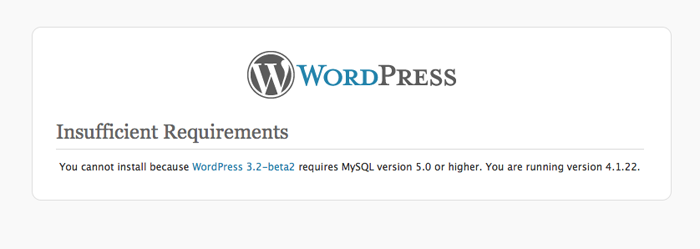
MySQL5 and PHP5 systems have been running stable now for several years and they collectively add quite a bit of functionality, but there are still servers out there that run old web services for any number of perfectly valid reasons.
If you are currently hosting with a larger hosting provider like Hostgator, Bluehost, Softlayer, Rackspace, LiquidWeb or the like, don’t sweat it—you are probably just fine. But if you happen to be with a smaller hosting company, have an account with several “legacy sites” that require older services, or are even running your own server, you may end up needing to upgrade both WordPress and the server it lives on.
If you don’t know whether or not your sites are running on a server that will support WordPress 3.2, there’s a handy little plugin written by Ryan Duff called WordPress Requirements Check. Just download it and add it to your WordPress installation, and it’ll let you know whether or not you are ready for the next version of WordPress.
So don’t be caught with your pants down—the official release for WordPress 3.2 is slated for on or around June 30th, so there’s still time to clean up your act and be able to join in the fun!
Considering that even Microsoft is counting down the days till none of us ever have to deal with that wretched Internet Explorer 6 ever again, the official dropping of support for IE6 is hardly a surprise.
Still, seeing it in online print should give seasoned web development veterans warm fuzzies on some level. IE7 is also on the way out, though WordPress won’t officially drop support for it for a little bit yet.
Now that we’ve covered the important stuff that is going away that you need to be aware of, let’s talk about what’s new and good coming to a WordPress installation near you soon! We’ll start with the new and improved, streamlined WordPress administration interface.
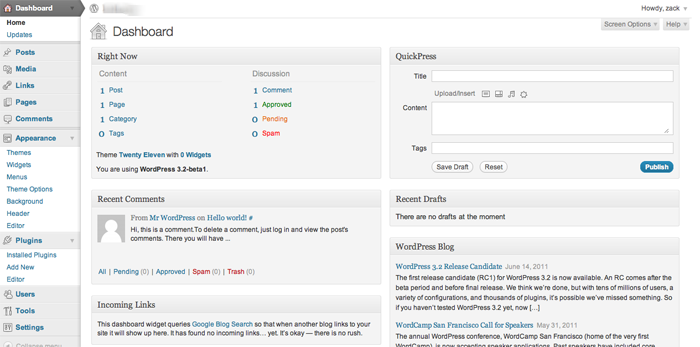
With the release of WordPress 3.0, we were introduced to a lighter, friendlier feel in the WordPress administration interface, and the refreshed version of the WordPress 3.2 interface seems to build further in that direction.
I really like how WordPress has continued to make a concerted attempt to get out of your way, removing unneeded clutter, compressing the width of the left hand sidebar significantly, and reducing the height of the admin header.
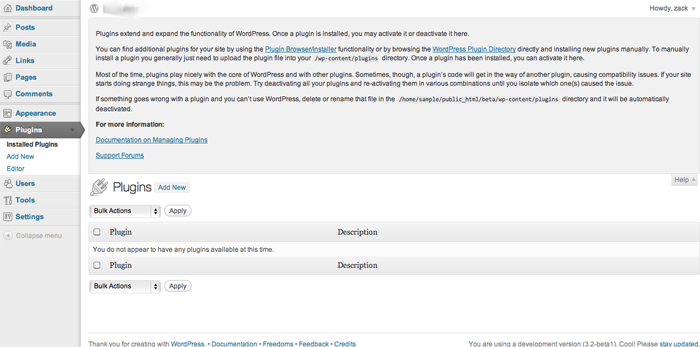
Further, the contextual screen options menu initially introduced in WordPress 3.0 really shines in 3.2. They essentially work the same way, but it’s a bit more intuitive now with the rest of WordPress being so out of the way now. If you have never had the chance to play with the contextual Screen Options, have a look at how the work in the two screenshots below:
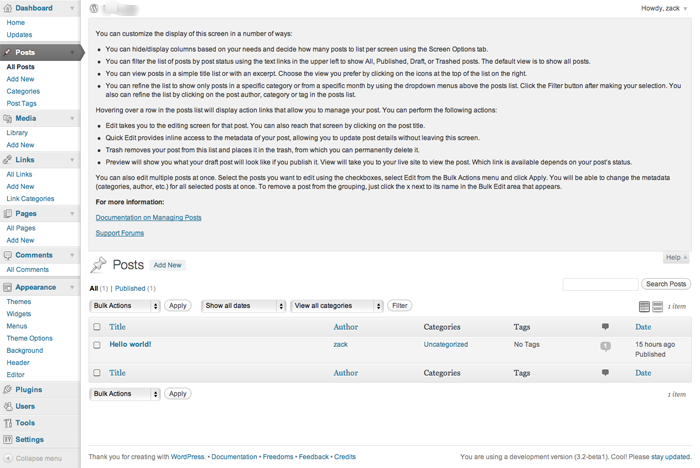
As you can see, utilizing the screen options when you work with posts, shown above, provides different options to working with screen options when working with links, as is shown in the screenshot below.
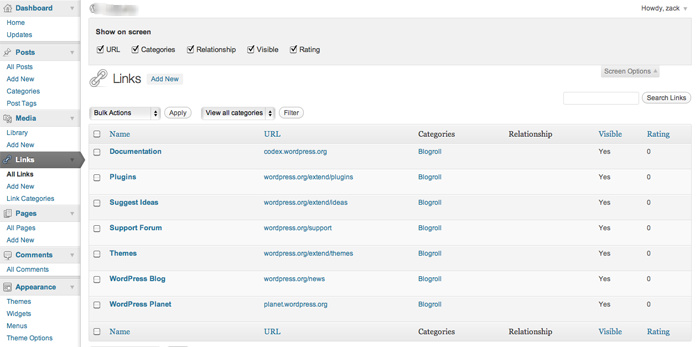
The Help button is also contextual in this same manner, so if you aren’t sure how to proceed somewhere in any given section of the WordPress administration interface, you are always treated to pertinent assistance as shown in the example below.
Continuing the theme of staying out of your way, WordPress also is improving on its authoring experience by enhancing the existing fullscreen writing mode. While you’ve always been able to edit a post in fullscreen mode if you like, the experience has been streamlined in a very Ajax-y kind of way.
Open up the fullscreen mode form the editor and you’ll initially see a fairly minimal screen that gives you only essential authoring options, like the ones you see below.
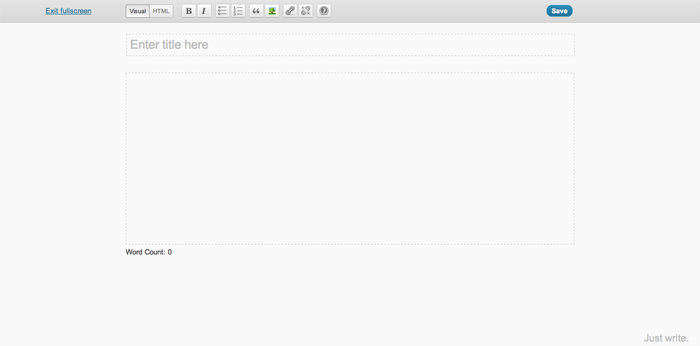
However, stop monkeying with your mouse for a minute or two, and all of that magically fades away in the background, leaving only a gray screen with a flashing cursor. This eliminates all the clutter from your screen—aside from WordPress’s gentle reminder in the bottom right hand corner to “Just write”.

Move your cursor again, and the fullscreen view reappears, giving you formatting options just as before, as well as the ability to save your work. Pretty cool stuff, and a welcome addition for the serious blogger.
Another really significant development with 3.2 is how much the development team has trimmed the fat and optimized the speed of WordPress. The core development team has completely re-factored the core code in WordPress, removing deprecated functions and making things overall run much more efficiently.
This results in faster page loads, faster upgrades, and faster plugin additions, and it all really shows when you are just playing around with the admin interface. Further, the switch from PHP4 to PHP5 offers significant speed increases as well.
Especially with Google making changes to factor website speed and performance into organic search engine rankings, this is a massive boost for WordPress, and does nothing but help make it a sturdy platform for growth moving forward.
Another important feature that has been implemented with 3.2 revolves around WordPress upgrades. While in the past, upgrades were full replacements of core code, the system has been modified to now only replace files that have actually been modified and need to be changed out.
This makes the upgrade process faster, as there are fewer files to download and swap out. More importantly, it also makes the process safer and much more reliable, reducing the possibility of download errors significantly due to the decreased volume of code being downloaded.
If all of that wasn’t enough, WordPress has also given us a new default theme to play with, if we so choose. Twenty Eleven looks like a fairly solid theme for something default and free, giving you a much larger array of options for customization that its’ predecessors have.
Starting with two default color schemes – a light one and a dark one – out of the box, Twenty Eleven gives you several solid options including the ability to easily change the overall layout into several different configurations as you can see in the screenshot below.
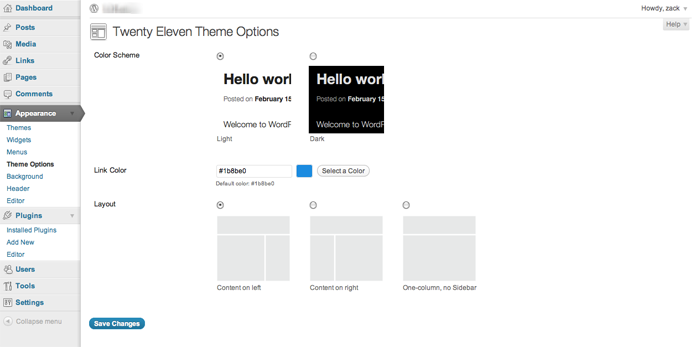
You can also change the text color, and upload your own graphic headers right through the theme options. Random header images per page are also supported, as is the ability to upload and work with your own custom background.
All of these things are pretty easy to code into any custom theme anyway, but it’s nice to see WordPress making it easier for people to quickly build out a website and make it look different that the standard Twenty Ten install we’ve all come to know and identify so easily on countless WordPress installs across the Web.
The new WordPress features will all be pretty useful, but at the end of the day the most important thing to keep in mind with the upcoming release is that you need to be certain you are ready for it on a server level.
That said, the speed improvements alone are enough to get this developer pretty excited about the release of WordPress 3.2 (not that it was overly slow before), and I think that the revamped full screen experience should be a nice addition for frequent content editors doing a lot of work within the system.
What about you? Is your server ready for WordPress 3.2, and what are you most excited to see in the new release?
via Comments on:

In my last article, I talked about the difference between Tactical thinking and Strategic thinking. In a nutshell, Tactical thinking is “doing things right,” while Strategic thinking is “doing the right things.” Strategic thinking is typically leadership: creating the vision. Whereas Tactical thinking is management: implementing the vision.
When it comes to strategic vs. tactical planning, it’s easy to fall into either/or thinking—that is, either strategic thinking is better, or tactical thinking is better. This is especially true when you realize which type of thinker you are. We tend to believe that our type of thinking must be superior. But regardless of whether you are a strategic or a tactical thinker, you must come to realize that both types are critical to success; and you must learn to appreciate your business partner and/or your employees’ way of thinking and value the contribution they can make towards accomplishing your goals.
So when I use the term strategic vs. tactical thinking, it’s not to imply that they are at odds with one another; rather it’s to contrast the difference between the two, so you can begin to distinguish and appreciate those differences. It’s also critical to recognize when you are not applying both types of thinking to the situation.
Difficulties arise when one or the other, rather than both, is used to tackle a problem. Strategic thinkers tend to analyze the situation but often fail to take action. “Paralysis by analysis” is their downfall. Tactical thinkers are all about “doing something,” but they often don’t think before springing into action; so oftentimes, their action is ineffective, and perhaps unnecessary. If only they’d taken the time to step back and analyze the situation beforehand.
Think of strategic and tactical thinking like the strings of a violin. In order for the instrument to create beautiful music, each string must have tension applied to both ends. If tension is released from either side, then the music it was intended to create cannot be produced.
The apparent tension between strategic and tactical thinking is seen in the statement, “Doing Things Right vs. Doing the Right Things.” Tactical thinkers tend to focus on “doing things right,” and strategic thinkers are concerned with “doing the right things.” But let’s consider that statement for just a moment. If you do something “right,” but it’s the wrong thing to do, your efforts will be futile. Conversely, if you do the “right thing,” but you do it wrong, you’ll also fail miserably.
“Strategy without tactics is the slowest route to victory. Tactics without strategy is the noise before the defeat” – Sun Tzu
Let me give you a couple of examples.
When my partners and I began our web development business, one of the “things” we did to find clients was cold-calling. Today, I run a telemarketing department, so I know something about it. But eight years ago, I was completely ignorant on the topic. Without a script or much of plan, we opened the phone book and started calling.
As you can imagine, we were less than successful. We landed two very small jobs (one of which we ended up refunding the money), so we decided that cold calling wasn’t the way to find clients in our market. It wasn’t until a few years later that I met some colleagues who were having great success with cold calling. One even told me that it was the primary way he gained new business. Our failure caused us to conclude that we were “doing the wrong thing,” when in reality, we were “doing the thing wrong.”
A few years later, I met a business woman whose product was coffee gift baskets. Previous to this, she’d been a freelance computer programmer and IT consultant. As most of you know, the primary way a person in that field gets business is through networking: belonging to groups such as chamber of commerce, establishing relationships with people that could become clients or who know others who could become clients. Much of this type of work is gained by “word of mouth.” Jackie knew this and was good at it. And since that was all she knew, she was using it for her coffee gift basket business.
The problem was that, unlike computer programming, where she only needed maybe one or two new clients every few months to make a living, Jackie needed to sell several dozen baskets each week to make a profit. What Jackie needed was a website and a retail outlet to expose her product to the public. Networking meetings were getting her one or two sales, at best, a month. If Jackie had been a different type of person, she might have concluded that she was “doing the thing wrong” and tried harder—more networking meetings, talk to more people, and so on. Fortunately, she realized that, although she was “doing the thing right,” it was “the wrong thing” to do for her new business.
So let’s get away from either/or thinking, and engage in both/and thinking: both strategic thinking and tactical thinking are critical for success.
via Comments on:
HP shuffled its executive suite again late Monday, claiming that the changes will better align its corporate structure with the cloud strategy CEO Léo Apotheker vaguely sketched out in March. Ann Livermore, who runs HP’s Enterprise Business, where it gets the bulk of its revenues, has been kicked upstairs to the boardroom or will be as soon as the company finds a replacement for her. While HP looks, two of Livermore’s reports - EMC émigré Dave Donatelli, EVP, enterprise servers, storage, networking and technology services, and Microsoft émigré Bill Veghte, EVP, software - will report directly to Apotheker along with EVP Jan Zadak, EVP of global sales, who until recently ran EMEA for HP.
HP shuffled its executive suite again late Monday, claiming that the changes will better align its corporate structure with the cloud strategy CEO Léo Apotheker vaguely sketched out in March. Ann Livermore, who runs HP’s Enterprise Business, where it gets the bulk of its revenues, has been kicked upstairs to the boardroom or will be as soon as the company finds a replacement for her. While HP looks, two of Livermore’s reports - EMC émigré Dave Donatelli, EVP, enterprise servers, storage, networking and technology services, and Microsoft émigré Bill Veghte, EVP, software - will report directly to Apotheker along with EVP Jan Zadak, EVP of global sales, who until recently ran EMEA for HP.
A recent survey from the International Association of Outsourcing Professionals (IAOP) found two-thirds of outsourcing customers currently do utilize or have plans to implement cloud computing solutions. Eighty percent of those surveyed indicated their organization intended to deploy more outsourcing services in the next year. In a recent Forrester report titled “Sizing the Cloud,” it estimates a move from $40.7 billion spent on the global market for cloud computing in 2011 to more than $241 billion in 2020. The public cloud, which is under considerable scrutiny for security risks, will account for more than 66 percent of the total in 2020. For many enterprises, moving data and applications is really a question of “when” instead of “if.” The cloud is a sea change in business, and is moving well beyond a fad stage. Security breaches and large-scale outages might prove to be hiccups in cloud adoption rates, but the cost savings and increased flexibility will win out long term. Addressing the concerns about the cloud will allow you to see the benefits more clearly, and promote an informed decision in selecting a provider.

Episode 117 of The SitePoint Podcast is now available! In this week’s show, our host Louis Simoneau (@rssaddict) interviews the legend of web design podcasting that is Paul Boag (@boagworld). We get to hear about the new seasons of podcasts Paul is doing which chronicle the method used while re-designing the Boagworld website, from mood boards to the HTML5 coding and responsive web design.
Play this episode directly in your browser — just click the orange “play” button below:
You can download this episode as a standalone MP3 file. Here’s the link:
The SitePoint Podcast is on iTunes! Add the SitePoint Podcast to your iTunes player. Or, if you don’t use iTunes, you can subscribe to the feed directly.
Louis: Hello and welcome to another episode of the SitePoint Podcast. Today on the show I’m very happy to have with us another illustrious podcaster in the web design world, Paul Boag, hi Paul.
Paul: Hello, good to meet you and good to be on the show, thanks for inviting me.
Louis: Absolutely, it’s a pleasure. I’ve been told by Patrick, who you know, to thank you for any influence you may have had for judging the .net Awards where the show won The Best Podcast Award, so his thanks to you. I didn’t have anything to do with the show at that point so I can’t really thank you for that directly, but yeah, so it’s good to have you on the show.
Paul: It’s good to be on the show, and you guys have been going for a good length of time now.
Louis: We’re getting there, we’re in the — what is this, I think this will be 118 or 117, so pretty good, getting there, not quite the venerable age of Boagworld.
Paul: Well, nobody’s quite the venerable age of Boagworld unfortunately.
Louis: I definitely remember. I remember listening to possibly the first few episodes you did.
Paul: That must’ve been painful.
Louis: (Laughs)
Paul: It was terrible to begin with; it was just me droning on in the mic without any company or any banter or anything that people have come to like from the show. We’ve actually put on the very first episode now, we got a health warning at the beginning
Louis: You’ve added in a little bit?
Paul: yeah, we’ve added in a little bit saying ‘don’t listen to this’.
Louis: (Laughs) just in case anyone should stumble across it.
Paul: Exactly, yeah, we’ve told them to listen to the later episodes, but I think a lot of people still ignore it, it’s interesting.
Louis: So that brings me on to something I wanted to talk about, you guys have done something pretty interesting, you’ve decided sort of I guess retrospectively that the first 200-odd episodes of the show you did were the first season spread out over five years.
Paul: That’s quite a long season isn’t it really?
Louis: I think that might actually be a record, you should look into to phoning Guinness about that; you might be eligible for something. And then so you took a bit of a break and then launched into a second season which is sort of thematically different, do you want to talk a bit about that, it’s pretty interesting.
Paul: Yeah, I mean essentially after 200-plus episodes we were losing a bit of momentum, and to be frank the kind of the burden of doing a weekly show and having to do it every week was becoming problematic to us and our business because of the amount of effort that was involved with it, and I think there wasn’t the same passion that there was initially for it, and I think even listeners were beginning to take the show for granted, and we needed a change, we needed to do something different. And so what we decided to do, you know, we debated should we stop it entirely as our kind of time gone, there are all these other web design podcasts with people that are super-enthusiastic out there wanting to do stuff, so should we just step away from it completely, and we didn’t really want to do that just simply because we do enjoy doing the podcast a lot. So what we decided to do is move to a more TV-based approach to the show which is where we do a season of say six, eight, whatever episodes on a particular subject doing a particular thing, and then essentially what we do is we finish that season, we have a rest, we decide what we want to be the next season and then we repeat the process again. And so far we’ve done one season and we’ve just started the second, and it seems to be working, it makes the show feel much more focused, it makes it feel much more alive again, there seems to be renewed interest, so overall it feels like the right move to do. The other thing that we did with the first season which we’re not doing with the second season, we’ve produced a book that’s associated with that season, and I think that went down very well as well of having this kind of take-away that you can take away from the season as well. So, yeah, it seems to be working well, I’m enthusiastic about it.
Louis: That’s really cool, it’s an innovative idea and especially the idea of bundling it with a book; did you guys self-publish that or did you partner with a publisher for the book?
Paul: Yeah, we decided just to self-publish it. I mean it’s really interesting because I was a little bit unsure about what the best thing to do with that was. And so we’ve just kept it really simple for the first season and we’ve published an e-book associated with it. So it’s a fair length book, six chapters in it, and in that first season it’s about dealing with return on investment, how to build a website that generates a return on investment. And, yeah, we decided to self-publish it; interestingly I was of the opinion of a web designer they would want a physical book anyway, they’ll be quite happy with their Kindle or their iPad or their iPhone or whatever, but I got into an interesting debate on Twitter where everybody told me that actually we still want dead trees and that I’m entirely wrong on that, so apparently it was a false presumption, but there you go.
Louis: It definitely appears to be the case here at SitePoint; we make a pretty good living on sitting in an office that was built on selling dead-tree books.
Paul: Absolutely.
Louis: It seems to be something that people still like to have next to the computer and reference, especially when it comes to sort of instructional stuff for code or even any kind of I’m doing something on the computer which is where I’m working, but then when I want to refer to some advice or instruction about that I can turn away and look at something different. The new season of the Boagworld Podcast that just started, you’ve done one episode so far in the new season if I’m not mistaken.
Paul: It depends on when this interview goes out (laughs), either one or two I’m guessing.
Louis: And so the new season is something a bit different, right?
Paul: Yeah. So, season one which was building websites for return on investment, season two was meant to be client-centric web design; I was going to write another book and do a second season which was going to be looking at the subject of working with clients and how to get the most out of that client relationship, because I get kind of fed up with a lot of the negativity that flies around about clients. But, when I kind of actually sat down to write it, it’s a subject I’m really keen on and still really want to do, but I was kind of looking back at my body of work and going I don’t know I’ve talked a lot about web design and not actually do a lot of it, and I was feeling that I think the thing that’s always held me back with an audio podcast is it’s quite hard to obviously demonstrate things like code and design and that kind of stuff, so I’ve always intended to keep away from the really specifics of, I don’t know, how to approach design or get a mood boards or wireframes or code or anything like that because it’s visual and it’s hard to do. But what I’ve decided to do, and they’ve left me feeling like well everything that we’ve been doing is very theoretical, I’d like to do something that was more practical, more hands-on, getting our hands dirty kind of thing. At the same time I also had this problem whereby the Boagworld website is in desperate need of redesign; when you’ve got a website that’s about web design it should really be using cutting edge technology and all of the rest of it. So I decided to kill two birds with one stone and essentially rebuild the Boagworld.com website as season two, so each episode within the season will tackle a different aspect of the process that I’m going through to rebuild Boagworld. So it’s starting at the very basics in episode one where we’re talking about what are my business objectives of Boagworld, why does the website exist, etcetera, episode two is going to be about target audiences, who are my target audiences, what do I want from them, etcetera, three is going to be a wireframe, four on kind of mood board look and feel, then we’re going to get on to design proper, we’re going to look at usability, accessibility, we’re going to get into responsive design, setting up a WordPress blog, dealing with content, all these different areas going step-by-step through the process right the way through to kind of analytics and AB testing and all that kind of good stuff. So, I’ve really taken this case study and following it through; I think this is going to be quite a long season simply because I think it’s going to take me quite a while to do this.
Louis: Yeah, that sounds like it’s a bit more involved than what you could fit in five or six hours of radio.
Paul: Exactly. So, you know I think this one will go on a while, but I just think it’ll be much more hands-on and much more practical and already the feedback has been superb for it, and I think people are much more excited to see a website evolve. I mean what really kind of got me was being at Future of Web Design this year, and I was watching Mike Kus who is a designer here in the UK, and he gave a talk in which he played a video of him designing a website, it was obviously a time-lapse video to kind of compress it all down, but essentially you watch this website kind of evolve in front of you, and I find those the most exciting talks, the talks where you see somebody’s work, see somebody’s thought process rather than here’s a load of pretty pictures of stuff that I produced previously or alternatively here’s a load of theories; it’s seeing that stuff done in practice I think is so inspiring. But as a podcaster and a web designer it’s absolutely terrifying designing in the open like this and letting everybody see your work and see your thought process, it’s scary because people might be horrible about it (laughter), but I’m hoping not.
Louis: Yeah, I’m sure you’ll do fine in it, and if anything the feedback you’ll get will help you out.
Paul: Well that is what I’m kind of hoping really. I’m just being blatantly honest and transparent about the whole process, and even to the point where the show that I’m recording on Monday is about target audiences, and obviously everybody listening to the show is actually the target audience I’m trying to reach, and so I’m sitting there like talking about all the things I can extract from this target audience, you know, what I want them to do and how I want them to do it, and you’re thinking, bloody hell, should I be talking like this, but let’s go transparent, let’s go on this, let people see the real reasons we do these podcasts, that we do these things and the marketing benefits they provide, etcetera, and just put it out there and see how people respond. And I think normally people respond very positively to honesty, and people are already making some great suggestions about how I can improve the site and stuff that I can do, so I think it’s going to be a good process.
Louis: It will be really interesting. Have you come with a way of how you’re going to deal with the more I guess the bits of it that require more visual parts, so for the bits that are code or even the wireframes and design aspects it’s hard to convey that through audio, as you were mentioning earlier; what’s the plan?
Paul: I mean, yeah, you’re right, there are going to be some limitations. What I’m intending to do, I think, I’m still kind of playing with it because we’re at the early stages where it’s a lot of still theoretical, stuff like business objectives and target audiences, not a problem yet; I think when we get on to design then that’s where I think the show notes will become really important, I mean I’ve always taken an approach with podcasting where my show notes were essentially a blog post about whatever we’re podcasting on, so people will be able to go and see designs and mood boards and all the rest of it there. When we kind of get to the coding stage I don’t know, I mean obviously again the blog post could do that and you could show examples of code and stuff, I’m half toying with the idea of setting up a development site online somewhere, where people could actually see the website in bits, they can see the un-styled HTML, and as I add the CSS on top of it and all of that kind of stuff. I don’t know yet whether I want to do that or not, so I’m kind of still playing with ideas; it will be interesting to see what people think, and I’m sure they’ll let me know how they want me to do it.
Louis: It will be interesting to get to play with a lot of the newer technologies that are becoming sort of available now, we recently did a book on HTML5 and CSS3, and it’s sort of shocking to see how much stuff has changed. Maybe as I’ve been working in books for a little while and you’ve been working more with clients and on the podcast, if you haven’t actually gotten your hands dirty with code in a little while, when you come back and, oh wow, there’s a lot of different stuff we can do now that we couldn’t do the last time I tried to do this.
Paul: I know; it’s so exciting, even because I’ve already started building bits and bobs of the site, I’m trying to keep ahead of myself so that things that take longer aren’t going to hold the show back, if that makes sense. And already I’m starting to play with things like responsive design and some of the CSS3 stuff that’s going on, and looking at mobile, and to be honest it really excited me there’s just so much; I’m going to sound like an old man now but it’s so much easier than it used to be.
Louis: (Laughs) Well, that’s definitely the truth. We used to spend, and this is going to actually kind of lead on to the other thing I wanted to talk about today, but we used to spend hours or even half a day messing with getting rounded corners on a flexible box to not break.
Paul: Yeah! And now it’s a line of code. So, yeah, absolutely really excited, I mean I do have the advantage, and one of the exercises I need to go through and did go through as part of the show is looking at my analytics and all the rest of it, and I’m in a spoiled position that I think that 10% of my users use IE, and out of that 10% almost all of them are on IE9, so, you know, I’m spoiled in that I don’t have to worry as much about kind of it working in older browsers, although I am going to try and address that just simply because otherwise I’m missing out on a big part of the problem that people face. But, you know that is just brilliant that you can shortcut so much stuff now by using some of these advanced selectors and advanced styling and all of that kind of stuff, and I’m loving responsive design, I just think that’s the coolest thing ever.
Louis: Yeah, I was just going to say it used to be one of those things where you’d start a site and think, ah, you know, do I go fluid or fixed and fluid can look ugly sometimes and fixed who knows what’s going to happen if monitors get huge, and now you don’t even have to worry about it, you can just do it once and it can look good as much time as you’re willing to put into every sort of step along the way, it can look good at any resolution.
Paul: And you know I’m going to spend a bit of time thinking about potentially the future and what will come along and how you can layer in some additional, you know, if suddenly there’s a new resolution that comes out that everybody seems to be using for whatever reason, you can just layer that into the site and the site will adapt without having to rebuild it from scratch and all that kind of stuff. I’m also using another thing that I’m really enjoying using, it’s just making life so much easier, is rems; have you come across these, Jonathan Snook’s article on it?
Louis: I’ve read it but I didn’t really play around with it, I think I just sort of saw it in passing and thought hey that’s pretty cool and then got swept up with something else.
Paul: Yeah, so essentially the thing with REMs, you know, traditionally we’ve all been taught to use EMs as our font sizing, the way that we do font sizing, but the problem with EMs is they’re basically a pain in the neck because you get deeper and deeper because they kind of inherit their value from the parent and so it all gets very complicated working out what value you want in order to get the text a particular size and so on. With REMs what’s so great is they’re set from the root, so if you just set your font size on your html tag and then whatever you set relates back to the html tag, so if you set the html tag as 62.5% that makes one REM equal to ten pixels, so therefore if you want 14 pixels it’s the size of your text and it’s 1.4 and so on, so that made life so much easier, thank you very much Jonathan Snook.
Louis: Yeah, that’s definitely something you run into. I was recently looking over someone’s CSS where because of that cascade of EMs that wound up with calculated values of .487 EM for a given size, and it’s just not very pretty.
Paul: No, absolutely not. So this made the world a so much simpler place. I mean it’s not supported by IE, but then you can fall back onto pixels and he talks about how to do that in the article as well which is kind of is a no-brainer really.
Louis: Yeah, that’s great. That does, what were saying earlier, leads onto the other thing I wanted to talk to about we were just briefly mentioning how some of the CSS3 stuff makes our lives a lot easier, for example the rounded corners and how you’re somewhat in a privileged position because very few of your users are on IE but you’re still going to try and address those things. One of the things we were talking about on the panel show on the podcast a couple of weeks ago was this little PDF fact sheet that your company Headscape put out, which was simply entitled Where are my Rounded Corners? And we thought it was a really, really cool little device because it really addressed all of the key sort of points that a client might come up with, if you’ve employed this sort of progressive enhancement in your website where you sort of say I’m going to do CSS3 rounded corners and if the person is using an older browser what they’ll see is a square button but I can still make that button look okay, and at the end of the day I’ve saved two or three hours of development time and there’s a number of reasons in here. So do you want to talk a bit about how that came about and what sort of the content and general philosophy of the fact sheet is?
Paul: I mean as with everything I do it came about for purely pragmatic reasons that we were getting frustrated by clients not getting it. There was also a problem that we were having whereby the designers got it, they wrapped their heads around it, they understood obviously the arguments behind it, but then there were project managers and account managers that were talking to clients and they were having trouble justifying it, and it was just — it was turning into a pain in the ass for our projects, and we were finding that it was becoming the single biggest issue that was preventing design sign-off, and we were having to then, you know, the designers would do it obviously the correct way, the way that they know is best practice, then the client would complain about it, and then we’d have to retrofit kind of the old hacks back into the website and it would waste more time and it was just horrible. So, I was in the process of putting together another document which was a document How To Get The Best Work Out of Working With Your Designer, which was a document we were client that essentially taught them how to interact on design, on websites and deal with some common issues that come up, which are published online as well, but I thought why not also do another very simple document that addresses this issue of rounded corners. So essentially what the document does it starts off by explaining what the issue is very simply, it shows some different examples of what it will look like in a more advanced browser, what it would look like in all the versions of IE side-by-side just to show the kind of subtleties of difference which isn’t just rounded corners it’s also drop shadows, it’s subtle formatting differences, that kind of stuff. Then what the rest of the document does in I think it’s about 10 very simple points, a paragraph or two on each point, it goes through different arguments to why this is the approach that isn’t beneficial to us as web designers but is beneficial to the client, right, and I think that’s really important; often we kind of argue things from our perspective, and to be honest why should the client give a monkey’s ass whether it’s best practice for us or whether it looks good in our portfolio or whether it makes our lives easier, it’s really about what benefits it provides them, so that’s what the document does. And the benefits include more time for what matters; if you waste time creating rounded corners, you know, when a project’s on limited time and budget effort is really better allocated to more important things such as understanding business objectives or user testing or something like that, so that’s one point. The second point is it’s designing for a growth audience but in time on older browsers such as IE7 or 8, ultimately it’s going to be counterproductive because those are going to be replaced by more capable browsers such as IE9, so why spend time and money developing for a shrinking market, so that was my second point. I talk about improved site performance; I talk about improving search engine rankings, which to be honest is a little bit of a stretch (laughter).
Louis: Yeah, you draw it on from the performance to the potential tenth of a percent increase in search rankings.
Paul: But clients love that kind of stuff. If you tell them it improves their search engine rankings then great, but let’s be honest, in theory it should make a difference, how much of a difference it makes I don’t want to really dwell on that but I put it in anyway, a little bit naughty of me, so we talk about better search engine rankings, future-proofing your website, easy maintenance and updates, how it opens up more design possibilities. And then right at the end of the document I talk about — I deal with the major issue which is that people come back, ‘well my audience will hate it, they’ll hate the fact that it looks shitty in their browser. And I kind of emphasize that it’s not going to look shit in their browser, you know these differences are only subtle. And the other thing I think clients do is, you know, because you have to explain this process to them, you have to show it to them in different browsers, so then they say oh well it looks better in Safari, and oh it’s going to look crap for the majority of my users, because they’re comparing it to the other version. The thing is, and I think what clients forget is obviously a normal user doesn’t open it up in IE7 and then open it up in Safari and do a side-by-side comparison, so I kind of talk about that and explain that as well. So, it’s just a really short little handy document, only a few pages long, that you can give to a client and it’s deadly simple, and I’ve released it under creative comments so people can do what they want with it and use it I suppose however they want really.
Louis: Yeah, that’s really great. And like we were saying on the podcast, I can definitely see how this would be a really useful tool, I would definitely provide it to anyone that I was building a website for if I was using those techniques, and I don’t see why I wouldn’t because I don’t feel like spending half a day in Photoshop messing with drop shadows.
Paul: Exactly. I mean the other thing I would say, I think the most important thing to do, which is what we’re doing, is to give it out at the beginning of the project before it becomes an issue because once somebody — I mean this is a bit of psychology really, but once somebody states a position like oh I’m unhappy with this design, it’s very hard for them to back down without you actually making some form of change. However, if you give out this document right at the beginning of the project you’re saying, look, this is a common issue, here’s the arguments for it, and that makes it very difficult for a client to then come back over it because nobody likes to ask the dumb questions, you know, if something’s a common issue they don’t want to be the person to ask it. And also you’ve already addressed the issue up front so they’re not kind of wading into something and then not being able to back down over it, so we’ve just started giving it out at the beginning of every project essentially so hat people know up front about these kinds of issues and can explain them.
Louis: So that’s one of the things that I was going to ask, is this something that you’re doing with just about all clients now? Are there any projects where based on the analytics or based on the site audience you can see that it’s a disproportionately large number of IE users and in those cases you opt for the more traditional techniques, or you just jettison that completely?
Paul: No, we haven’t jettisoned it completely; we do take everything on a case-by-case basis. This is our kind of — this is our default approach, okay, so when we submit a proposal it makes the assumption we’re going to take this approach. If when the client then engages us we look through their analytics and we conclude that actually they’ve got a lot of IE7 users or whatever, we then go back and explain the pros and cons whether we take this approach or not, we discuss it with them, if the client then decides well actually they do want and it’s appropriate for them to have rounded corners in IE7 then we’ll happily do that because we’ve looked at the analytics and it seems appropriate, but we will charge an additional charge for it, okay. So we’ve kind of — it’s a decision we can make based on the analytics, but all of our proposals and our costings are based on the fact that we won’t be doing that because in most cases these days it’s not relevant.
Louis: Yeah, outside of perhaps sort of Intranets.
Paul: Yeah, there are always a few exceptions.
Louis: There always will be. Do you find that — I was just speaking recently I think with Jeremy Keith on the podcast, and one of the things he was talking about with having sort of a similar conversation about oh it’s so cool you can do all this stuff really easily now and it feels really fun to get in there and play with code, and I think it was him, podcast listeners will correct me if I’m mistaken and I’m thinking of someone else, who said that it wad doing a lot of his designs in the browser now, and I think that sort of that’s addressed in here, but is that something that you guys are doing as well where you’re kind of moving away from comping everything in Photoshop and starting to work directly in the browser for some designs?
Paul: Yeah, it varies from project to project. I’m really torn over this because I do feel that designing exclusively in the browser in my experience and the experience of what I’ve seen at Headscape, it can lead to quite uninspiring design because I think inevitably whenever you do design you’re limited by the tools that you’re using, whenever you’re doing art you’re limited by the tools you’re using; you know if you’re doing an oil painting it’s going to look different to watercolor, it’s inevitable. And I think that coding directly in the browser does have with it some limitations, we rarely start in the browser. What we tend to do is we tend to start in Photoshop or whatever, actually increasingly we tend to start not even doing a website (laughs), I know that sounds ridiculous, because oftentimes you get so hung up on you’ve got this wireframe which has got all these boxes on and all the rest of it, and you’ve got to worry about navigation and search, all the rest, it kind of limits your creativity, so often we start designing something completely different like a poster. We did this recently on a charity website that we’re doing, and once you got the poster then we kind of compromise it based on the wireframe and all of the other things that make it practical, but it is incredible how that transforms a design into something quite amazing. That’s where we start, however, we very quickly move into the browser to the point now where we don’t even ask the client to signoff on a design concept that they haven’t first seen in the browser. So we get roughly the direction right, the client’s happy with the approximate direction, we maybe only mockup one or two pages, and then we quickly move into the browser and do the rest there. But even that is not always the case, I mean some of our clients because they’ve got such a clearly defined look and feel we just move straight into the browser right off, and actually with Boagworld, with the redesign that I’m doing on Boagworld, the way that I’ve approached on that I’ve done some mood boards to set the kind of feel that I want for the site, and then I’ve got very detailed wireframes, quite designed wireframes but still wireframes, and the combination of those two I feel is enough for me to now leap into the browser and design the rest in the browser. So there’s no specific way of doing things, we’re not tied to doing in specific ways, there are pros and cons to each way, I think it very much depends on the individual project, and also the individual designer, it doesn’t surprise me for a minute that the guys at Clearleft would jump straight into the browser, that’s kind of looking at the style of websites that they produce that seem very appropriate for them, but asking somebody like Mike Kus, who I mentioned earlier, to design straight in the browser would just destroy his whole approach and his whole style for things. And I think oftentimes with issues like this we become very entrenched, designing in the browser’s the right way, designing in Photoshop’s the right way! Actually I think it’s personal taste and that’s fine, you do whatever’s right for you. We kind of float somewhere in the middle and change our minds every five minutes as to which is the best way to do things, you know, that’s fair enough too.
Louis: Absolutely. A lot of that comes from the fact that it’s fairly recent that we have the flexibility to do that, designing a whole website in the browser even five years ago would have been laughable because you couldn’t do anything, you couldn’t get your text, you couldn’t get any of the stylistic elements without going back to Photoshop.
Paul: Yeah, absolutely.
Louis: Yay, us!
Paul: Yay, the future (laughter).
Louis: Absolutely. Alright, well it’s been great talking to you and getting your read on a lot of these things. I know we had a lot of fun talking about the ‘where are my rounded corners’ document, I like the title of it, ‘where are my rounded corners’ because I can totally imagine someone charging into the office and saying where are my rounded corners, even though that’s never going to happen, but it’s a beautiful image of this angry client holding a sheaf of papers in one hand charging into the door (laughter).
Paul: Yeah, they do. It’s where you receive a fax where they’ve printed out your website, have you ever had that?
Louis: I’ll have to admit I have not.
Paul: We’ve had that. They’ve printed out the website, they’ve scribbled notes on it with a circle around the corner going ‘where’s my rounded corner’ then they’ve faxed it through to you.
Louis: Clash of civilizations there.
Paul: Absolutely. I like that way or wording it, yeah, different cultures isn’t it?
Louis: Clearly. It’s been a blast talking to you, Paul, thanks so much for coming on and talking about this stuff. I wish you all the best of luck, we’ll be tuning in to the new season of Boagworld to see how the design progresses, I’m looking forward to seeing the new design, seeing what kind of cool stuff you do with responsive web design and CSS3.
Paul: (Laughs) No pressure then.
Louis: And you know all the HTML5 audio you’re going to be using for your podcast.
Paul: I haven’t even thought about that!
Louis: I’m looking forward to that, it’s going to be a lot of fun, I’ll try it out on my mobile device and see how that works. I’m just trying to lay out the pressure here.
Paul: You are; you are absolutely. You’re terrifying me. You’ve got to remember I haven’t coded anything for flipping ages, the pressure here is immense. I’ll tell you what we are doing is we’re getting a load of different people on the show, I’m hoping to get Ethan, for example, he came up with responsive design and that kind of stuff, it should be good.
Louis: Fantastic. So for anyone who’s listening who doesn’t know already I can tell them that they definitely should, Boagworld is sort of the grandfather of web design podcasts, and we’re sort of one of the later generation I guess. So where can people find you this season of Boagworld, your books?
Paul: It’s all at Boagworld.com, and you can get to everything from the podcast to the books to the whole lots on there, and if you go to it, if you’re listening to this a long time in the future, hello future, but also hopefully there will be a new spangly site there as well for you to enjoy.
Louis: And if you’re listening to this and you’re like responsive web design, so 2010.
Paul: Oh no! Don’t say that (laughter)!
Louis: Alright, thanks so much, Paul, it’s been a pleasure.
Paul: Yeah, thank you for having me on.
Louis: Alright, and have yourself a good day, I know it’s pretty early in the morning there.
Paul: I’ve got my whole day ahead of me. Yippie!
Louis: Awesome. Alright.
Paul: Bye.
Louis: Bye Paul.
Theme music by Mike Mella.
Thanks for listening! Feel free to let us know how we’re doing, or to continue the discussion, using the comments field below.
via Comments on:
IBM CEO Sam Palmisano is going to designate his heir apparent in 12-18 months by naming a president or operating chief, according to the Wall Street Journal. Handicappers say the mantle is likely to fall on the shoulders of Virginia Rometty, 53, who led the integration of PriceWaterhouseCoopers’ consulting arm, got her services card punched and in the three quarters she’s been running sales has managed to up the number 5.8%. Obviously she would be IBM’s first female captain. Also reportedly in the race are Global Services chief Michael Daniels, 56, who may be too old and Rodney Adkins, 52, the African-American, who held the server unit together after Robert Moffat got arrested in the Galleon Group insider-trading case.

Web developers often moan about having to support five mainstream browsers, a few mobile devices and quirky behavior in a certain applications. If you think we have it bad, spare a thought for those creating HTML emails. They must contend with:
Forget about stylesheets, floats, negative margins, positioning, background images, animated GIFs, PNGs or any other fun time-saving techniques. If you think it’s tough making a site work in IE6 today, HTML emails must be coded like it’s 1998. That means tables, inline styles and images.
Fortunately, Sean Powell has taken inspiration from Paul Irish’s HTML5 Boilerplate and created the HTML Email Boilerplate. It includes various fixes discovered by industry leaders such as Campaign Monitor and MailChimp to produce a bullet-proof email template which works in Outlook, GMail, Hotmail, Yahoo Mail and other popular clients.
Sean admits it’s not plug and play — you will need to get your hands dirty with coding — but it’s a great first step which solves many of the common problems experienced when developing HTML emails.
The HTML Email Boilerplate code includes two HTML files: one with commented instructions and one without which can be used as the basis of your email. It’s issued under the MIT License, is free and can be used for any commercial or non-commercial project.
What have you got to lose? Please let us know if you’ve tried the boilerplate and, more importantly, whether it worked in your email application.
via Comments on:

Even from a nondesigner’s standpoint, defining a design that satisfies all the requirements I outlined previously is a simple task. It’s similar to making a phrase on your refrigerator with magnetic poetry words. Although there are millions of ways to arrange the words, only a few arrangements make any sense. The magnetic words are like the components, or blocks, of the web page
View post:
DesignFestival: Web Page Anatomy
via Comments on:
Even from a nondesigner’s standpoint, defining a design that satisfies all the requirements I outlined previously is a simple task. It’s similar to making a phrase on your refrigerator with magnetic poetry words. Although there are millions of ways to arrange the words, only a few arrangements make any sense.
More here:
DesignFesival: Web Page Anatomy
via Comments on:
A few weeks ago, I wrote an article about splitting out work to be done into threads to improve performance of a URL checker. A commenter noted that the parallel gem could be used to achieve the same result, which got me all curious. I investigated the gem and found that not only can it parallelize into threads, it also supports splitting out work into multiple processes . I wonder how that works
See the article here:
RubySource: Code Safari: Forks, pipes, and the Parallel gem
via Comments on:
Scott McNealy, often mistaken for one of Sun’s founders – technically he wasn’t but he was so identified with the company for so long people assume he was – has been hinting about a new start-up called WayIn on Twitter, according to GigaOm. Actually Twitter’s the way WayIn will launch if it sorta hasn’t already. GigaOm says WayIn was registered as an LLC in California by former Sun exec Damien Eastwood in February. LinkedIn identifies Eastwood as having been VP, legal at Sun. GigaOm also says that WayIn told the SEC on June 7 that it had raised $6.39 million and identified Wilson Sonsini, Sun’s old law firm, as WayIn’s counsel. WayIn’s web site merely says “Welcome to WayIn. We're currently being quiet. In the meantime feel free to contact us if you have any questions or apply for a job. For updates on our launch, please follow WayIn or Scott McNealy” on Twitter.
Tomcat is a widely popular lightweight application server. When securing Tomcat web applications, Valve, JAAS and Filter are used in various scenarios. The challenges for developers are when to use each of these methods and how to integrate them together if more than one method is chosen. For example, the WebSeal agent discussed in the article [1] uses Valve. If a customer needs to integrate WebSeal and its own JAAS-based authentication module, they will need to know how to configure Tomcat to use both the WebSeal Agent Valve and the JAAS module and how to pass information between them. In this article, we will explain the concepts of Valve, JAAS and Filter, and their relationships such as the order that they get called. Through an example application, we will explain how you can use them together and pass information among them for an authentication process. How to configure and run the example application using Tomcat 7 will also be discussed.

The Rio 2016 Olympic Games logo was unveiled on Copacabana Beach in Rio De Janeiro. The identity is made up of multi-colored figures holding hands over the Olympic rings, and the words Rio 2016 in a script typeface. It was designed by Brazilian agency Tatil . According to the organizers of the games, the new Rio 2016 emblem is inspired by the vision of “All Brazilians uniting to deliver the greatest festival on earth and proudly advancing our national promise of progress.” That’s a bit of a mouthful.
Read this article:
DesignFestival: Dissecting the Rio 2016 Logo
via Comments on:
If you are developing a distributed application, you can’t get by with any single technology. You’re using at least one programming language and one or more frameworks. I work in the world that requires Adobe Flex and Java EE knowledge. To develop a front end I use, at a minimum, HTML, MXML, ActionScript, and Flex framework (add Eclipse with WTP and Flash Builder). The server side’s consists of a Java Servlet Container with installed BlazeDS Web application (throw in some XML configuration files) that talks to the business tier of your application, which ideally, has just Plain Old Java Objects (yeah, right!) that embed SQL queries talking to a DBMS using some JDBC driver. Almost forgotten about the ANT build tool. Have I mentioned that this dozen of different pieces of software is a bare minimum? The client-server technology of early 90th with its 3-piece set (e.g. VB-SQL-Oracle) sounds like a toy these days.

In my previous CSS3 article, we created blurred text using a shadow and a transparent text color. Today, we’ll use a similar technique to create animated glowing links.
Text-shadow is a versatile CSS3 property which is supported in all browsers without vendor prefixes. Except one. Sorry IE9 users — you’ll need to wait a few more months for IE10. It’s not just useful for shadows, though. On a darker background, a white “shadow” appears to make the text glow:

This can be applied when the user hovers/focuses over a link. With a little CSS3 transition magic, we can create an animated glowing effect. Let’s write some code. Starting with our HTML, we’ll apply a “glow” class to a link:
<a href="#" class="glow">Glowing Link</a>
Our first CSS3 declaration defines the initial state and the vendor-prefixed transition properties. The transition starts immediately and lasts for half a second. I found “linear” timing produced the most natural effect, but you can experiment with others (ease, ease-in, ease-out, ease-in-out, cubic-bezier):
a.glow, a.glow:hover, a.glow:focus
{
	text-decoration: none;
	color: #aaf;
	text-shadow: none;
	-webkit-transition: 500ms linear 0s;
	-moz-transition: 500ms linear 0s;
	-o-transition: 500ms linear 0s;
	transition: 500ms linear 0s;
	outline: 0 none;
}
We can now define the glowing text properties. I found that a single text-shadow such as 0 0 8px #fff was a little too subtle. Two shadows produced a better result — one white and one bright yellow at slightly different offsets:
a.glow:hover, a.glow:focus
{
	color: #fff;
	text-shadow: -1px 1px 8px #ffc, 1px -1px 8px #fff;
}
View the glowing links demonstration page. The source contains all the code and I recommend you experiment with different animation and text-shadow properties.
This animated effect works well in Firefox, Chrome and Safari. IE9 doesn’t support text-shadow so the effect can’t be seen. Opera supports CSS3 transitions but it only affects certain properties. Color works well, but it’s not applied to text shadows — which results in more abrupt animation. This should be fixed in a future version.
The second set of links on the demonstration page shows a back-lit effect created by changing the text color to the same as the background. However, this makes the text invisible on IE9 and below. To solve the problem, we can either use Modernizr or write our own text-shadow detection code, e.g.
if (document.createElement("detect").style.textShadow === "") {
	document.getElementsByTagName("html")[0].className += " textshadow";
}
Have fun with the technique. Please leave your comments and a URL if you create a nice effect on your site.
via Comments on:
Few freelancers get there by waking up one morning and deciding to start a business that day. On the other hand, to the part-time freelancer longing to sever the ties of paid employment, the decisions involved in moving to full time freelancing can seem intractable.
There are a few common transition strategies you can use to make the change. While everyone’s experiences are different, because each of us is an individual with our own competing priorities and challenges, hopefully you’ll be able to take some elements of these ideas to formulate your own approach.
Yep, that old chestnut. If you can swing it, great! But for many of us, there’s simply not enough spare cash in the budget to save enough of a buffer to support ourselves for three months without work, or whatever it is the pundits advise.
Landing a whopper of a freelance job — one that’s big enough to justify you resigning from work, as a sort of freelance stepping stone — is a nice idea, and again, if you can manage it, good on you.
For me, this wasn’t an option. My work tends to entail smaller projects, and I’m happy with that as a freelancing model: it means variety. Also, for many freelancers who may have done a few jobs as independent operators, the chances of landing a job that’s big enough (or pays well enough) to justify leaving secure employment completely are slim.
A short-term contract that uses the skills on which you’ll base your freelance income can be a good alternative strategy — it’s the one I used to transition to full-time freelancing.
By taking a contract, you can build up your folio in certain areas, make new contacts in the industry, and establish your reputation in — and potentially beyond — an organization that needs your skills. If they ever have extra work, they’ll know where to come!
The other benefits of this approach are that it can get you out of entrenched-employment mode, provide mental space for network-building and strategy-making, and give you the time to take on additional, smaller jobs that can help build your business before you make the leap.
Plenty of freelancers I know subsidised their freelancing during the initial phases by taking part-time work in unlikely places. Some taught their profession in night school, others worked casually in cafes, others built small online businesses that were comparatively self-sustaining and generated a reliable, if small, income that they could use to cover some expenses.
Sites like 99designs, Learnable, and the SitePoint Market might be worth looking at if you want to take this approach — but there are plenty of options out there.
Many business owners argue that this approach distracts you from your business — that if you’re going into business for yourself, you need to plunge in and spend all your time making it work. Fair enough. But for those who are interested in pursuing an untethered lifestyle, and don’t want to build a growing business so much as a freelance income, this can be an option. It does require discipline, though — otherwise, you may wake up one morning and find that your freelancing dream has seen you quit a good job to bus tables three days a week, get lonely, and live on cup noodles.
An assumption that’s implied in many conversations about freelancing is that if you get the transition strategy “right”, you’ll be set up — you’ll be off and running, and you’ll never have to worry about money again. As if your transition strategy should springboard you to freelancing security.
Those words — “freelancing security” — are something of a contradiction in terms. Ultimately, security is a state of mind, not of circumstance.
But whatever strategy you choose, you may find x months down the track that you’re struggling to find work, you’re not generating the income you need, and you’re down to the cheapest brand of cup noodles. That may not happen, but it may. That’s something to be aware of — not to worry about.
None of these strategies is a silver bullet. You have to be your own silver bullet. When times get tough and work dries up, you’ll need to rely on your own skills and integrity to get things going again. It sounds like a small thing, but for those who have never been self-employed, it can be extremely intimidating.
Do you have what it takes? Yes. The more you freelance, and the more earning approaches you try, the more clearly you’ll be able to see that you can rely on yourself to earn an income. Just don’t make the first leap bigger than you can manage.
Do you have a strategy to transition to full time freelancing? Have you already done it? Tell us how in the comments.
Image courtesy stock.xchng user lusi.
via Comments on: