

As a serial entrepreneur, I learned a lot of lessons from things that didn’t work. These lessons later on shaped my ideas on what would be needed to build a successful startup company. When I became a VC, I realized that these same lessons could be applied to helping evaluate the many businesses that I was getting to see. Whilst the following criteria are by no means a guarantee of success, or the only criteria that you should think about, I do believe they can be very helpful. So in no particular order, here is a list of six questions that I learned to ask to validate my own startup ideas, that now shape what I look for in an investment. I hope this list will help you validate your idea:
As BIRT 2.5.2 was released recently, I wanted to post on some of the new features available in the release. BIRT 2.5.2 represents a maintenance release, which is generally dominated with bug fixes and not new enhancements, but this release does have a few that are worth noting. The SQL Query Builder is now directly available without creating a connection profile. When adding a new data source, the query builder is listed as one of the data sources available. After selecting the Query Builder data source you are prompted with a list of available databases. Once you select the type of database you can then specify the specific driver and connection properties that will be used.
As BIRT 2.5.2 was released recently, I wanted to post on some of the new features available in the release. BIRT 2.5.2 represents a maintenance release, which is generally dominated with bug fixes and not new enhancements, but this release does have a few that are worth noting. The SQL Query Builder is now directly available without creating a connection profile. When adding a new data source, the query builder is listed as one of the data sources available. After selecting the Query Builder data source you are prompted with a list of available databases. Once you select the type of database you can then specify the specific driver and connection properties that will be used.
I’ve been thinking about my presence on the Internet from the early days, from my time at Argonne National Labs near Chicago in 1988-1989 and from my graduate school days at the University of Minnesota in Minneapolis in 1989-1992. That was even before the web browser days, which didn’t come out till 1993-94...
I’ve been thinking about my presence on the internet from the early days, from my time at Argonne National Labs near Chicago in 1988-1989 and from my graduate school days at the University of Minnesota in Minneapolis in 1989-1992. That was even before the web browser days, which didn’t come out till [...]
I’ve been thinking about my presence on the Internet from the early days, from my time at Argonne National Labs near Chicago in 1988-1989 and from my graduate school days at the University of Minnesota in Minneapolis in 1989-1992. That was even before the web browser days, which didn’t come out till 1993-94...
I’ve been thinking about my presence on the internet from the early days, from my time at Argonne National Labs near Chicago in 1988-1989 and from my graduate school days at the University of Minnesota in Minneapolis in 1989-1992. That was even before the web browser days, which didn’t come out till [...]
Actuate Corporation, the people behind BIRT, on Tuesday announced the availability of the BIRT Mobile Viewer. The free download is a native iPhone application, available on the iPhone App Store. BIRT, an eclipse-based development environment for presenting compelling data visualizations on the web, can be accessed via BIRT onDemand on a fee-free trial basis. Together the BIRT Mobile Viewer and BIRT OnDemand or a BIRT iServer, which generates and deploys BIRT content to various devices securely in a scheduled manner, enable iPhones, iPod touch and in the future, iPad users to view and work with BIRT content anywhere. A growing mobile workforce has generated demand for access to enterprise information on handheld devices including the popular iPhone, wherever decisions are made: in the local retail store or bank branch, on the assembly line or on the road. With BIRT Mobile Viewer, users get an extended rich interactive application experience for their work-related data that stretch beyond the confines of an office or Internet connection, making critical information immediately available.
Actuate Corporation, the people behind BIRT, on Tuesday announced the availability of the BIRT Mobile Viewer. The free download is a native iPhone application, available on the iPhone App Store. BIRT, an eclipse-based development environment for presenting compelling data visualizations on the web, can be accessed via BIRT onDemand on a fee-free trial basis. Together the BIRT Mobile Viewer and BIRT OnDemand or a BIRT iServer, which generates and deploys BIRT content to various devices securely in a scheduled manner, enable iPhones, iPod touch and in the future, iPad users to view and work with BIRT content anywhere. A growing mobile workforce has generated demand for access to enterprise information on handheld devices including the popular iPhone, wherever decisions are made: in the local retail store or bank branch, on the assembly line or on the road. With BIRT Mobile Viewer, users get an extended rich interactive application experience for their work-related data that stretch beyond the confines of an office or Internet connection, making critical information immediately available.
Samuel Taylor Coleridge, whom most people know as an English poet, also wrote some very nice prose about words. For example he was the one who summed up poetry itself as being about, above all, choosing "the best possible words in the best possible order."
Another fellow who knew a thing or two about words was a predecessor of mine - by a few hundred years! - at Trinity College, Cambridge. His name was Archbishop Richard Chevenix Trench and he produced, among another things, a little volume call On The Study of Words. This was back in 1852.
At one point in this book, Trench is musing on the power of words and, in particular, the role that words play in paving the way for the public acceptance of ideas.
Some ideas, he notes, just don't seem to catch on until the right words are found to "nail" them down.
I was strongly reminded of Coleridge, and of Trench, when interviewing a technology CEO the other day about Cloud Computing. Because this particular CEO seemed to be a beacon of light amid the murky fog surrounding Cloud Computing. And what stuck in my mind particularly was his ability, just as Archbishop Trench noted, to "nail down" the essential value proposition of Cloud Computing.
One new term that he used and that struck me as particularly insightful was this: "Resource Cloud."
This term definitely resonates immediately with me as being one that will not just help, it will triumph. Instead of talking of hardware, of physical servers, what the world needs to do is think of there as existing a "Resource Cloud" in which providers of resources and consumers who use compute power are matched up.
"Those consumers don't need to know, and indeed don't care, where the resources are," said my CEO. "So let the providers with the hardware push it into the cloud while the consumers consume it by creating virtual machines."
He continued:
"'I need X terabytes of storage at this kind of performance level, let us say Grade A performance, and I need 30 CPU cores,' the consumer might say, and the providers will run the hardware necessary to supply that need. IT runs the hardware side, but it doesn't manage the virtual side. That is done by the customer at via their Virtual Data Center."

The JDev11gPS1 New Features page lists a large amount of improvements, including something called the "Declaration Insight". The New Features blurb lists this feature as "When declaring local variables from method calls, declaration insight can automatically add the declaration and assignment code as well as completing the method call." Like us, if you're using JDev11gPS1 you've probably already stumbled upon this feature and not realized it. You'll be familiar with the traditional Completion Insight. Say in an EntityImpl you're implementing a method and within you want to call the super class method to get the database transaction. However you've forgotten the function name, is it getDBTransaction or getDatabaseTransaction? This is easily solvable by starting to type the function name "getD" then activating Completion Insight, either via pressing Ctrl-Space or the Source menu's same named option. The editor will show the Completion Insight popup in blue with all the functions starting with "getD" in the super class stack, including the method we’re interested in getDBTransaction.
The JDev11gPS1 New Features page lists a large amount of improvements, including something called the "Declaration Insight". The New Features blurb lists this feature as "When declaring local variables from method calls, declaration insight can automatically add the declaration and assignment code as well as completing the method call." Like us, if you're using JDev11gPS1 you've probably already stumbled upon this feature and not realized it. You'll be familiar with the traditional Completion Insight. Say in an EntityImpl you're implementing a method and within you want to call the super class method to get the database transaction. However you've forgotten the function name, is it getDBTransaction or getDatabaseTransaction? This is easily solvable by starting to type the function name "getD" then activating Completion Insight, either via pressing Ctrl-Space or the Source menu's same named option. The editor will show the Completion Insight popup in blue with all the functions starting with "getD" in the super class stack, including the method we’re interested in getDBTransaction.
In Part 1 of this tutorial, I showed how to set up a web project and connect to a database. In this step, you will use the Data Source Explorer to browse database artifacts. You may need to re-open the JPA perspective. In the Data Source Explorer, expand the nodes inside the New Oracle Database Connection node. You can view the individual tables and columns. Observe that the Data Source Explorer denotes which columns have been designated as primary keys. Note that the tables shown below are stored in the JPATUTORIAL schema. While browsing database artifacts, simply expand the tree to view columns, constraints, dependencies, indexes, triggers, and other relevant properties of the selected component. While browsing database artifacts, navigate up the tree to view columns, constraints, dependencies, indexes, triggers, and other relevant properties of the selected component.
In Part 1 of this tutorial, I showed how to set up a web project and connect to a database. In this step, you will use the Data Source Explorer to browse database artifacts. You may need to re-open the JPA perspective. In the Data Source Explorer, expand the nodes inside the New Oracle Database Connection node. You can view the individual tables and columns. Observe that the Data Source Explorer denotes which columns have been designated as primary keys. Note that the tables shown below are stored in the JPATUTORIAL schema. While browsing database artifacts, simply expand the tree to view columns, constraints, dependencies, indexes, triggers, and other relevant properties of the selected component. While browsing database artifacts, navigate up the tree to view columns, constraints, dependencies, indexes, triggers, and other relevant properties of the selected component.
VeriSign, a provider of Internet infrastructure for the networked world, continues to gain traction with customers in driving the adoption of mobile phone-based security for online access. The VeriSign Identity Protection (VIP) Authentication Service is a cloud-based authentication service enabling secure online access for end users utilizing their mobile phones. Today, VeriSign supports both standalone mobile security applications as well as a Mobile Software Development Kit (SDK) for building security into mobile applications. The VIP Access for Mobile application is offered for free from VeriSign and transforms more than 500 different types of mobile devices into VIP credentials for strong authentication including the most popular handsets -- iPhone, BlackBerry, Windows Mobile and handsets supporting the most popular J2ME and BREW platforms. Strong authentication works by requiring each user to provide not just a username and password but also a unique, one-time six-digit security code generated by a user's VIP authentication credential.
VeriSign, a provider of Internet infrastructure for the networked world, continues to gain traction with customers in driving the adoption of mobile phone-based security for online access. The VeriSign Identity Protection (VIP) Authentication Service is a cloud-based authentication service enabling secure online access for end users utilizing their mobile phones. Today, VeriSign supports both standalone mobile security applications as well as a Mobile Software Development Kit (SDK) for building security into mobile applications. The VIP Access for Mobile application is offered for free from VeriSign and transforms more than 500 different types of mobile devices into VIP credentials for strong authentication including the most popular handsets -- iPhone, BlackBerry, Windows Mobile and handsets supporting the most popular J2ME and BREW platforms. Strong authentication works by requiring each user to provide not just a username and password but also a unique, one-time six-digit security code generated by a user's VIP authentication credential.
As we start this year, hope is mounting on a vibrant IPO market, better than last couple of years. This article lists 20 companies that are hot candidates for IPO. The list has some well-known names like Facebook, Skype, LinkedIn, Twitter, Digg, Yelp, LiveOps, and Tesla Motors. The less known names are - Associated Content, BrightCove, Chegg, Demand Media Etsy, Exact Target, Gilt Group, Glam Media, Rearden Commerce, Workday, and Zynga. Workday is the new company founded by Peoplesoft founder David Duffield. It's a SaaS-based HR and ERP company.
As we start this year, hope is mounting on a vibrant IPO market, better than last couple of years. This article lists 20 companies that are hot candidates for IPO. The list has some well-known names like Facebook, Skype, LinkedIn, Twitter, Digg, Yelp, LiveOps, and Tesla Motors. The less known names are - Associated Content, BrightCove, Chegg, Demand Media Etsy, Exact Target, Gilt Group, Glam Media, Rearden Commerce, Workday, and Zynga. Workday is the new company founded by Peoplesoft founder David Duffield. It's a SaaS-based HR and ERP company.
JNBridge, a provider of Java and .NET Framework-based interoperability tools, enabled developers at CambridgeSoft Corporation to easily integrate Java-based digital signature APIs into their .NET-based electronic lab notebook product. CambridgeSoft supplies discovery, collaboration, and knowledge enterprise solutions, desktop software, scientific databases and consulting services to the pharmaceutical, biotechnology, and chemical industries. Using JNBridgePro, developers at CambridgeSoft now are easily able to integrate third-party Java-based digital signature technology into the .NET infrastructure of E-Notebook -- CambridgeSoft's electronic lab notebook software -- to quickly meet business and compliance requirements of a major pharmaceutical customer. "It takes an incredible amount of work to solve such a complex interoperability problem," said Alfred Nehme, director of application development at CambridgeSoft. "JNBridgePro provided a level of Java and .NET integration that otherwise would have been very difficult and time-consuming to do ourselves."
JNBridge, a provider of Java and .NET Framework-based interoperability tools, enabled developers at CambridgeSoft Corporation to easily integrate Java-based digital signature APIs into their .NET-based electronic lab notebook product. CambridgeSoft supplies discovery, collaboration, and knowledge enterprise solutions, desktop software, scientific databases and consulting services to the pharmaceutical, biotechnology, and chemical industries. Using JNBridgePro, developers at CambridgeSoft now are easily able to integrate third-party Java-based digital signature technology into the .NET infrastructure of E-Notebook -- CambridgeSoft's electronic lab notebook software -- to quickly meet business and compliance requirements of a major pharmaceutical customer. "It takes an incredible amount of work to solve such a complex interoperability problem," said Alfred Nehme, director of application development at CambridgeSoft. "JNBridgePro provided a level of Java and .NET integration that otherwise would have been very difficult and time-consuming to do ourselves."
Will iPad succeed? We will know the answer to this question in few months time but I would like to put my neck out and apply one of my theories about why such devices succeed example – iPhone, iPod, Blackberry, Palm, Walkman etc.
For any new device to become very popular – it needs to satisfy [...]
Will iPad succeed? We will know the answer to this question in few months time but I would like to put my neck out and apply one of my theories about why such devices succeed example – iPhone, iPod, Blackberry, Palm, Walkman etc.
For any new device to become very popular – it needs to satisfy [...]
Today at CeBit in Hannover, Germany SAP & Sybase announced the first set of applications to Millions of Mobile Workers. This will extend the reach of SAP Business Suite Applications (including SAP CRM), to iPhone, Windows Mobile and other Mobile Device Users.
Today at CeBit in Hannover, Germany SAP & Sybase announced the first set of applications to Millions of Mobile Workers. This will extend the reach of SAP Business Suite Applications (including SAP CRM), to iPhone, Windows Mobile and other Mobile Device Users.
By now I'm sure you're aware that Oracle's acquisition of Sun Microsystems is complete, and that Oracle is therefore the new steward of Java and the sponsor of the Java Community Process. It's too soon to say what changes this may bring, but for an overview of Oracle's Java strategy see the Software Strategy webcast from Thomas Kurian, Oracle's Executive Vice President of Product Development. (The Java portion of his presentation starts at the 3-minute mark and lasts for about 10 minutes.) In the meantime, since the New Year is upon us it's time for my yearly "state of the JCP" review. Our total membership grew by 4% in 2009 to a total of about 1,500. However, since individuals can join at no cost, and there's no formal renewal process for them, we suspect that many have "lapsed." During the next year we will clean up our individual membership records, and it's quite likely that the 2010 numbers will show a reduction as we remove the people who have moved on from the rolls.
By now I'm sure you're aware that Oracle's acquisition of Sun Microsystems is complete, and that Oracle is therefore the new steward of Java and the sponsor of the Java Community Process. It's too soon to say what changes this may bring, but for an overview of Oracle's Java strategy see the Software Strategy webcast from Thomas Kurian, Oracle's Executive Vice President of Product Development. (The Java portion of his presentation starts at the 3-minute mark and lasts for about 10 minutes.) In the meantime, since the New Year is upon us it's time for my yearly "state of the JCP" review. Our total membership grew by 4% in 2009 to a total of about 1,500. However, since individuals can join at no cost, and there's no formal renewal process for them, we suspect that many have "lapsed." During the next year we will clean up our individual membership records, and it's quite likely that the 2010 numbers will show a reduction as we remove the people who have moved on from the rolls.
I’ve been talking a lot about external lists lately as you may know. They are so easy to create with SharePoint Designer, but you wouldn’t really deploy them to production that way would you? Of course not! We need a feature. At first, you might think generating all of that CAML might be too difficult, but remember we can use the Save Site as Template page to generate a .wsp file for us. Using this we can import it into Visual Studio and learn what CAML we need to use.
We’re going to start with the same external list from yesterday. You can build your own using SharePoint Designer as described in my BCS post.

Once you are happy with your list, go to Site Settings –> Save Site as Template. Fill in the fields and it will save a solution package in your solution gallery of your site collection. Save the .wsp file to disk and we’re ready to begin. Once you have your solution package, open Visual Studio 2010, create a new project, and use the Import SharePoint Solution Package project template. You will be prompted for what site to use and where the package file is. On the next step, you will be prompted for what you want to import.
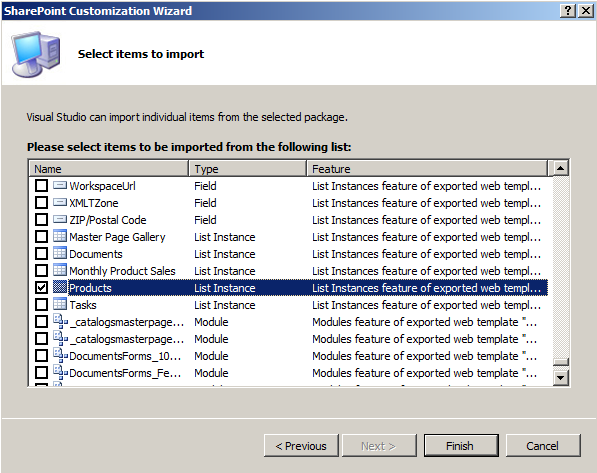
The solution package has every site column, content type, page, list, etc, on the site so there is a lot to sift through. However, the only thing we really need is the list instance in question (in my case Products). You will want to unselect everything else as it will take forever to import if you don’t.
Quick Tip: There isn’t a select all button, so press Ctrl+A, and then unclick a checkbox to deselect everything.
On the next step you will get a warning about dependencies. Go ahead and just say yes and your project will import. Your project will likely have a bunch of stuff you don’t really care about. All that you really need is what it is created in List Instances. Your list instance might look something like this.
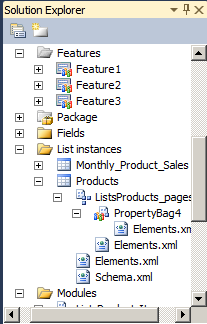
At this point, I created a new project because I want to keep things clean. Create a new project and create a new List Definition. At this point, you will have a schema file and two new elements files. The elements.xml file with the list template can be deleted since I don’t want users creating new versions of this list. Before we start digging into the CAML that is required to make an external list work, let’s go back and look at SharePoint Designer so we can remember what our application definition looked like.
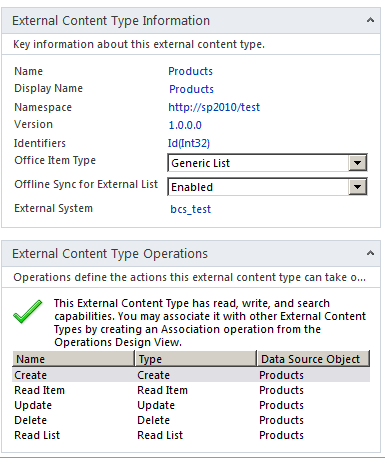
The reason I show you this is because these values we’re going to see when we take a look at our elements.xml file. Here is the file that came from the site export.
<?xml version="1.0" encoding="utf-8"?>
<Elements xmlns="http://schemas.microsoft.com/sharepoint/">
<ListInstance FeatureId="{00bfea71-9549-43f8-b978-e47e54a10600}" TemplateType="600" Title="Products"
Description="" Url="Lists/Products" CustomSchema="FilesListsProductsSchema.xml"
HyperlinkBaseUrl="http://sp2010/Test" RootWebOnly="FALSE"
xmlns="http://schemas.microsoft.com/sharepoint/">
<DataSource>
<Property Name="Entity" Value="Products" />
<Property Name="EntityNamespace" Value="http://sp2010/test" />
<Property Name="LobSystemInstance" Value="bcs_test" />
<Property Name="SpecificFinder" Value="Read Item" />
</DataSource>
</ListInstance>
</Elements>
A couple of things to note here. First, the TemplateType is 600. We can only presume this is the list template id for an external list. The other thing of note is the new DataSource element. This was not in previous versions of SharePoint. As you might notice here, these values correspond to what we see on the external content type. This is what you will change should you decide to rename the entity in or change the LobSystemInstance name. This XML is highly useable in our own feature, but I am going to remove some of the unnecessary attributes such as FeatureId and CustomSchema. I’m also going to give it a new Title so that we know this is a different list. Here is what my new elements.xml looks like.
<?xml version="1.0" encoding="utf-8"?>
<Elements xmlns="http://schemas.microsoft.com/sharepoint/">
<ListInstance TemplateType="600" Title="Products - Deployed by Feature" Description=""
Url="Lists/ProductsDeployedByFeature" HyperlinkBaseUrl="http://sp2010/Test"
RootWebOnly="FALSE" xmlns="http://schemas.microsoft.com/sharepoint/">
<DataSource>
<Property Name="Entity" Value="Products" />
<Property Name="EntityNamespace" Value="http://sp2010/test" />
<Property Name="LobSystemInstance" Value="bcs_test" />
<Property Name="SpecificFinder" Value="Read Item" />
</DataSource>
</ListInstance>
</Elements>
Honestly, I think I can get rid of HyperLinkBaseUrl as well. It doesn’t seem to matter though, I deployed it to a few other sites and it seems to work fine. Now let’s take a look schema.xml. It’s actually pretty small which is nice compared to the files we were used to in the past.
<?xml version="1.0" encoding="utf-8"?>
<List Title="Products" Direction="none" Url="Lists/Products" BaseType="0" Type="600"
FolderCreation="FALSE" DisableAttachments="TRUE" Catalog="FALSE" RootWebOnly="FALSE"
SendToLocation="|" ImageUrl="/_layouts/images/itgen.gif" xmlns:ows="Microsoft SharePoint"
xmlns:spctf="http://schemas.microsoft.com/sharepoint/v3/contenttype/forms"
xmlns="http://schemas.microsoft.com/sharepoint/">
<MetaData>
<ContentTypes>
<ContentType ID="0x01" Name="Item" Group="List Content Types" Description="Create a new list item." FeatureId="{695b6570-a48b-4a8e-8ea5-26ea7fc1d162}">
<Folder TargetName="Item" />
<FieldRefs>
<FieldRef ID="{c042a256-787d-4a6f-8a8a-cf6ab767f12d}" Name="ContentType" />
<FieldRef ID="{fa564e0f-0c70-4ab9-b863-0177e6ddd247}" Name="Title" Required="TRUE" ShowInNewForm="TRUE" ShowInEditForm="TRUE" />
</FieldRefs>
<XmlDocuments>
<XmlDocument NamespaceURI="http://schemas.microsoft.com/sharepoint/v3/contenttype/forms">
<FormTemplates xmlns="http://schemas.microsoft.com/sharepoint/v3/contenttype/forms">
<Display>ListForm</Display>
<Edit>ListForm</Edit>
<New>ListForm</New>
</FormTemplates>
</XmlDocument>
</XmlDocuments>
</ContentType>
</ContentTypes>
<Fields>
<Field DisplayName="BDC Identity" Hidden="FALSE" Name="BdcIdentity" SourceID="http://schemas.microsoft.com/sharepoint/v3" StaticName="BdcIdentity" Type="Text" />
<Field DisplayName="Name" Hidden="FALSE" Name="Name" SourceID="http://schemas.microsoft.com/sharepoint/v3" StaticName="Name" Type="Text" />
<Field DisplayName="Id" Hidden="FALSE" Name="Id" SourceID="http://schemas.microsoft.com/sharepoint/v3" StaticName="Id" Type="Integer" />
<Field DisplayName="Color" Hidden="FALSE" Name="Color" SourceID="http://schemas.microsoft.com/sharepoint/v3" StaticName="Color" Type="Text" />
<Field DisplayName="Description" Hidden="FALSE" Name="Description" SourceID="http://schemas.microsoft.com/sharepoint/v3" StaticName="Description" Type="Text" />
<Field DisplayName="Price" Hidden="FALSE" Name="Price" SourceID="http://schemas.microsoft.com/sharepoint/v3" StaticName="Price" Type="Decimal" />
</Fields>
<Forms />
<Views>
<View DisplayName="Products Read List" DefaultView="TRUE" BaseViewID="1" Type="HTML" MobileView="TRUE" MobileDefaultView="TRUE" ImageUrl="/_layouts/images/generic.png" XslLink="main.xsl" WebPartZoneID="Main" WebPartOrder="1" Url="Read List.aspx" SetupPath="pagesviewpage.aspx">
<XslLink>main.xsl</XslLink>
<Method Name="Read List" />
<Query>
<OrderBy>
<FieldRef Name="Name" />
</OrderBy>
</Query>
<ViewFields>
<FieldRef Name="Name" ListItemMenu="TRUE" LinkToItem="TRUE" />
<FieldRef Name="Id" />
<FieldRef Name="Color" />
<FieldRef Name="Description" />
<FieldRef Name="Price" />
</ViewFields>
<RowLimit Paged="TRUE">30</RowLimit>
<Aggregations Value="Off" />
</View>
</Views>
</MetaData>
</List>
As you can see it’s pretty clean. It again uses the Type of 600. In the ContentTypes section, it does define a regular list item, but it doesn’t actually add any of the fields from the external list there. The Fields element has a field defined for each field in my external content type. As you can see there is nothing special about the way they are defined. The only one of note is the BdcIdentity field which I assume is required to keep track of the ID that ties back to the BCS itself. The View is surprisingly clean as well. The XslLink and Method elements are new. I assume we can use XslLink to customize how the view is rendered, but I didn’t actually see a main.xsl file generated in the solution package anywhere. The Method element I can only assume corresponds to the name of the finder method Read List which we have seen above. The rest is pretty simple. It just has a FieldRef for each column in my external content type.
I can pretty much use the Schema.xml file as is. I did change the Title and Url attributes at the top but that is it. At this point my new feature to deploy this is ready to go. Here is what it looks like in Visual Studio.
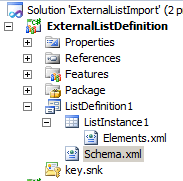
Deploy your solution and have it activate your feature. The new list won’t show up automatically in the navigation on the side, but it will be there. Just go to the URL directly or view the lists on your site to get there. Here it is on my new site.
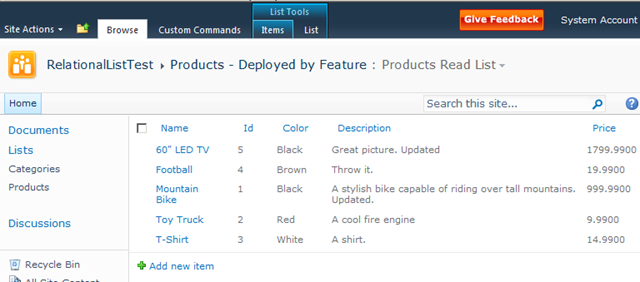
As you can see it’s really not that hard to deploy an external list to another site properly using a feature. Now, you might have noticed there are a few other elements.xml files generated when we did the site export. One stores specific values in the property bag of the list. This we did not want because we don’t really want to copy those internal properties. The other deals with the forms of the list. It uses the BinarySerializedWebPart which scares me a bit, so I haven’t messed with it much. If you are just using default forms you don’t need to worry about it. In a future post, I’ll try seeing if I can deploy some InfoPath forms along with the list, but I figured that deserves its own post.
Also, one other thing to note. If you are deploying your external content type to another server, you can do that in the same manner as you did in SharePoint 2007. Just export the application definition and import it on the new server. You can also use the Export Application Model button in SharePoint designer on the External Content Types list.

I hope this helps when you look to move lists into production. This technique of exporting and importing will also work with regular lists of course. Just remember, friends don’t let friends deploy lists without a feature.