

I’ve been talking a lot about external lists lately as you may know. They are so easy to create with SharePoint Designer, but you wouldn’t really deploy them to production that way would you? Of course not! We need a feature. At first, you might think generating all of that CAML might be too difficult, but remember we can use the Save Site as Template page to generate a .wsp file for us. Using this we can import it into Visual Studio and learn what CAML we need to use.
We’re going to start with the same external list from yesterday. You can build your own using SharePoint Designer as described in my BCS post.

Once you are happy with your list, go to Site Settings –> Save Site as Template. Fill in the fields and it will save a solution package in your solution gallery of your site collection. Save the .wsp file to disk and we’re ready to begin. Once you have your solution package, open Visual Studio 2010, create a new project, and use the Import SharePoint Solution Package project template. You will be prompted for what site to use and where the package file is. On the next step, you will be prompted for what you want to import.
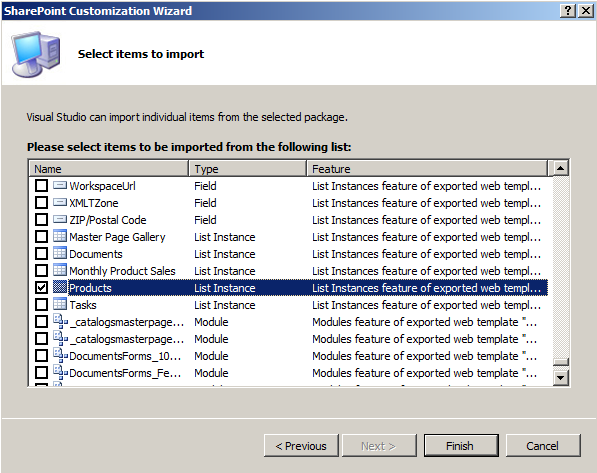
The solution package has every site column, content type, page, list, etc, on the site so there is a lot to sift through. However, the only thing we really need is the list instance in question (in my case Products). You will want to unselect everything else as it will take forever to import if you don’t.
Quick Tip: There isn’t a select all button, so press Ctrl+A, and then unclick a checkbox to deselect everything.
On the next step you will get a warning about dependencies. Go ahead and just say yes and your project will import. Your project will likely have a bunch of stuff you don’t really care about. All that you really need is what it is created in List Instances. Your list instance might look something like this.
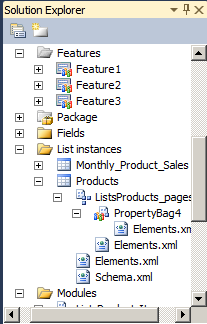
At this point, I created a new project because I want to keep things clean. Create a new project and create a new List Definition. At this point, you will have a schema file and two new elements files. The elements.xml file with the list template can be deleted since I don’t want users creating new versions of this list. Before we start digging into the CAML that is required to make an external list work, let’s go back and look at SharePoint Designer so we can remember what our application definition looked like.
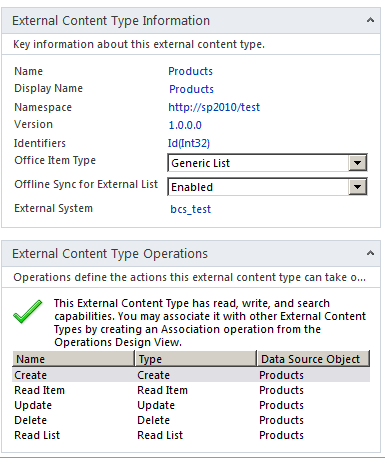
The reason I show you this is because these values we’re going to see when we take a look at our elements.xml file. Here is the file that came from the site export.
<?xml version="1.0" encoding="utf-8"?>
<Elements xmlns="http://schemas.microsoft.com/sharepoint/">
<ListInstance FeatureId="{00bfea71-9549-43f8-b978-e47e54a10600}" TemplateType="600" Title="Products"
Description="" Url="Lists/Products" CustomSchema="FilesListsProductsSchema.xml"
HyperlinkBaseUrl="http://sp2010/Test" RootWebOnly="FALSE"
xmlns="http://schemas.microsoft.com/sharepoint/">
<DataSource>
<Property Name="Entity" Value="Products" />
<Property Name="EntityNamespace" Value="http://sp2010/test" />
<Property Name="LobSystemInstance" Value="bcs_test" />
<Property Name="SpecificFinder" Value="Read Item" />
</DataSource>
</ListInstance>
</Elements>
A couple of things to note here. First, the TemplateType is 600. We can only presume this is the list template id for an external list. The other thing of note is the new DataSource element. This was not in previous versions of SharePoint. As you might notice here, these values correspond to what we see on the external content type. This is what you will change should you decide to rename the entity in or change the LobSystemInstance name. This XML is highly useable in our own feature, but I am going to remove some of the unnecessary attributes such as FeatureId and CustomSchema. I’m also going to give it a new Title so that we know this is a different list. Here is what my new elements.xml looks like.
<?xml version="1.0" encoding="utf-8"?>
<Elements xmlns="http://schemas.microsoft.com/sharepoint/">
<ListInstance TemplateType="600" Title="Products - Deployed by Feature" Description=""
Url="Lists/ProductsDeployedByFeature" HyperlinkBaseUrl="http://sp2010/Test"
RootWebOnly="FALSE" xmlns="http://schemas.microsoft.com/sharepoint/">
<DataSource>
<Property Name="Entity" Value="Products" />
<Property Name="EntityNamespace" Value="http://sp2010/test" />
<Property Name="LobSystemInstance" Value="bcs_test" />
<Property Name="SpecificFinder" Value="Read Item" />
</DataSource>
</ListInstance>
</Elements>
Honestly, I think I can get rid of HyperLinkBaseUrl as well. It doesn’t seem to matter though, I deployed it to a few other sites and it seems to work fine. Now let’s take a look schema.xml. It’s actually pretty small which is nice compared to the files we were used to in the past.
<?xml version="1.0" encoding="utf-8"?>
<List Title="Products" Direction="none" Url="Lists/Products" BaseType="0" Type="600"
FolderCreation="FALSE" DisableAttachments="TRUE" Catalog="FALSE" RootWebOnly="FALSE"
SendToLocation="|" ImageUrl="/_layouts/images/itgen.gif" xmlns:ows="Microsoft SharePoint"
xmlns:spctf="http://schemas.microsoft.com/sharepoint/v3/contenttype/forms"
xmlns="http://schemas.microsoft.com/sharepoint/">
<MetaData>
<ContentTypes>
<ContentType ID="0x01" Name="Item" Group="List Content Types" Description="Create a new list item." FeatureId="{695b6570-a48b-4a8e-8ea5-26ea7fc1d162}">
<Folder TargetName="Item" />
<FieldRefs>
<FieldRef ID="{c042a256-787d-4a6f-8a8a-cf6ab767f12d}" Name="ContentType" />
<FieldRef ID="{fa564e0f-0c70-4ab9-b863-0177e6ddd247}" Name="Title" Required="TRUE" ShowInNewForm="TRUE" ShowInEditForm="TRUE" />
</FieldRefs>
<XmlDocuments>
<XmlDocument NamespaceURI="http://schemas.microsoft.com/sharepoint/v3/contenttype/forms">
<FormTemplates xmlns="http://schemas.microsoft.com/sharepoint/v3/contenttype/forms">
<Display>ListForm</Display>
<Edit>ListForm</Edit>
<New>ListForm</New>
</FormTemplates>
</XmlDocument>
</XmlDocuments>
</ContentType>
</ContentTypes>
<Fields>
<Field DisplayName="BDC Identity" Hidden="FALSE" Name="BdcIdentity" SourceID="http://schemas.microsoft.com/sharepoint/v3" StaticName="BdcIdentity" Type="Text" />
<Field DisplayName="Name" Hidden="FALSE" Name="Name" SourceID="http://schemas.microsoft.com/sharepoint/v3" StaticName="Name" Type="Text" />
<Field DisplayName="Id" Hidden="FALSE" Name="Id" SourceID="http://schemas.microsoft.com/sharepoint/v3" StaticName="Id" Type="Integer" />
<Field DisplayName="Color" Hidden="FALSE" Name="Color" SourceID="http://schemas.microsoft.com/sharepoint/v3" StaticName="Color" Type="Text" />
<Field DisplayName="Description" Hidden="FALSE" Name="Description" SourceID="http://schemas.microsoft.com/sharepoint/v3" StaticName="Description" Type="Text" />
<Field DisplayName="Price" Hidden="FALSE" Name="Price" SourceID="http://schemas.microsoft.com/sharepoint/v3" StaticName="Price" Type="Decimal" />
</Fields>
<Forms />
<Views>
<View DisplayName="Products Read List" DefaultView="TRUE" BaseViewID="1" Type="HTML" MobileView="TRUE" MobileDefaultView="TRUE" ImageUrl="/_layouts/images/generic.png" XslLink="main.xsl" WebPartZoneID="Main" WebPartOrder="1" Url="Read List.aspx" SetupPath="pagesviewpage.aspx">
<XslLink>main.xsl</XslLink>
<Method Name="Read List" />
<Query>
<OrderBy>
<FieldRef Name="Name" />
</OrderBy>
</Query>
<ViewFields>
<FieldRef Name="Name" ListItemMenu="TRUE" LinkToItem="TRUE" />
<FieldRef Name="Id" />
<FieldRef Name="Color" />
<FieldRef Name="Description" />
<FieldRef Name="Price" />
</ViewFields>
<RowLimit Paged="TRUE">30</RowLimit>
<Aggregations Value="Off" />
</View>
</Views>
</MetaData>
</List>
As you can see it’s pretty clean. It again uses the Type of 600. In the ContentTypes section, it does define a regular list item, but it doesn’t actually add any of the fields from the external list there. The Fields element has a field defined for each field in my external content type. As you can see there is nothing special about the way they are defined. The only one of note is the BdcIdentity field which I assume is required to keep track of the ID that ties back to the BCS itself. The View is surprisingly clean as well. The XslLink and Method elements are new. I assume we can use XslLink to customize how the view is rendered, but I didn’t actually see a main.xsl file generated in the solution package anywhere. The Method element I can only assume corresponds to the name of the finder method Read List which we have seen above. The rest is pretty simple. It just has a FieldRef for each column in my external content type.
I can pretty much use the Schema.xml file as is. I did change the Title and Url attributes at the top but that is it. At this point my new feature to deploy this is ready to go. Here is what it looks like in Visual Studio.
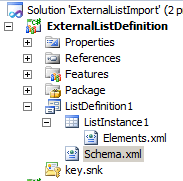
Deploy your solution and have it activate your feature. The new list won’t show up automatically in the navigation on the side, but it will be there. Just go to the URL directly or view the lists on your site to get there. Here it is on my new site.
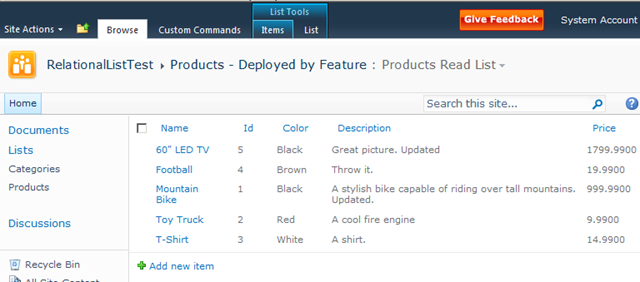
As you can see it’s really not that hard to deploy an external list to another site properly using a feature. Now, you might have noticed there are a few other elements.xml files generated when we did the site export. One stores specific values in the property bag of the list. This we did not want because we don’t really want to copy those internal properties. The other deals with the forms of the list. It uses the BinarySerializedWebPart which scares me a bit, so I haven’t messed with it much. If you are just using default forms you don’t need to worry about it. In a future post, I’ll try seeing if I can deploy some InfoPath forms along with the list, but I figured that deserves its own post.
Also, one other thing to note. If you are deploying your external content type to another server, you can do that in the same manner as you did in SharePoint 2007. Just export the application definition and import it on the new server. You can also use the Export Application Model button in SharePoint designer on the External Content Types list.

I hope this helps when you look to move lists into production. This technique of exporting and importing will also work with regular lists of course. Just remember, friends don’t let friends deploy lists without a feature.
SYS-CON Events announced today that Amazon Web Services, a provider of an infrastructure web services platform in the cloud, has been named “Bronze Sponsor” of SYS-CON's 5th International Cloud Expo, which will take place on April 19-21, 2010, at the Jacob Javits Convention Center in New York City. With AWS you can requisition compute power, storage, and other services - gaining access to a suite of elastic IT infrastructure services as your business demands them. With AWS you have the flexibility to choose whichever development platform or programming model makes the most sense for the problems you're trying to solve. You pay only for what you use, with no up-front expenses or long-term commitments, making AWS the most cost-effective way to deliver your application to your customers and clients. And, with AWS, you can take advantage of Amazon.com's global computing infrastructure, that is the backbone of Amazon.com's retail business and transactional enterprise whose scalable, reliable, and secure distributed computing infrastructure has been honed for over 13 years.
SYS-CON Events announced today that Amazon Web Services, a provider of an infrastructure web services platform in the cloud, has been named “Bronze Sponsor” of SYS-CON's 5th International Cloud Expo, which will take place on April 19-21, 2010, at the Jacob Javits Convention Center in New York City. With AWS you can requisition compute power, storage, and other services - gaining access to a suite of elastic IT infrastructure services as your business demands them. With AWS you have the flexibility to choose whichever development platform or programming model makes the most sense for the problems you're trying to solve. You pay only for what you use, with no up-front expenses or long-term commitments, making AWS the most cost-effective way to deliver your application to your customers and clients. And, with AWS, you can take advantage of Amazon.com's global computing infrastructure, that is the backbone of Amazon.com's retail business and transactional enterprise whose scalable, reliable, and secure distributed computing infrastructure has been honed for over 13 years.
Badges, Passports, the Creator, the Founder, the Mayor, getting a Pin, picking up a raccoon..This is the language of the newest phenomenon to hit the location-enabled social media marketing world. I am talking about Social Networking Games. No longer only for geeks and geocachers, these are real tools for seeing where your friends are, in real time, as they “check-in” to locations and share what they are doing. Since the device knows where it is, you can only check in to a location you are visiting. While mobile location sharing is not new, incentives that tap our competitive side offered by a “game” are, and this makes all the difference.
Badges, Passports, the Creator, the Founder, the Mayor, getting a Pin, picking up a raccoon..This is the language of the newest phenomenon to hit the location-enabled social media marketing world. I am talking about Social Networking Games. No longer only for geeks and geocachers, these are real tools for seeing where your friends are, in real time, as they “check-in” to locations and share what they are doing. Since the device knows where it is, you can only check in to a location you are visiting. While mobile location sharing is not new, incentives that tap our competitive side offered by a “game” are, and this makes all the difference.
I’ve spent the last couple of days, after absorbing the Sybase acquisition of Aleri’s assets, looking at the various CEP players websites for evidence of cloud (grid name du jour) deployment. I haven’t found anything worth mentioning. That’s not to say that I might have missed something. But my guess is that with all the economic woes lately, that the CEP vendors have either chosen to ignore or just simply aren’t aware that the rest of the world is actually solving real problems with cloud deployments. Which is interesting.
I’ve spent the last couple of days, after absorbing the Sybase acquisition of Aleri’s assets, looking at the various CEP players websites for evidence of cloud (grid name du jour) deployment. I haven’t found anything worth mentioning. That’s not to say that I might have missed something. But my guess is that with all the economic woes lately, that the CEP vendors have either chosen to ignore or just simply aren’t aware that the rest of the world is actually solving real problems with cloud deployments. Which is interesting.
Want an easy way to build installers for Linux, Solaris, HP-UX, AIX, UNIX, IBM i, Mac OS X, and more? Try InstallAnywhere! From the makers of InstallShield, InstallAnywhere is the most popular installation tool for Java developers. Create professional, bulletproof installers for any platform in minutes – no expertise needed. Try it now!
Want an easy way to build installers for Linux, Solaris, HP-UX, AIX, UNIX, IBM i, Mac OS X, and more? Try InstallAnywhere! From the makers of InstallShield, InstallAnywhere is the most popular installation tool for Java developers. Create professional, bulletproof installers for any platform in minutes – no expertise needed. Try it now!
If you'd like to get local and community news, with personalized local news alerts, or join a community of citizen reporters with incentives to share revenues, then MotionCast might just be the app for you. The team behind some of the most popular mobile apps, including iMobile Care and TatTap, created MotionCast to provide location-aware news and a dynamic platform to cast local and community news, on your iPhone. The first release MotionCast lets users personalize hyper-local news feeds by category, location, most popular, breaking, hot and by Casters. The MotionCast Community lets Casters share information, rate casts, provide feedback, and collaborate on stories through a WikiNews module.
If you'd like to get local and community news, with personalized local news alerts, or join a community of citizen reporters with incentives to share revenues, then MotionCast might just be the app for you. The team behind some of the most popular mobile apps, including iMobile Care and TatTap, created MotionCast to provide location-aware news and a dynamic platform to cast local and community news, on your iPhone. The first release MotionCast lets users personalize hyper-local news feeds by category, location, most popular, breaking, hot and by Casters. The MotionCast Community lets Casters share information, rate casts, provide feedback, and collaborate on stories through a WikiNews module.
Level 3 Communications has announced it is working with France Télévisions to help deliver the 2010 Vancouver Winter Olympics in high definition (HD) to online and mobile audiences from Feb. 12 to 28. France Télévisions is delivering the Games live to the Web and Apple iPhone during the two-week event from 7 p.m. PST until 6 a.m. PST and providing on-demand content at all other hours. The delivery is made possible using Level 3’s content delivery network (CDN) and Live Event services, alongside Microsoft Internet Information Services (IIS) Live Smooth Streaming and Microsoft Silverlight. IIS Smooth Streaming is designed to help improve the quality of an online video stream by minimizing broadcast disruptions through varying the quality of the delivery in real time, based on the available bandwidth of a given computer.
Level 3 Communications has announced it is working with France Télévisions to help deliver the 2010 Vancouver Winter Olympics in high definition (HD) to online and mobile audiences from Feb. 12 to 28. France Télévisions is delivering the Games live to the Web and Apple iPhone during the two-week event from 7 p.m. PST until 6 a.m. PST and providing on-demand content at all other hours. The delivery is made possible using Level 3’s content delivery network (CDN) and Live Event services, alongside Microsoft Internet Information Services (IIS) Live Smooth Streaming and Microsoft Silverlight. IIS Smooth Streaming is designed to help improve the quality of an online video stream by minimizing broadcast disruptions through varying the quality of the delivery in real time, based on the available bandwidth of a given computer.
IT is reliable today largely because of years of investment in management, monitoring and modeling. So, as the paradigm shift to Cloud Computing occurs, will we still be able to leverage these investments? This is the question that will be asked - and asnwered - by 3Tera Chairman and CEO Barry X Lynn in his upcoming session at the largest cloud computing event in the world, the 5th Cloud Expo in New York (19-21 April, 2010). Lynn's session will focus on how the management of IT in the Cloud needs to evolve in order for Cloud to become pervasive and even more reliable that IT is today.
IT is reliable today largely because of years of investment in management, monitoring and modeling. So, as the paradigm shift to Cloud Computing occurs, will we still be able to leverage these investments? This is the question that will be asked - and asnwered - by 3Tera Chairman and CEO Barry X Lynn in his upcoming session at the largest cloud computing event in the world, the 5th Cloud Expo in New York (19-21 April, 2010). Lynn's session will focus on how the management of IT in the Cloud needs to evolve in order for Cloud to become pervasive and even more reliable that IT is today.
Last week I got to analyze a web page that spent 4.8 seconds in the onLoad event handler of a custom script file. It turned out that 2.8 seconds were consumed by applying a dynamic menu library (will blog about this one separately). The remaining 2 seconds were spent in jQuery selectors. The analysis showed that most of the selectors didn’t return any object and those that returned objects can be improved by using different selectors. About jQuery Selectors There are some great blog articles about jQuery Selectors and their Performance Impact. As you can see you can select elements by ID, TagName or ClassName. Depending on the select jQuery can use the native browser methods to query elements by id or tag or needs to manually iterate through the DOM in case of class names (as there is not getElementsByClassName in IE).
Last week I got to analyze a web page that spent 4.8 seconds in the onLoad event handler of a custom script file. It turned out that 2.8 seconds were consumed by applying a dynamic menu library (will blog about this one separately). The remaining 2 seconds were spent in jQuery selectors. The analysis showed that most of the selectors didn’t return any object and those that returned objects can be improved by using different selectors. About jQuery Selectors There are some great blog articles about jQuery Selectors and their Performance Impact. As you can see you can select elements by ID, TagName or ClassName. Depending on the select jQuery can use the native browser methods to query elements by id or tag or needs to manually iterate through the DOM in case of class names (as there is not getElementsByClassName in IE).
Twitter is a very simple and easy service to use and becasue of its openness (via numerous APIs) there are numerous Twitter clients from providers other than Twitter itself that you can use. From thick clients such as TweetDeck to thin web-based clients such as HootSuite to mobile and smart phone clients such as TinyTwitter, there are many options. You can also tweet via basic text/SMS to 40404. And if you don't like any of these options and can program, you can always write your own Twitter client using the Twitter APIs.
Twitter is a very simple and easy service to use and becasue of its openness (via numerous APIs) there are numerous Twitter clients from providers other than Twitter itself that you can use. From thick clients such as TweetDeck to thin web-based clients such as HootSuite to mobile and smart phone clients such as TinyTwitter, there are many options. You can also tweet via basic text/SMS to 40404. And if you don't like any of these options and can program, you can always write your own Twitter client using the Twitter APIs.
BIRT offers several ways reports can be deployed. The AJAX based BIRT viewer can be deployed to your application server, the BIRT tag libraries can be used or you can deploy the Report Engine in your application. You can also modify any of the above options, given that the source is available for download. Several commercial options are also available. This post explains deploying the BIRT engine as an Action component within Struts2. It also discusses using Actuate’s JSAPI with Struts 2’s Bean tag. The BIRT report engine can be deployed as a Servlet and the process for doing this is described in the BIRT wiki. If you happen to be using Struts 2 as your application framework you can deploy the Report Engine as an Action component. The process for doing this is not much different than the Servlet approach described in the above link. First you have to implement the ActionSupport class.
BIRT offers several ways reports can be deployed. The AJAX based BIRT viewer can be deployed to your application server, the BIRT tag libraries can be used or you can deploy the Report Engine in your application. You can also modify any of the above options, given that the source is available for download. Several commercial options are also available. This post explains deploying the BIRT engine as an Action component within Struts2. It also discusses using Actuate’s JSAPI with Struts 2’s Bean tag. The BIRT report engine can be deployed as a Servlet and the process for doing this is described in the BIRT wiki. If you happen to be using Struts 2 as your application framework you can deploy the Report Engine as an Action component. The process for doing this is not much different than the Servlet approach described in the above link. First you have to implement the ActionSupport class.
Thin client manufacturer IGEL Technology has announced the addition of an Asset Management solution to its Universal Management Suite (UMS) software. The solution allows system administrators to automatically scan for and discover all hardware information, licensed features and installed hot fixes and then to efficiently manage them. The latest IGEL Universal Management Suite also includes a time-saving firmware update tool and a support wizard. The new asset and systems management tools are all standard features of the IGEL UMS, which is provided free with all IGEL Universal Desktop thin clients. In the latest release (3.05.100), IGEL has included a new firmware-update tool which allows missing updates to be quickly and reliably identified, downloaded, installed and managed - delivering a helpful, time-saving alternative to downloading updates directly from the IGEL website. What's more, IGEL has also included a support wizard that gathers support-related log files together in a bundle that can then be distributed to systems support staff.
Thin client manufacturer IGEL Technology has announced the addition of an Asset Management solution to its Universal Management Suite (UMS) software. The solution allows system administrators to automatically scan for and discover all hardware information, licensed features and installed hot fixes and then to efficiently manage them. The latest IGEL Universal Management Suite also includes a time-saving firmware update tool and a support wizard. The new asset and systems management tools are all standard features of the IGEL UMS, which is provided free with all IGEL Universal Desktop thin clients. In the latest release (3.05.100), IGEL has included a new firmware-update tool which allows missing updates to be quickly and reliably identified, downloaded, installed and managed - delivering a helpful, time-saving alternative to downloading updates directly from the IGEL website. What's more, IGEL has also included a support wizard that gathers support-related log files together in a bundle that can then be distributed to systems support staff.
If Phillips had moved from Oracle to CA, he might have been richer - although that's hard to believe - but not necessarily happier considering McCracken reportedly wanted him to execute on McCracken's strategy, which is reportedly focused on the cloud. In that case, note that CA Thursday joined the Cloud Security Alliance as a corporate member to help establish and promote best practices for security in cloud computing, meaning to kick in its identity and access management expertise. It said it is "working with enterprise customers and cloud service providers to securely adopt and deliver cloud services." SAP could sure use a bit of that.
If Phillips had moved from Oracle to CA, he might have been richer - although that's hard to believe - but not necessarily happier considering McCracken reportedly wanted him to execute on McCracken's strategy, which is reportedly focused on the cloud. In that case, note that CA Thursday joined the Cloud Security Alliance as a corporate member to help establish and promote best practices for security in cloud computing, meaning to kick in its identity and access management expertise. It said it is "working with enterprise customers and cloud service providers to securely adopt and deliver cloud services." SAP could sure use a bit of that.