Log on:
Powered by Elgg

Tim Dalton :: Blog

November 10, 2011

Our experience of setting up Moodle as an administrator, for a couple of sample courses of different kinds (weekly, topic based and social format) and by adding in the SLoodle module both in the web end of Moodle and in Second Life classroom has been a frustrating experience.  This is a mostly due to the very many layers of user permissions, user roles, different styles of setup, confusion over what happens at site, user and course levels, and interactions between these, and so on.  We still cannot work out why some users can see their SLoodle profiles and others cannot even with all permissions ticked on (more than should be needed).

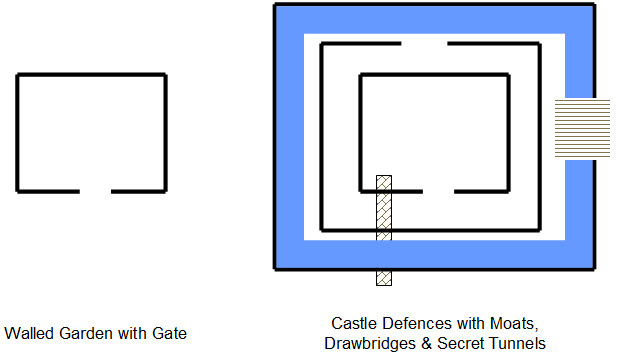
This makes me think of the "Walled Garden" idea which is how I see VLEs like Blackboard's WebCT.  The wall is there for a number of reasons:

  • To protect those inside;
  • To protect and control access to the assets inside;
  • To keep out undesirables;
  • To provide a clear gateway where people can enter, or request entry.


But my mental picture of Moodle is more like a complex arrangement of "Castle Defences" with multiple battlements, with entry points offset from one another and the direction to turn not obvious at every level. There are moats and some bridges across.  But you are not sure where they all are. There may even be secret tunnels you don't know about and that others may be able to use, and you suspect there are as its all so labyrinthine.

Posted by Austin Tate | 0 comment(s)

November 07, 2011

My earlier blog postings have described my own preferred approach to the creation of a PLE which at its outer level is simply an easily customised web page.  I chose a freely available well constructed CSS1 stylesheet that maximised the viewable area of the central content when viewed on a wide range fo devices and browsers, using a layout that allows for flexible width.  Below this top levele entry web page a number of directories hold the locally stored content, for my own images, screenshots, and resources that it is suitable to provide locally (i.e. have no copyright issues) and these can be pulled into the web page via relative URLs to allow for the whole PLE to be easily shifted to a new hosting environment, used locally off a memory stick, or cut to CD.  The resources and images can also be used in other blogging and course discussion forums via URL reference where appropriate.

This approach works fine for me, as I am comfortable with using a simple text editor to edit HTML directly, and have a simplistic but working understanding of the CSS style sheet approach.  I also can access an area where I can store and serve the files easily.  But this custom approach is not suitable for all.  Technically a way to create such a custom web area and make changing its content and layout easier would be preferable for some. There are many drag and drop frameworks for dropping in content in "frames" and an emerging set of "widgets" that can be dropped into "containers" in such self hosted web sites using a number of script libraries.  Again, this can be quite technical to initially set up, but easy to use thereafter. I do worry about the long term stability of some of these mechanisms though, and they do mean that the contents have to be served using a web server, rather than it being possible to simply copy and use the files on a memory stick or off a CD locally on a single computer off-line Some blogging frameworks like WordPress, richer content management systems like Drupal and Joomla, and commercial platforms like iGoogle provide simple approaches for columns of content with inclusion of "blocks" made up of various types of content, widgets and frames.

The issue of security and legality must also be taken into account.  there can be legal constraints on the monitoring which an institution is obliged to perform on its own staff communications, and in some cases on the official communications of its students.  Issues of copyright infringement may also need to be investigated.  These legal requirements can be made more difficult in highly decentralised and personalised environments.

A study of the use of personal web sites as the basis for PLEs at Graz University of Technology (UT Graz) in Austria (Taraghi et al., 2010) described a set of issues to be considered before going on to describe their own framework and approach. They base their approach on work by Schaffert & Hilzensauer who describe seven crucial aspects to consider in the adoption of PLEs:

  • The role of the learner
  • Personalisation
  • Content
  • Social involvement
  • Educational & organisational

So, it is important to look at ways in which the basic approach of using a personalised web page and web area as the basis for a PLE might be made more widely accessible and accesptable within the constraints of an educational institution's role and requirements.  An educational establishment can encourage the use of PLEs alongside their institutional learning support systems.  It could seek to provide a framework or "template" approach which all students can adopt and adapt a framework or arrangement that suits them, and that they feel comfortable supports them and the degree of autonomy they seek.

Reference

Schaffert, S. and Hilzensauer, W (2008) "On the way towards Personal Learning Environments: Seven crucial aspects," in eLearning Papers, no. 9, July, 2008.

Taraghi, B.,  Ebner, M., Till, G. and Muhlburger, H. (2010) "Personal Learning Environment - A Conceptual Study", iJET - Volume 5, Special Issue 1: "ICL2009 - MashUps for Learning", January 2010.

Keywords: IDEL11, PLE

Posted by Austin Tate | 1 comment(s)

November 04, 2011

My interest in personal portable information stores and information predates my use of the approach as a PLE.

I am interested in a computer-based personal assistant and ways in which that could build information to help you throughout your life.  Issues of privacy and ownership and location of that information immediately are an issue when that is contemplated.  Its clear to me that this means the data must be owned, hosted and controlled by an individual in some way, and ANY access to it approved and logged at the user ownership end.  This is WAY WAY different to its being hosted and accesible to Facebook and Google+ (or an Institution like a government, insurance company or teaching organisation). 

I liked recently a pointer from Daniel Griffin on the MSc Digital Cultures course on the Diaspora Freedom in Software community (http://diasporafoundation.org/ and https://joindiaspora.com/) and specifically to Eben Moglen's "Freedom in The Cloud" presentation at NYU Feb 5 2010. http://www.youtube.com/watch?v=QOEMv0S8AcA

I was reminded of some discussions I had 20 years ago with telecoms providers about a user centric architecture for use of personal profile information from a computer-based personal assistant. the personal information was served on each request from the user end and with access to information and resources controlled by the user... WAY WAY different o how we have come to use Facebook and Google+ where our data is in their servers and used when they want for their benefit.

Section 3 - The Personal Profile - From http://www.aiai.ed.ac.uk/~bat/tania.pdf

One important feature of the approach to be taken is that the concept of a long lived Personal Profile for communications and information use will be established. It will be a guarantee of the approach that the information that an individual builds in their co-worker personal profile will be able to stand alone and be meaningful outside of its specific use in this particular generation of information agent. We will establish the concept of a separate transportable personal profile that can accompany the user for the rest of his or her life and can grow with him or her.

Keywords: Diaspora, EDC11, Personal Profile

Posted by Austin Tate | 0 comment(s)

November 03, 2011

I am experimenting with a style of non-linear essay employing a customised Typographical Visual "Neo-Grammar". It involves experimentation with expressing the core message carrying semantically tagged "connectors" in a type and layout style and with interactive linking capabilities well suited to on-line communications of layers of content.

Grammar ::=  <Planet>: <Locale>: <Connector>  [ — <Annotation> ] 

<Connector> ::= <Token> ⊃—⊂ <Token>

Token gives identity elements, citations and references.

Keywords: IDEL11, Neo-grammar

Posted by Austin Tate | 2 comment(s)

October 30, 2011

Its Halloween, and the Zombies have attacked!

There has been a bit of a  struggle to get the "cron" job running on the Moodle setup.  cron.php is an admin routine that is run every few minutes to do a number of maintenance things, like pulling in information feeds, external blogs, clearing away pending messages, etc.  It need a bit of setting up and a couple of different mechanisms using the Windows Task Manager had not been working correctly.

I had settled on a way to initiate the cron.php script by calling it from a job every few minutes which launched the Firefox/Mozilla browser run the job, and then should have terminated.  I got that suggestion off blog postings by others who has similar problems getting cron to run.  It seemed to work after I set it up on testing, so I left it for a day or so...  But when I came back... spookily... there were many "Zombie" processes running.  My colleague experienced in these matters tells me that happens when you launch a browser to run a script in a web page and he had seen this issue before.

We are also still working to get the outward bound e-mail going on our Moodle 2.1.2 setup on Windows.  This is way more complicated than it should be with many layers involved.  Settings are all over the place in Apache, PHP, Moodle and beyond your machine in the SMTP server you use, as well as perhaps in multiple firewalls and out bound messaging spam filters on the way.  We have been gradually picking our way through these layers.  Our University will not allow e-mail out with a "from" address that is not validated as a legitimate University address - sensibly.  So we are having to use a "Moodle Admin" address personally tied to a staff member at the moment, which is not ideal. We have established a "noreply" address that will validate now too. More layers to work out before its working properly I am afraid.

In general, I also am finding a lot of Moodle settings are hidden away a bit or are in several places or in multiple layers whic all need to coordinate. Things like e-mail setup is under Site Administration -> Plugins -> Message Outputs -> E-mail.  The site admin/support e-mail addresses also appear there and in Site Administration -> Server -> Site Contact.  Rooting round to change the roles an individual is assigned is also convoluted, rather than just a set of check boxes off the user page you have to edit roles... and not via the edit button but by knowing to click on the role title hyperlink. And some roles are considered "System Roles" which are changed on a different web page.

Keywords: Cron, IDEL11, Moodle, Second Life, SLoodle, Zombies

Posted by Austin Tate | 1 comment(s)

October 28, 2011

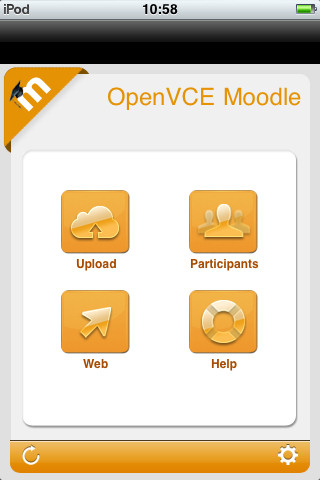
There is an iPhone/iPod/iPad app called "My Moodle" which provides mobile device access to Moodle 2.1+. See http://itunes.apple.com/us/app/my-moodle/id461289000

The experimental Moodle 2.1.2 site at AIAI now has mobile web services enabled as required to support this app - they are off by default. See http://docs.moodle.org/20/en/Enable_mobile_web_services

My initial attempts to snap a screen shot image with an iPod and upload it via the My Moodle app indicated the file exceeded the maximum upload file size, yet the PNG file involved was only 44KB... and our site is set for upload file limits of 8MB to 128MB depending on what layer is filtering.

 A future road map for development of the My Mobile app is available. See http://docs.moodle.org/dev/Mobile_app

Keywords: IDEL11, Mobile, Moodle, SLoodle

Posted by Austin Tate | 0 comment(s)

I have been testing elements of the SLoodle Second Life toolkit version 2.0.10 alpha alongside Moodle 2.1.2 and the SLoodle module 2.0.10 alpha with a few revisions being made by Edmund Elgar, a SLoodle developer and one of the owners of Avatar Classroom (http://avatarclassroom.com). The testing is throwing up some minor issues and a couple of PHP scripts have been changed as a result.  They will appear in the next alpha test build of SLoodle as the developers move towards the first beta version suitable for Moodle 2.

To date the tests have included:

  1. chat link up between a Second Life classroom and the Moodle chat tool, and logging of authorised by individual avatars in world
  2. in-world assessment delivery drop box
  3. presentation screen using shared media web based image, video and web page URL assets
  4. multiple choice voting and presentation display


Keywords: IDEL11, Moodle, SLoodle

Posted by Austin Tate | 0 comment(s)

October 27, 2011

You may have heard that John McCarthy died this week. See 

John was an early pioneer of AI, inventor of Lisp, and indeed originator of the term "AI" in 1956. See http://en.wikipedia.org/wiki/John_McCarthy_(computer_scientist). It is good to see how broad and expansive John McCarthy's vision for computing was:

From Wikipedia: In 1961, he was the first to publicly suggest (in a speech given to celebrate MIT's centennial) that computer time-sharing technology might lead to a future in which computing power and even specific applications could be sold through the utility business model (like water or electricity).

Take a look also at his short sci-fi story "The Robot and the Baby" for some great fiction (or is it?) about future robotics. See

I worked with John both before and after his formal retirement, and it was a very enjoyable experience. His interest in formalising the notion of "context" was his most recent work which I spoke to him about. The ability to "assert that the proposition p is true in the context c" is a key to much of what we do in planning... and my own work some 30 years ago was involved with something I called "functions in context" that had similar aims.

Keywords: Context, IDEL11, McCarthy, ULOE11

Posted by Austin Tate | 0 comment(s)

October 26, 2011

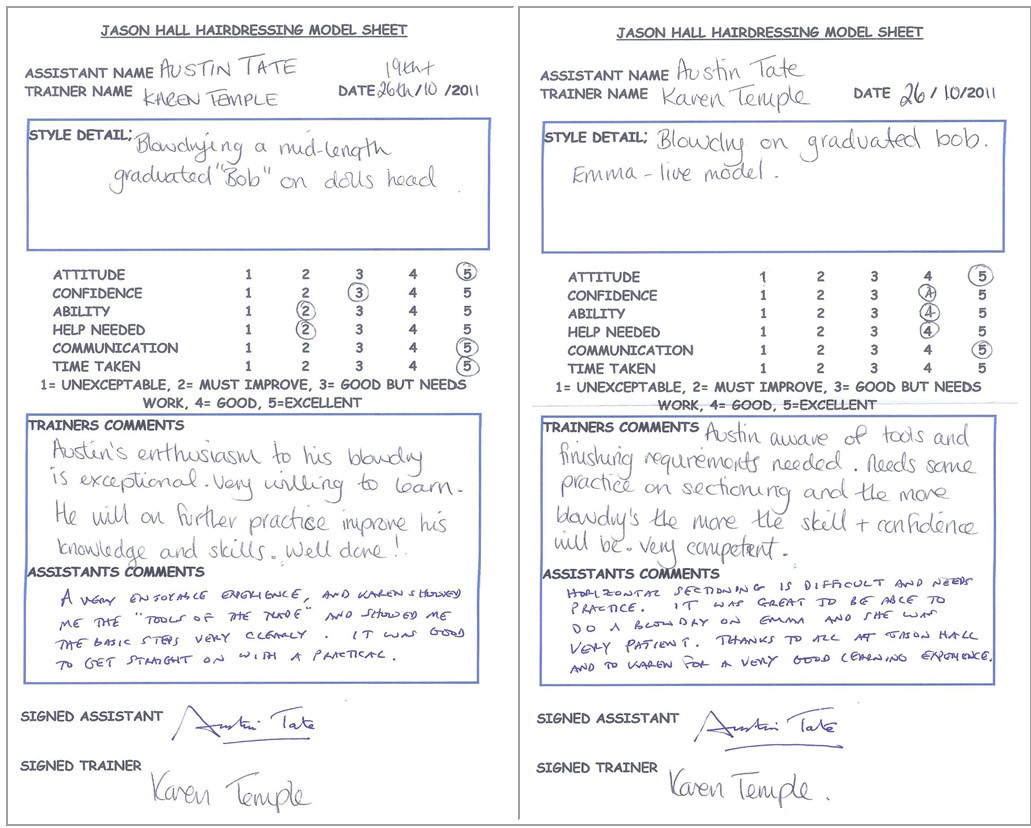
Here is my assessment as a trainee hairdresser on blow drying... from the first go to my final attempt on a live model today.

Keywords: Hairdresser, ULOE11

Posted by Austin Tate | 0 comment(s)

Emma very patiently let me do her hair today during my training session:

I now have access to the Hairdressing Foundations e-Teaching course at http://eteachhairdressing.co.uk along with some exercises to complete there.  I have also been given Hairdressing Trainee Model Sheets showing my experience and an assessment of my progress.  They will appear in my Hairdresser Training Photo Log at http://atate.org/mscel/hair/ and are available via a link on my new Personal Learning Space at http://atate.org/space/

Keywords: Hairdresser, ULOE11

Posted by Austin Tate | 0 comment(s)

<< Back Next >>